This category includes the latest news on email archiving solutions, new legislation relating to the storage of email and tips and advice on implementing and maintaining email archives.
Email archiving is a method of preserving emails and storing messages securely. An email archive allows employees to keep their inboxes and email account folders clear. Archives can be stored locally or on an email server, although many organizations use a cloud-based service for archiving old messages. A cloud-based archive means less storage space is required on already overburdened mail servers.
In contrast to backups, email archives are searchable, allowing messages to be quickly retrieved when needed. Not only does this allow accidentally deleted messages to be quickly found and restored, it means messages can be easily located in the event of a compliance audit, legal discovery or freedom of information request.
Federal and state laws require organizations to keep all email correspondence for several years. For many medium to large enterprises, that means hundreds of millions of emails need to be stored. Securely storing those emails in the cloud reduces hardware requirements, slashing the costs of email storage.
An effective email archiving solution is also a necessity for businesses who collect, use, share or store the personal data of EU citizens due to the enactment of the EU´s General Data Protection Regulation (GDPR). An effective email archiving solution helps businesses comply with the requirements for the security of access control, auditing and encryption. It can also facilitate quick and effortless responses to data access and erasure requests.
In addition to storing messages, archives can store email attachments, calendars, pst files, contacts, notes and instant messages, which can all be recalled and accessed quickly and easily via search UI.
An email archive is important for compliance, but there are also several departmental benefits of email archiving. The improvements in efficiency as a result of implementing an email archiving solution can deliver cost savings and ease the burden on your workforce, with the benefits felt by al employees in your organization.
Most businesses choose to implement an email archiving solution to ensure emails can be found and quickly produced in the event of HR issues, customer disputes, legal actions, and to comply with federal, state, and industry regulations.
An email archive acts as a black box flight recorder for email. All emails that need to be retained are sent to the archive for long term storage. In the event of a compliance audit or eDiscovery request, the archive can be quickly searched, and important emails can be found and exported in minutes. An email archive is also important for disaster recovery, allowing business-critical emails to be recovered in the event of corruption, deletion or a cyberattack.
Businesses that implement an email archiving solution often discover there are many other benefits that come from the secure archiving of emails in a dedicated repository, separate from the mail server.
Email Archiving Benefits for the IT Department
Some of the biggest benefits are enjoyed by the IT department. Storing the millions of emails that are sent and received by the organization, along with their attachments, can consume a lot of expensive storage space. Email archiving solutions deduplicate emails before they are sent to the archive and will only store one copy of a message. The removal of duplicates and compression of data greatly reduces storage space resulting in significant cost savings.
The IT support team will undoubtedly receive many requests from employees to recover important emails that have been misfiled or accidentally deleted. Many email archiving solutions can be configured to allow employees to access their own archives. When an email is lost, or is accidentally deleted, the employee can search their own archive for the missing email without bothering the IT department. The same is true for HR investigations, which will no longer need to involve the IT department to such a large degree.
By sending emails to the archive, they do not need to be stored locally in PST files or on the mail server. PST files are a security risk and are a management headache that can be avoided. An email archive saves considerable maintenance time and freeing up space on the mail server improves performance. In the event of disaster, such as hardware failure or a cyberattack, emails can be quickly and easily restored from the archive, saving the IT department considerable time which can be put to much better use.
Benefits of Email Archiving for the HR and Legal Departments
When there are employee disputes, email investigations need to be conducted. That involves the HR department contacting the IT department to get them to find the emails that have been sent or received by a particular employee. HR departments will not have to wait for a busy IT department to respond and can simply search for the emails they need in the archive.
An archive will help to ensure compliance and if an eDiscovery request is received, rather than taking hours or days to compile all the necessary email data, the eDiscovery process is a quick and easy. An email archive ensures there is an immutable record of emails, which is essential in any legal actions. The legal department can be 100% sure that emails will not have been accidentally deleted, and since a full audit trail is maintained, access attempts can easily be identified along with any attempted changes to email content. Email archiving can save hours of time, which can be put to more productive uses.
Benefits for All Employees
A study conducted by Adobe found that employees spend a huge amount of their time on email. In 2019, a typical employee spent around 5 hours a day checking their email accounts. Emails are often misplaced or are accidentally deleted, resulting in productivity losses. Being able to access their own archives means employees will never lose an email, as a quick search can easily be performed on the archive.
Employees can prove that they sent or did not receive an email, access to emails is much faster, inboxes are easier to clear, and searches are more efficient.
ArcTitan Cloud – Secure Email Archiving with Lightning Fast Searches
ArcTitan Cloud is a 100% cloud-based, secure email archiving service from TitanHQ. ArcTitan is fully compliant with HIPAA, SOX, GDPR, Federal Rules of Civil Procedure and other key regulations that have data retention requirements.
ArcTitan stores a copy of every message that is sent and received by your organization (subject to user-defined policies). The archive is self-maintaining and self-healing, which ensures a reliable service with minimal or no disruption during an outage. The archive is stored securely on Replicated Persistent Storage on AWS S3, and the archive is automatically backed up to prevent data loss. All data are encrypted at rest and in transit, with strong authentication controls to prevent unauthorized access.
A set and forget solution, ArcTitan ensures that emails will never be lost again. When you need to perform a search and find emails, searching is lightning fast. A search of 30 million messages takes less than a second.
If you are not currently archiving your emails, take advantage of a free demonstration of ArcTitan to find out more about how the solution can help your business. If you are already archiving and are unhappy with your current provider, give the TitanHQ team a call to find how much you can save by switching provider and the additional benefits that ArcTitan offers.
Q3, 2019 has seen TitanHQ register record-breaking growth in the MSP market with its busiest ever quarter for MSP sales. TitanHQ now has more than 2,200 MSP partners and its cloud-based email security, web security, and email archiving platforms are now used by more than 8,200 businesses around the world.
Many great success stories start from humble beginnings, and TitanHQ is no exception. The company started life as Copperfasten Technologies in 1999 and sold anti-spam appliances to local businesses from its Galway, Ireland base. The company then developed its own cybersecurity solutions, starting with the anti-spam and anti-phishing solution, SpamTitan.
The product portfolio grew to include WebTitan web filtering, a powerful DNS-based web security solution to protect businesses from the full range of internet threats. That was followed by the launch of ArcTitan, a cloud-based email archiving solution for businesses that eases their email storage and compliance burden.
That trio of core TitanHQ products has proven to be a massive hit with managed service providers, although not by accident. Many companies have developed innovative solutions for SMBs but have only realized the importance of the MSP market later on. Additional features are then added to appeal to MSPs. TitanHQ took a different approach. Its solutions were developed by MSPs for MSPs and MSPs were considered at every stage of product development. The result is a suite of security solutions tailor-made for MSPs.
This approach, along with cutting-edge technology and industry-leading customer support, has seen the company go from strength to strength and become the gold standard in email and web security and the leading global provider of cloud-based security solutions for MSPs servicing the SMB market.
Phishing attacks on businesses are soaring, new malware variants are being released at record levels, and the current ransomware epidemic is threatening to derail businesses. Many SMBs lack the internal resources to block these threats and turn to MSPs to provide the security they need.
To cope with the increased demand, MSPs need solutions with 100% cloud-based architecture that seamlessly integrate into their existing centralized management systems and are easy to implement, use, and maintain. Ideally, those solutions need to be flexible, have a range of hosting options, be available in white-label form to take MSP branding, and also include generous margins. That is a big ask, and many solutions only tick a few of those boxes. However, TitanHQ’s suite of solutions include all those features and more.
TitanHQ also offers extensive sales enablement and marketing support, world-class customer service, and each MSP has a dedicated account manager, engineers, and a support team to help them maximize their sales opportunities and really grow their businesses.
As part of the celebration of the Q3, 2019 MSP growth, TitanHQ has launched a new initiative to ensure Q4 will be an even bigger success.
On October 22, TitanHQ announced a new disruptive price package for a SpamTitan Email Security and WebTitan DNS filtering bundle at an exclusive once-in-a-lifetime price. The initiative has been called Margin Maker for MSPs and is intended to ensure MSPs build profitability instantly in Q4, 2019.
The two solutions are provided in two private clouds, customized to meet MSPs email and web security needs, and secure the most common attack vectors – email and the web. The package includes advanced protection for email, including Office 365 environments, complimented by WebTitan DNS filtering to block web-based threats and implement content control for on-premises and remote workers. These solutions are naturally provided with extensive sales enablement and marketing support.
The aim is to make TitanHQ’s email and web security platforms even more appealing to MSPs and to encourage MSPs to offer both SpamTitan email security and WebTitan web filtering to their clients and maximize revenues.
One MSP that is already boosting its profits and achieving increased, reliable recurring monthly revenues is UK-based OpalIT. The MSP has bases in Newcastle and Edinburgh and a 6,000+ customer base. Prior to joining the TitanShield program, OpalIT was offering its clients firewall filtering and email filtering with Barracuda and Vade. The company has now switched to TitanHQ’s cybersecurity bundle and is pushing SpamTitan Email Security, WebTitan DNS filtering, and ArcTitan email archiving to its clients and is reaping the rewards.
“Opal IT moved to TitanHQ because of our MSP focused solutions, ease of deployments, extensive APIs functionality and the increased margin they’re now making. Our cybersecurity bundle solutions allow MSPs to provide their downstream customers with a layered defense approach” said Rocco Donnino, EVP Strategic Alliances, TitanHQ.
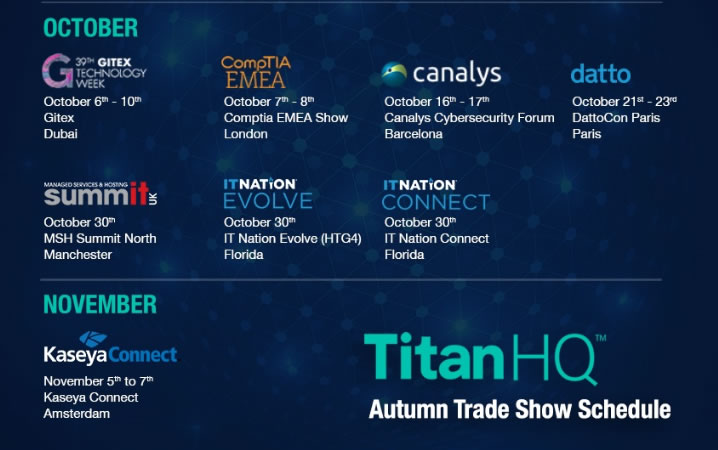
If you are a managed service provider, now is the perfect time to sign up with TitanHQ. Come and meet the TitanHQ channel team at the following MSP events to find out more about the TitanShield program for MSPs, OEMs, and service providers, and take advantage of the amazing new MSP package.
If you are unable to attend any of these events, be sure to give the TitanHQ team a call to find out more and take advantage of this exciting new and exclusive offer.
In this post we will explain why businesses using Office 365 should implement a third-party email archiving service rather than use the Office 365 email archiving feature to ensure compliance.
Many businesses have ditched their on-premise Exchange email systems and have migrated their email to the cloud. There are many benefits of such a move. Switching to the cloud means it is not necessary to purchase and maintain on-premises hardware and the space devoted to housing that hardware can be freed up and put to better use. There is also no limit on the number of mailboxes that can be set up and mailbox limits do not need to be set as storage space is never an issue.
Businesses store huge amounts of business-critical information in mailboxes, such as contacts, purchase orders, legal documents, and intellectual property. It is important that this information is always available and cannot be accidentally deleted. A study by IDC suggests that 60% of business-critical information is actually stored in the email system, and much of that data is not stored elsewhere. It is therefore no surprise that when ransomware attacks result in encryption of email data, businesses have little option other than pay the ransom demand.
Most of the time, data in the email system is not required, so it makes sense to archive the messages. When information in the archive needs to be recovered, it can be found with a simple search.
If a customer gets in touch, emails related to past email conversations can be recovered, but if emails need to be recovered for legal reasons, businesses need to demonstrate that the email in the archive is exactly the same as the message that was received or sent. They must be able to prove emails have not been altered in any way.
Users of Office 365 can prove the authenticity of an email by placing it on Legal Hold in Office 365. Messages placed on Legal Hold are stored in their original, unedited form. Legal Hold is activated by the Office 365 administrator through the admin panel. Provided Legal Hold remains switched on, edited and deleted messages can be recovered along with the original message through the Compliance Center.
To ensure compliance, Legal Hold should never be switched off. Without Legal Hold, messages can be forever lost from the email system. There are two legal hold options available – Litigation Hold and In-Place Hold. The former will ensure that all messages are retained, even if they are deleted from mailboxes. They will be retained for as long as Litigation Hold remains active.
With In-Place Hold, the admin can set criteria for a search query and only messages that meet that search query will be preserved. With In-Place Hold, if a user deletes an email that is not covered by the search query, it will be purged within 14 days and will not be recoverable, even by the IT team. With this option, businesses will not be able to prove that a message has not been sent. If a message is not in the archive, it could just mean that the message was not picked up by the search query.
Legal Hold is therefore the best option, but while Legal Hold is set up, the mailbox cannot be deleted, even if that individual leaves the company. If a user account is deleted, and that user has a mailbox, since the account is no longer connected to a user account, it will be marked for deletion. It does not matter if the account is still on Legal Hold.
Most third-party email archiving solutions use an archiving method called journaling. Journaling takes a copy of all incoming and outgoing emails on the mail server – or all messages for selected users – in real time. In addition to the message, all associated meta-data and attachments are included in the journal message. This archiving method is utilized by Microsoft Office 365, but there are limitations. For example:
Searches are limited to under 10,000 mailboxes in any one search
Search results are limited to 250 results in the Compliance Center. For more results in a single search, a .PST file must be used. Since .PST files can be edited, this method does not guarantee message authenticity as edits could potentially be made.
Only a maximum of 2 eDiscovery searches can be made at any one time by the same company
If the email service goes down, emails on Litigation Hold and/or live email cannot be accessed
If Litigation Hold is turned off, it is not possible to prove that emails are originals
Without a permanent Litigation Hold, it is not possible to prove that an email has not been sent
Searches are limited to the Outlook search bar
Searches can be difficult for non-technical users
Searches are slow, especially when searching multiple folders or mailboxes.
If individuals leave the company, emails will only be retained if the mailbox is maintained and that has cost implications.
The latter issue can prove costly for organizations. In order to maintain a mailbox when a user has left the company, the license for that user must be maintained. If that user is replaced, another license will be required for that person’s replacement.
That means that for an organization with 50 employees who stay for an average of 2 years, in four years the company would be paying for 200 licenses a year, even though at any one time only 50 licenses should be required. That adds up to a significant extra and unnecessary cost.
TitanHQ has developed its email archiving solution, ArcTitan, to work seamlessly with Office 365. The solution solves the above compliance and performance issues and augments Microsoft’s Compliance Center with much more powerful search and recovery tools. Messages can be found and retrieved much more quickly and efficiently, and there are considerable savings to be made as customers only pay for the licenses they need, regardless how many individuals leave the company and are replaced.
Key Features of ArcTitan
Scalable, email archiving that grows with your business
Email data stored securely in the cloud on Replicated Persistent Storage on AWS S3
Lightning fast searches – Search 30 million emails a second
Rapid archiving at up to 200 emails a second
Automatic backups of the archive
Email archiving with no impact on network performance
Ensure an exact, tamperproof copy of all emails is retained
Easy data retrieval for eDiscovery
Protection for email from cyberattacks
Eliminate PSTs and other security risks
Facilitates policy-based access rights and role-based access
Only pay for active users
Slashes the time and cost of eDiscovery other formal searches
Migration tools to ensure the integrity of data during transfer
Seamless integration with Outlook
Supports, single sign-on
Save and combine searches
Perform multiple searches simultaneously
Limits IT department involvement in finding lost email
Compliant with regulations such as HIPAA, SOX, GDPR, Federal Rules of Civil Procedure, etc.
If you are looking for a more powerful email arching solution to work on top of Office 365 that can be quickly and easily implemented in one step and will save you money and ensure compliance, give the TitanHQ team a call.
There are several common misconceptions about email archiving which are preventing many businesses from creating an email archive. It is often only when email data needs to be recovered that businesses realize just how important an email archive is. Of course, by then it is too late.
In this post we debunk some of the email archiving myths and explain why email archiving is now essential for almost all businesses, regardless of industry or business size.
Misconception #1: An Email Archive is the Same as a Backup
The recent increase in ransomware attacks has highlighted the importance of creating backups of all critical data. An email backup contains all messages in a mailbox. If anything happens to that mailbox – it is encrypted by ransomware for instance – all email data can be recovered.
An email archive could serve the same purpose but differs in some very important ways. An email archive serves as a depository for all emails that are no longer required but need to be retained to meet state and federal data retention requirements.
If an email, group of emails, needs to be recovered, the messages can be located and restored very quickly. That is because the archive includes email metadata and the archive is searchable. A backup is intended for mass email recovery. Finding individual emails in a backup can be incredibly time consuming, costly, and difficult.
You can restore emails from a backup following a ransomware attack, but for eDiscovery and dealing with customer complaints, an email archive is required.
Misconception #2: Email Archives are Only Necessary in Highly Regulated Industries
The Sarbanes-Oxley Act of 2002 (SOX) requires organizations maintain an audit trail for 7 years, which includes email communications. However, it is not only organizations covered by SOX that must retain emails. Several states have enacted laws that require email data to be retained for a set period of time.
Further, no company is immune to litigation. The Federal Rules of Civil Procedure require email communications to be produced as part of eDiscovery. Those communications must be found and provided quickly, which is only possible with an email archive. The failure to produce emails can result in significant financial penalties.
Misconception #3: Email Archives Must be Stored On-Premises
There is no law that states email archives must be housed on-premises, but many companies mistakenly believe that this is necessary. They then purchase expensive hardware and software to create an on-premises email archive. This is often out of security concerns as IT departments feel they can better protect email data in house.
However, cloud service providers offer the same if not greater security, and their solutions require no hardware purchases nor ongoing hardware and software maintenance. Businesses are therefore paying unnecessarily high prices for their email archive.
There is no need to purchase expensive hardware to store sizable email archives and resources do not need to be made available to maintain the hardware and software. On-premises systems also tend to lack flexibility, whereas cloud-based email archives are extremely scalable. When greater capacity is required, additional storage space is always available.
Many businesses only retain emails for a limited period of time, such as 90 days, after which messages are permanently deleted. There is a common view that If an email is deleted, it cannot cause any harm. However, if a complaint is received or emails need to be produced for eDiscovery, the failure to produce those messages could see a company liable for data destruction.
If you want to meet compliance requirements, reduce costs, and be able to recover email data instantly, an email archive is required.
ArcTitan: The Easy Way to Implement a Cloud Email Archive
TitanHQ offers a powerful, fast, and easy to use archiving solution that allows customers to securely store email data in the cloud. ArcTitan is a set and forget solution that serves as a black box flight recorder for email. Whenever an email needs to be found, you are selected for a compliance audit, or receive and eDiscovery request, the archive can be quickly searched and emails can be recovered in seconds or minutes. Emails are sent to the archive at a rate of around 200 messages a second and searches of the archive can be performed at a rate of up to 30 million messages a second.
With ArcTitan emails are sent to the archive in real-time when they arrive at your mail server. An exact copy of the email is sent to the archive, messages are de-duplicated, compressed and sent to Replicated Persistent Storage on Amazon AWS S3 and the archive is automatically backed up to ensure they can always be recovered. With ArcTitan there are no software updates to be performed, as that is handled by TitanHQ. A full audit log is maintained and you can prove that any emails produced have not been altered – Which is essential for compliance and eDiscovery requests.
Some of the key features of ArcTitan are listed below:
Scalable, email archiving that grows with your business
Email data stored securely in the cloud on Replicated Persistent Storage on AWS S3
Lightning fast searches – Search 30 million emails a second
Rapid archiving at up to 200 emails a second
Automatic backups of the archive
Email archiving with no impact on network performance
Ensure an exact, tamperproof copy of all emails is retained
Easy data retrieval for eDiscovery
Protection for email from cyberattacks
Eliminate PSTs and other security risks
Facilitates policy-based access rights and role-based access
Only pay for active users
Slashes the time and cost of eDiscovery other formal searches
Migration tools to ensure the integrity of data during transfer
Seamless integration with Outlook
Supports, single sign-on
Save and combine searches
Perform multiple searches simultaneously
Limits IT department involvement in finding lost email
Compliant with regulations such as HIPAA, SOX, GDPR, Federal Rules of Civil Procedure, etc.
To find out more about the benefits of email archiving and for further information on ArcTitan. Contact TitanHQ today.
TitanHQ, the leading provider of spam filtering, web filtering, and email archiving solutions to SMBs and managed service providers (MSPs) has announced a new partner program has been launched: TitanShield.
The aim of the TitanShield Partner Program is to provide MSPs, cloud distributors, OEM partners, Wi-Fi providers, and Technology Alliance partners with all the tools and support they need to start offering TitanHQ solutions to their clients and to provide continued support.
The launch of the new program coincides with TitanHQ’s 20-year anniversary. For the past two decades, TitanHQ has been developing innovative cybersecurity solutions for SMBs and MSPs that serve the SMB market. The company started by developing anti-spam technologies for businesses in Ireland and has since grown into an award-winning global provider of cybersecurity solutions.
Over the course of the past year, TitanHQ has been working closely with partners to make it as easy as possible for them to sell, onboard, deliver, and managed advanced network security solutions directly to their client base. In fact, in the past 9 months, as a result of those efforts, TitanHQ has increased its partner base by 40%.
In addition to providing cutting edge cybersecurity solutions to protect against email and web-based attacks and meet compliance requirements, TitanHQ offers partners flexible pricing models, competitive margins, and a wealth of sales and technical resources to drive revenue growth.
Under the new partner program, all qualified partners will be assigned a dedicated account manager, a support team, and engineers. Partners also benefit from a full range of APIs that will enable them to incorporate TitanHQ products into their backend provisioning and management systems and will be provided with extensive sales enablement and marketing support, including lead generation resources.
“Our new TitanShield partner program allows us to separate partners into their specific areas so that we can make sure they are receiving best practices, simple pricing models and focused information for the markets and customers they serve,” explained TitanHQ Executive VP of Strategic Alliances, Rocco Donnino “Our program takes a unique and strategic approach for our partners and can be customized to fit all business models.”
MSPs and cloud providers who have not yet started offering TitanHQ solutions to their clients can find out more about the TitanShield program by emailing the team at partners@titanhq.com
Email archiving is essential for most businesses; however, many businesses are not using a cloud-based email archiving solution. In fact, a large number rely on email backups, even though backups are impractical and data loss is a very real concern. But what are the benefits of secure, cloud-based email archiving over backups?
Loss of Email Simply isn’t an Option
Hillary Clinton could easily explain one of the most important benefits of a cloud-based email archiving solution. If an email archive is stored locally, should the device on which that archive is stored be lost or stolen, the entire archive would never be seen again. That is exactly what happened last year.
Donald Trump was quick to criticize Hillary Clinton. Not only was that archive lost, it could potentially have been accessed by an unauthorized individual. Donald Trump is keen not to make a similar mistake. He has reportedly started using a messaging app that deletes all messages once they have been read. Such an app would certainly prevent accidental disclosure, although it would not be an option for many businesses as regulations require emails to be kept for a number of years.
Loss of email is simply not an option in regulated industries. Big fines await companies who do not archive or backup their emails. Emails must be securely stored and made available to auditors or organizations will be in violation of the Sarbanes-Oxley Act, FINRA, HIPAA, and the Gramm-Leach-Billey Act to name but a few. If a backup or local email archive is lost, the consequences can be severe.
Take healthcare organizations for example. If a laptop computer is stolen and email backups containing electronic protected health information were on the device, those data could potentially be accessed by an unauthorized individual. That would be a violation of HIPAA Rules. The Office for Civil Rights could easily fine a healthcare organization millions of dollars for such a data breach. If emails are archived and stored in the cloud, such a breach would not occur in the event of device loss or theft.
Emails Must Be Found Quickly for Legal Discovery and GDPR
If a lawsuit is filed against a company, it may be necessary to provide copies of emails as part of legal discovery. While many companies store old emails in backups, searching for emails can be a difficult, expensive and long-winded process. For an average-sized organization searching for emails could take weeks, even though emails need to be found in minutes. With an email archiving solution, archived messages can be searched and retrieved in a matter of seconds or minutes, not weeks.
A similar scenario exists for data access requests under the EU´s General Data Protection Regulation. EU citizens now have the right to request details of any data that could be used to identify them, modify it where necessary, and erase it is there is justifiable cause. Businesses maintaining a database of EU citizens will find compliance with GDPR much easier by implementing cloud-based email archiving, which also has the benefit of complying with the regulations relating to data security.
Considering the volume of emails now being sent, and the requirement for those emails to be kept for years in many cases, the space required for storing email is considerable. A recent report from Radicati Group suggests the average employee sends or receives 121 emails a day. For an organization with 500 employees that is 60,500 emails a day. With 22 working days each month, that amounts to 15,972,000 emails a year. Each of those emails may only be a few KB, but over a year the storage space required is substantial. Cloud-based email archiving not only allows millions of emails to be stored, there is no need for organizations to purchase any hardware for storage. All emails are securely stored in the cloud.
ArcTitan – Secure, Cloud-Based Email Archiving for Enterprises of All Sizes
The benefits of secure, cloud-based email archiving are clear. So what options are available that provide all of the benefits of cloud-based email archiving in an easy to use, cost effective package? To meet businesses’ email archiving needs, TitanHQ is offering ArcTitan – a secure, cloud-based email archiving solution that allows organizations to meet compliance requirements, search email archives quickly, and retrieve messages in minutes. ArcTitan has excellent scalability, and can be used for old email storage by companies with ten to 10,000+ email accounts.
Emails can be archived from anywhere at any time, and messages can be accessed via a mail client or browser. Furthermore, with a pay as you go subscription, cloud-based email archiving is affordable for businesses of all sizes.
Key Features of ArcTitan
Scalable, email archiving that grows with your business
Email data stored securely in the cloud on Replicated Persistent Storage on AWS S3
Lightning fast searches – Search 30 million emails a second
Rapid archiving at up to 200 emails a second
Automatic backups of the archive
Email archiving with no impact on network performance
Ensure an exact, tamperproof copy of all emails is retained
Easy data retrieval for eDiscovery
Protection for email from cyberattacks
Eliminate PSTs and other security risks
Facilitates policy-based access rights and role-based access
Only pay for active users
Slashes the time and cost of eDiscovery other formal searches
Migration tools to ensure the integrity of data during transfer
Seamless integration with Outlook
Supports, single sign-on
Save and combine searches
Perform multiple searches simultaneously
Limits IT department involvement in finding lost email – users can access their own archived email
Compliant with regulations such as HIPAA, SOX, GDPR, Federal Rules of Civil Procedure, etc.
To find out more about the benefits of ArcTitan, contact the TitanHQ sales team today!