Spam News
Our spam news section provides up to date news on the latest threats that are likely to hit the inboxes of your employees. Cybercriminals are constantly changing tactics with new spam email campaigns, different social engineering techniques and new methods of installing malware and ransomware. By keeping up to date on the latest spam news, organizations can take timely action to mitigate risk.
In that regard, a spam filtering solution is essential. All it takes is for one employee to click on a malicious link or open an infected email attachment for an entire network to be compromised. A spam filter will check all incoming email messages and search for common spam signatures in addition to checking senders’ email accounts against blacklists of known spammers. Email attachments will be checked for virus signatures and hyperlinks compared to blacklists of known malicious domains.
Armed with the latest spam news, information security teams can send email alerts to their employees warning of pertinent threats that they need to be aware of.
This section also includes news on industry-specific attacks, in particular those that are being used to target the healthcare, education, financial services, legal and hospitality sectors.
by G Hunt |
January 31, 2025 |
Phishing & Email Spam, Security Awareness, Spam News
As the massive cyberattack on Change Healthcare demonstrated last year, the failure to implement multifactor authentication on accounts can be costly. In that attack, multifactor authentication was not implemented on a Citrix server, and stolen credentials allowed access that resulted in the theft of the personal and health information of 190 million individuals. The ransomware attack caused a prolonged outage and remediation and recovery cost Change Healthcare an estimated $2.9 billion last year.
The attack should serve as a warning for all companies that multifactor authentication is an essential cybersecurity measure – If passwords are compromised, access to accounts can be prevented. Unfortunately, multifactor authentication protection can be circumvented. Threat actors are increasingly using phishing kits capable of intercepting multifactor authentication codes in an adversary-in-the-middle attack. Phishing kits are packages offered to cybercriminals that cover all aspects of phishing. If purchased, phishing campaigns can be conducted with minimal effort as the phishing kit will generate copies of websites that impersonate well-known brands, the infrastructure for capturing credentials, and templates for phishing emails. After paying a fee, all that is required is to supply the email addresses for the campaign, which can be easily purchased on hacking forums.
Some of the more advanced phishing kits are capable of defeating multifactor authentication by harvesting Microsoft 365 and Gmail session cookies, which are used to circumvent MFA access controls during subsequent authentication. One of the latest phishing kits to be identified is has been dubbed Sneaky 2FA. The kit was first identified as being offered and operated on Telegram in October 2024 by researchers at the French cybersecurity firm Sekoia. The researchers identified almost 100 domains that host phishing pages created by the Sneaky 2FA phishing kit.
As with a standard phishing attack, phishing emails are sent to individuals to trick them into visiting a phishing page. One campaign using the Sneaky 2FA phishing kit uses payment receipt-related emails to trick the recipient into opening a PDF file attachment that has a QR code directing the user to a Sneaky 2FA page on a compromised website, usually a compromised WordPress site. These pages have a blurred background and a login prompt. Microsoft 365 credentials are required to access the blurred content. The phishing pages automatically add the user’s email address to the login prompt, so they are only required to enter their password. To evade detection, multiple measures are employed such as traffic filtering, Cloudfire Turnstile challenges, and CAPTCHA checks.
Many phishing kits use reverse proxies for handling requests; however, the Sneaky 2FA phishing server handles communications with Microsoft 365 API directly. If the checks are passed, JavaScript code is used to handle the authentication steps. When the password is entered, the user is directed to the next page, and the victim’s email address and password are sent to the phishing server via an HTTP Post. The server responds with the 2FA method for the victim’s account and the response is sent to the phishing server. The phishing kit allows session cookies to be harvested that provide account access, regardless of the 2FA method – Microsoft Authenticator, one-time password code, or SMS verification.
Phishing kits such as Sneaky FA make it easy for cybercriminals to conduct phishing attacks and defeat MFA; however, they are not effective at defeating phishing-resistant MFA such as FIDO2, WebAuthn, or biometric authentication. The problem is that these forms of MFA can be expensive and difficult to deploy at scale.
Businesses can greatly improve their defenses with advanced spam filter software with AI- and machine learning detection, email sandboxing, URL rewriting, QR code checks, greylisting, SPF, DKIM, and DMARC checks, and banners identifying emails from external sources. Effective email filtering will ensure that these malicious emails do not land in employee inboxes. TitanHQ offers two email security solutions – SpamTitan email security and the PhishTitan anti-phishing solution for M365. The engine that powers both solutions was recently rated in 1st place for protection in the Q4, 2024 tests by VirusBulletin, achieving a 100% malware and 100% phishing detection rate.
Regular security awareness training should also be provided to all members of the workforce to raise awareness of threats and to teach cybersecurity best practices. With the SafeTitan security awareness training platform it is easy to create and automate training courses and add in new training content when new threat actor tactics are identified. The platform also includes a phishing simulator for reinforcing training and identifying individuals in need of additional training.
For more information on improving your defenses against phishing and malware, give the TitanHQ team a call. Product demonstrations can be arranged on request and all TitanHQ solutions are available on a free trial.
by G Hunt |
October 31, 2022 |
Email Scams, Spam Advice, Spam News
Phishing attempts are often very convincing as the emails mimic trusted brands, include their logos and color schemes, and the message format is often copied from genuine company messages. The most commonly spoofed brands are well-known companies that have millions of customers, which increases the chances of the message landing in the inbox of a person who has, at least at some point in the past, used that company’s products or services.
Every quarter, Check Point releases its Brand Phishing Report, which highlights the latest phishing trends and the brands being impersonated most often. LinkedIn, Microsoft, Google, and Netflix are regulars in the top 10 List, with LinkedIn being the most commonly spoofed brand in phishing attacks in the first half of the year; however, the top spot has now gone to the German logistics and package delivery firm, DHL.
DHL accounted for 22% of all worldwide phishing attempts in Q3, 2022. DHL itself issued a warning to customers in July after the company became aware that it was being spoofed in a massive phishing campaign that was being conducted globally. It is probable that DHL will remain in the top spot in Q4 due to the increase in online purchases in the run-up to Christmas.
While there is some variation in the phishing emails impersonating DHL, one of the most common appears to have been sent by DHL Express and alerts the recipient about an undelivered package. The message warns that it will not be possible to attempt redelivery of the package unless delivery information is confirmed. The phishing emails include a link to a website to allow that information to be provided; however, the link directs the user to a website where they are required to log in and provide their name, username, password, and other sensitive information, such as payment details.
While email phishing is the most common form, DHL has been spoofed in SMS messages that achieve the same purpose. Of course, SMS messages are not subject to spam filtering controls and mobile devices are less likely to be protected by web filters, which can detect and block attempts to visit malicious websites. SMS phishing – termed smishing – has been growing in popularity in recent years.
Unsurprisingly, given the number of users, Microsoft achieved second place, accounting for 16% of phishing emails in the quarter. The phishing emails spoofing Microsoft are more varied due to the extensive product range, although OneDrive phishing emails were common. These emails claim to be collaboration requests and target businesses and ask the recipient to click on a button to view a shared document. Like many phishing emails, the messages warn the recipient that urgent action is required, as the document will be deleted in 48 hours. The user is directed to a malicious website where they are asked to enter credentials for their Microsoft account.
It is unclear why LinkedIn has fallen out of favor slightly, although it still achieved 3rd spot and accounted for 11% of phishing attempts in the quarter. The rest of the top ten consists of Google (6%), Netflix (5%), We Transfer (5%), Walmart (5%), WhatsApp (4%), HSBC (4%), and Instagram (3%).
Phishing is one of the main ways that cybercriminals gain access to business networks. The attacks are easy to conduct, low cost, and do not require extensive technical knowledge. Businesses can block the majority of these malicious messages by implementing an advanced spam filter such as SpamTitan Cloud. They should also consider adding an extra layer to their defenses – A web filter such as WebTitan Cloud.
Technical defenses such as these are vital for protecting against phishing attempts, but it is also important for businesses to ensure that they provide regular security awareness training to their employees to make them aware of the threat of phishing and to teach them how to identify phishing emails. In addition to training, phishing simulations should be conducted on the workforce. These have been proven to reduce susceptibility to phishing attempts, as they give employees practice at identifying phishing and any failures are turned into a training opportunity.
With the SafeTitan security awareness training and phishing simulation platform, training is automatically triggered in real-time in response to phishing simulation failures and other security errors, when the training is likely to have the greatest effect.
If you run a business and want to improve your defenses against phishing, give TitanHQ a call. TitanHQ products are available on a free trial to allow you to put them to the test before making a decision about a purchase. MSPs that have yet to add spam filtering, web filtering, and security awareness training to their service stacks should give the TitanHQ channel team a call to find out more about these opportunities to improve their clients’ defenses against phishing and other cyberattacks.
by G Hunt |
February 17, 2022 |
Email Scams, Phishing & Email Spam, Spam News
Business Email Compromise (BEC) is the leading cause of financial losses to cybercrime. The U.S. Federal Bureau of Investigation (FBI) Internet Crime Complaint Center (IC3) received 19,369 complaints about BEC scams in 2020, resulting in adjusted losses of $1.87 billion. While BEC crime ranked number 10 based on victim count, it topped the list in terms of the losses sustained by victims, with three times as much lost to the scams as the second-biggest loss to cybercrime – Confidence/romance fraud.
Business Email Compromise scams usually start with a phishing attack to gain access to email credentials. The attackers seek the credentials of the CEO, CFO, or another executive, and either target those individuals directly with spear phishing emails or compromise the email accounts of lower-level employees and use their email accounts to send phishing emails to the targeted individuals. Once the right credentials have been obtained, the executive’s email account is used to send messages to individuals responsible for wire transfers to trick them into making substantial wire transfers to attacker-controlled bank accounts. While these scams require planning and research, the time spent setting up the scams is well spent, as BEC attacks are often successful.
While BEC scams are usually conducted via email, BEC scammers are increasingly using virtual meeting platforms such as Microsoft Teams and Zoom in their scams. The scammers have taken advantage of the increase in remote working due to the pandemic and the popularity of virtual meeting platforms for communication and collaboration.
Once the scammers have access to the CEO’s email account, they identify their next target and send a request for a virtual meeting. When the target connects to the meeting, the scammer explains that they are having problems with their audio and video, so the meeting proceeds with the scammer on text chat. Oftentimes they will insert a picture of the CEO for added realism. The scammer then provides a reason for the out-of-band request, then asks the employee to make a wire transfer, either in the meeting or after the meeting via email.
The FBI has recently issued a warning to businesses about the increase in the use of virtual meetings for BEC scams, having observed an increase in the use of these platforms for BEC scams between 2019 and 2021. Scammers are also compromising employee email accounts and are inserting themselves into work meetings to gather information about the day-to-day processes at businesses. Since the scammers use genuine email accounts to connect, and audio/visual problems are relatively common, they are able to gather information and steal funds without being detected. The scammers also use compromised CEO email accounts to send emails to employees claiming they are stuck in a virtual meeting and unable to arrange an important wire transfer and ask an employee to initiate the transfer on their behalf.
There are several steps that businesses can take to improve their defenses against BEC attacks. Defending against these attacks should start with an advanced email security solution to block the phishing attacks that allow scammers to gain access to email accounts. SpamTitan has industry-leading detection of phishing URLs in emails and can prevent employees from visiting the web pages where credentials are harvested.
Security awareness training is important as some malicious emails bypass all spam filters. Employees need to be trained on how to identify scam emails. Security awareness training is concerned with creating a ‘human firewall’ to augment technical defenses and should make employees aware of BEC scams and how to identify scam emails from internal email accounts. TitanHQ has recently launched a new security awareness platform called SafeTitan to help businesses with training. SafeTitan is the only behavior-driven security awareness platform that provides real-time training to deal with threats targeting employees.
It is also recommended to implement policies and procedures that require secondary channels or two-factor authentication to verify requests for any changes to account information or atypical requests for bank transfers.
by G Hunt |
September 15, 2021 |
Industry News, Spam News, Spam Software
TitanHQ has released a new version of its award-winning email security solution that includes a new security feature – Geo-blocking email filtering, as well as several other security updates and fixes to improve usability.
Geo-blocking is a feature that has been requested by customers and has now been included in the product at no additional cost to users. Geo-blocking, as the name suggests, allows SpamTitan users to block or allow emails originating from certain geographical locations, based on either IP address or country. This feature allows businesses to add an extra layer of protection to block geographic threat vectors and stop malware, ransomware, and phishing emails from reaching inboxes.
The new feature allows businesses and organizations to block emails coming from any country. This extra control is important, as most malware-containing emails come from a handful of overseas countries – Countries that most small- to medium-sized businesses do not normally work with. Blocking emails from those countries eliminates threats, without negatively impacting the business.
Activating the geo-blocking feature could not be any easier. SpamTitan users can click to restrict emails from any country in the SpamTitan Country IP Database and all emails coming from those countries will be blocked. There will naturally be instances where things are not so cut and dry, but that is not a problem. Geo-blocking can be activated for a specific country, and IP addresses, domains, or email addresses of trusted senders within those countries can simply be whitelisted to ensure their messages are delivered.
“Geoblocking has been a much-requested feature and as always we listen to our customers and provide what they need to implement the very best email security they can,” said TitanHQ CEO Ronan Kavanagh. “After experiencing 30% growth in 2021, TitanHQ expects these product enhancements and new features to make 2021 another record-breaking year.”
Several other security enhancements have been made to further improve the already excellent threat detection and blocking mechanisms within SpamTitan. SpamTitan 7.11 includes an upgraded email sandboxing feature to provide even greater protection against malware, ransomware, phishing, spear-phishing, Advanced Persistent Threats, and malicious URLs embedded in emails. These enhancements also provide more detailed information about new threats to help SpamTitan users mitigate risk.
As always with a new release, recently reported bugs have been fixed, and SpamTitan has been further improved with enhanced email rendering in Mail Viewer. Users also now have the ability to remove quarantine report token expiry and improve domain verification, to name but a few of the enhancements.
SpamTitan is delivered either as a 100% cloud-based solution or as an anti-spam gateway, which is run as a virtual appliance on existing hardware. Existing SpamTitan Cloud customers need to do nothing to upgrade to the new version of the solution, released on September 14, 2021. SpamTitan Cloud is automatically updated to the latest version.
Users of SpamTitan Gateway will need to manually upgrade to the latest version via System Setup > System Updates.
by G Hunt |
February 23, 2021 |
Phishing & Email Spam, Spam Advice, Spam News
Tax season has begun and so have the annual scams targeting tax professionals. Each year in the run up to the tax filing deadline, cybercriminals conduct scams in order to obtain electronic filing identification numbers (EFINs).
In the United States, the Internal Revenue Service (IRS) issues EFINS to tax professionals and individuals to allow them to file tax returns electronically. If cybercriminals obtain these EFINs they can file fraudulent tax returns in victims’ names to obtain tax rebates. Obtaining an e-file number of a tax professional will allow tax returns to be filed for many individuals, so these scams can be very lucrative.
These scams usually start with a phishing email using a lure to get the recipient to visit a malicious website where they are asked to provide information or upload documents that contain sensitive information. Alternatively, recipients are told to download files which silently install a malware downloader which ultimately gives the attackers full control of the victim’s computer.
Commonly, the spam emails spoof the IRS and instruct tax professionals to provide information or documents in order to prevent the suspension of their account. At such as busy time of year, suspension of an account is best avoided. Faced with this threat, tax professionals may provide the requested information.
One of the phishing emails recently intercepted spoofed the IRS by using the sender name “IRS Tax E-Filing,” with the subject line “Verifying your EFIN before e-filing.” The emails looked convincing and required “authorized e-file originators” to reverify prior to filing returns through the IRS system. The emails claimed the IRS had started using this new security measure to prevent unauthorized and fraudulent activities. The scammers requested a PDF file/scan of the EFIN acceptance letter and both sides of the individual’s driver’s license. Similar scams have been conducted that require tax preparers’ ID numbers and e-services usernames and passwords to be provided.
This year, in addition to the usual phishing emails spoofing the IRS, campaigns have been detected where the attackers claim to be potential clients looking for tax preparers ahead of the filing deadline. Attachments are provided that would typically be needed by tax preparers, but they are laced with malicious scripts that install keylogging malware that records and exfiltrates keystrokes, with are likely to include usernames and passwords.
Tax preparers that fall victim to these scams can suffer catastrophic damage to their reputations, so it is important to exercise caution when opening any emails and to stop and think carefully about any request to provide sensitive information or download files.
One of the easiest ways to protect against these scams is to implement an advanced spam filtering solution that can identify and block these malicious messages. SpamTitan is a powerful email security solution that identifies and blocks malware and documents containing malicious scripts with dual antivirus engines, sandboxing, and machine learning techniques. In addition to blocking malware threats, SpamTitan is highly effective at blocking phishing emails containing malicious links.
The award-winning spam filter is quick and easy to implement and maintain, requiring no technical knowledge. You can be up and running in minutes and protecting your inbox from phishing and malware attacks, which will allow you to concentrate on your business at this busy time of year and avoid costly cyberattacks.
For more information about SpamTitan, to book a product demonstration or to register for a free trail, give the SpamTitan team a call today.
by G Hunt |
February 18, 2021 |
Email Scams, Phishing & Email Spam, Spam News
A new Adidas phishing scam has been detected that offers free shoes and money. The messages claim that Adidas is celebrating its 93rd anniversary and is giving 3000 lucky customers a free pair of Adidas sneakers and a free $50 a month subscription.
“Adidas is giving away 3000 Free Pair of Shoes to celebrate its 93rd anniversary. Get your free shoes at <link>”
The very same scam was run in 2019 claiming to celebrate 69th anniversary and on that occasion was giving 2,500 lucky customers a free pair of Adidas sneakers and a free $50 a month subscription. The scammer saw success previously and have clearly decided it’s worth trying again.
The Scam Adidas Email
There is also an email version of the scam. The fake Adidas email claims the recipient has won a large sum of money and all they need to do to claim the cash is send their personal details via email.
Scam emails are now a very effective form of cyber attack. Most successful hacking attacks today begin with a phishing email. Scam emails containing ransomware or BEC are a challenge for corporate security.
A successful breach can cost an organization millions but defending against this kind of attack requires powerful anti-spam and malware technology. To defend against this kind of phishing attack you need a cutting edge email security solution to stop scam emails, a security aware workforce to identify a scam email and spot a spoof email, and powerful web protection that blocks user from accessing dangerous websites
WhatsApp phishing scam
The WhatsApp phishing scam is targeting users on mobile devices in specific locations. If the user clicks the link in the message and is determined not to be using a mobile device, they will be directed to a webpage that displays a 404 error. The scam will also only run if the user is in the United States, Pakistan, India, Norway, Sweden, Nigeria, Kenya, Macau, Belgium or the Netherlands.
Provided the user is on a mobile device and located in one of the targeted countries, a series of four questions will be asked. The responses to the questions are irrelevant as all users will be offered a “free” pair of sneakers after answering the four questions.
In order to be able to claim the prize, users must share the offer with their contacts on WhatsApp. Regardless of whether the user does this, they will be directed to another webpage where they are asked further questions and are finally offered a “free” pair of sneakers worth $199.
There is another catch. In order to claim their free sneakers, the user must pay $1. The user is advised that they will also be charged $49.99 a month for the subscription at the end of the month if they do not cancel. The user is told they can cancel at any point.
On the payment screen the user is told that the payment will be processed by organizejobs.net. Proceeding with the payment will see the user charged $1, followed by the subscription cost of $49.99 in 7 days.
The campaign is being run on WhatsApp, although similar scams have been conducted via email and SMS messages. Several variations along the same theme have also been identified spoofing different shoe manufacturers.
The link supplied in the WhatsApp phishing message appears to be genuine, using the official domain for the country in which the user is located. While the domain looks correct, this is an example of a homoglyph attack. Instead of the domain adidas.de, the i is replaced with a vertical line – a homoglyph attack.
These types of scams are commonplace. Homoglyph scams take advantage of the ability to use non-ASCII characters in domain names. Similar scams use a technique called typosquatting – where domains closely matching real brand names are registered: Incorrect spellings for instance, such as “Addidas” instead of Adidas, or with an i replaced with a 1 or an L.
In this case, the attackers appear to be earning a commission for getting users to sign up, although disclosing debit and credit card details could easily see the information used to run up huge bills or drain bank accounts.
There are various warning signs indicating this is an Adidas phishing scam. Close scrutiny of the domain will reveal it is incorrect. The need to share the message to contacts is atypical, being notified of a charge after being told the shoes are free, the failure to ask the user to choose a pair of shoes or even select their size, and an odd domain name is used to process payment. However, even with these tell-tale signs that the offer is not genuine, this adidas phishing scam is likely to fool many people.
Be warned. If you receive any unsolicited WhatsApp message offering you free goods, best to assume it is a phishing scam.
To find out more about some of the key protections you can put in place to improve your resilience against email scams and phishing attacks, contact the SpamTitan team today.
by G Hunt |
January 28, 2021 |
Phishing & Email Spam, Spam Advice, Spam News
DMARC email authentication is an important element of phishing defenses, but what is DMARC email authentication, what does it do, and how does it protect against email impersonation attacks?
There is some confusion about what DMARC email authentication is and what it can do. In this post we explain in clear English what DMARC means and why it should be part of your anti-phishing defenses.
What is DMARC
DMARC is short for Domain-based Message Authentication, Reporting, and Conformance. Its purpose is to make it harder for threat actors to conduct phishing attacks that spoof brands and get those messages delivered to inboxes. DMARC is a critical component of email cybersecurity that reduces an attacker’s ability to get email threat to an end user’s inbox.
With DMARC, organizations can create a record of who is authorized to send emails from their domain. This helps to prevent misuse of a company brand in phishing campaigns.
If DMARC is implemented on email, a business can have all incoming emails checked against DMARC records and any email that fails the check can be subjected to certain actions.
The message can be delivered as normal with a warning and the email will be included in a report of emails that failed the check. The message could automatically be sent to quarantine for manual approval before delivery is made. Alternatively, the message could be rejected or subjected to a custom policy. An organization can select the best policy to adopt based on their level of risk tolerance.
DMARC will not stop all phishing emails from being delivered, but it is an important measure to implement to stop email spoofing and reduce the number of phishing emails that reach inboxes. DMARC is just one of several rules that are used to determine whether emails are genuine and should be delivered or if the messages have been sent from an unauthorized user.
Sender Policy Framework (SPF), DomainKeys Identified Mail (DKIM), and DNS records are also used to determine whether the email server being used is authorized to send emails for the organization.
Find out more about improving your email security defenses. Sign up for a free SpamTitan demo today.
Book Free DemoWhat is Sender Policy Framework (SPF)
The Sender Policy Framework (SPF) is an email-authentication technique used to restrict who can send emails from your domain. It allows your mail server determine when a message comes from the domain that it uses. SPF has three major elements: a policy framework, an authentication method and specialized headers to convey the information.
An email message contains two sender addresses:
- The From:header, displaying the name and email address of the sender
- The Envelope From:or Return-Path email address.
Both types of sender addresses can be easily spoofed.
SPF uses a DNS record to verify the Envelope From: only. This means that if a spammer spoofs the Envelope From: address using a domain where SPF is enabled, the mail will be caught by the receiving server. If the spammer spoofs the From: header, SPF will not catch this. The SPF record indicates which email servers are authorized to send mail on behalf of a domain. This would be the organization itself and any third parties, such as marketing companies. The SPF record is a DNS TXT record that includes IP addresses and hostnames that are allowed to send emails from a particular domain. The SPF record is the first thing checked by DMARC rules.
Together with the DMARC related information, this gives the receiver (or receiving systems) information on how trustworthy the origin of an email is. SPF is, just like DMARC, an email authentication technique that uses DNS (Domain Name Service). This gives you, as an email sender, the ability to specify which email servers are permitted to send email on behalf of your domain.
DKIM
DKIM is more advanced and uses a TXT record and asymmetric public-private key encryption. With DMARC enabled, the signature is encrypted with the public key and the key is published on DNS servers. The domain’s private key is then used at the recipient’s email server for verification.
If DKIM is enabled, the public key-encrypted signature is compared with the message that is decrypted using a newly generated key to confirm that the message has not been altered. DKIM also confirms that the sender is from the listed domain and that the sender has not been spoofed.
DMARC offers a much greater level of protection than SPF and is more dependable, so both should be implemented. Both SPF and DMARC are incorporated into SpamTitan to better protect users from email spoofing attacks. Enabling SPF, DKIM and DMARC will help greatly reduce the amount of spoof emails recieved, and that is only good.
To find out more about improving your email security defenses, contact the TitanHQ team today.
by G Hunt |
November 26, 2020 |
Phishing & Email Spam, Spam Advice, Spam News
Banking Trojans have long posed a threat to businesses, but one in particular has stood head and shoulders above the rest in 2020: The Emotet Trojan.
Emotet: The Biggest Malware Threat in 2020
The Emotet Trojan first appeared in 2014 and was initially a banking Trojan, which was used to steal sensitive data such as bank account information from browsers when the user logs into their bank account. The Emotet Trojan has since been developed and it has now evolved into a much bigger threat.
Emotet is now far more effective at spreading to other devices, using a worm like element to infect other devices on the network as well as hijacking the user’s email account and using it to send copies of itself to victims’ contacts. Infected devices are added to the Emotet botnet, and have been used in attacks on other organizations. The operators of Emotet have now joined forces with other cybercriminal operations and are using their malware to deliver other Trojans such as TrickBot and QakBot, which in turn are used to deliver ransomware.
Data from HP Inc. revealed Emotet infections increased by 1,200% from Q2 to Q3, showing the extent to which activity has increased recently. Data from Check point show Emotet is the biggest malware threat, accounting for 12% of all infections in October 2020. TrickBot, which is delivered by Emotet, is the second biggest threat, accounting for 4% of infections.
Emotet and TrickBot are Driving the Increase in Ransomware Infections
The Emotet and TrickBot Trojans are driving the increase in ransomware infections globally, especially attacks on healthcare organizations. The healthcare industry in the United States is being targeted by ransomware gangs due to the increased chance of the ransom being paid. In many cases, the recent ransomware attacks have been made possible due to previous Emotet an TrickBot infections.
Unfortunately, due to the efficient way that Emotet spreads, removing the malware can be problematic. It is probable that more than one device has been infected, and when the Trojan is removed from one device, it is often reinfected by other infected devices on the network.
Emotet is primarily spread via phishing emails, most commonly using malicious macros in Word documents and Excel spreadsheets, although JavaScript attachments are also known to be used. The lures used in the phishing emails are highly varied, often using topical lures linked to recent news events, COVID-19, and holiday season lures in the run up to Halloween, Black Friday, and Cyber Monday.
The best way of preventing attacks is stopping the Emotet emails from reaching inboxes and making sure that employees are trained how to recognize phishing emails.
How SpamTitan Can Protect Your Organization
SpamTitan use a wide range of different techniques to identify phishing emails that are used to deliver malware such as Emotet. These measures provide layered protection, so should one check fail to identify the threat, several others are in place to provide protection.
SpamTitan uses dual antivirus engines to identify previously seen malware variants and email sandboxing to identify new (zero day) malware threats. Suspicious email attachments are sent to the sandbox where they are subjected to in depth analysis to identify malicious actions such as command and control center callbacks.
Users can set controls to quarantine or reject messages with certain types of email attachments, and while blocking Word and Excel documents and spreadsheets is not practical for most businesses, setting rules to quarantine these files for manual review if they have macros is certainly wise, as is blocking JavaScript files and other file types commonly used to install malware.
SpamTitan uses Sender Policy Framework (SPF) and DMARC to block spoofing and email impersonation attacks, which are used to convince employees to open attachments and click malicious links. SpamTitan also includes outbound scanning, which detects devices that have potentially been infected and prevents messages from spreading Emotet internally and to business contacts.
There are many cybersecurity solutions that can provide protection against malware, but finding one that is easy to use, effective, and reasonably priced can be a challenge.
SpamTitan ticks all of those boxes. It is the most and best ranked email security solution on Capterra, GetApp and Software Advice, has achieved a rating of 4.9 out of 5 on Google reviews, and is listed in the top three in the email security gateway, MSP email security, and email security for Office 365 categories.
If you want to protect your organization from Emotet and other malware and phishing attacks, give the TitanHQ team a call to find out more about SpamTitan Email Security.
by G Hunt |
August 14, 2020 |
Email Scams, Phishing & Email Spam, Spam News
Several SBA loan phishing scams identified in recent weeks that impersonate the U.S. Small Business Administration in order to obtain personally identifiable information and login credentials for fraudulent purposes.
Due to the hardships suffered by businesses due to the COVID-19 pandemic, the SBA’s Office of Disaster Assistance is offering loans and grants to small businesses to help them weather the storm.
Hundreds of millions of dollars have been made available by the U.S. government under the Coronavirus Aid, Relief, and Economic Security Act (CARES Act) to help struggling individuals and companies during the pandemic. Cybercriminals have been quick to develop campaigns to fraudulently obtain those funds, raid bank accounts, steal sensitive information, and distribute malware and ransomware.
Several phishing campaigns have been launched since April 2020 targeting businesses that are considering or have already applied for loans under the SBA’s Economic Injury Disaster Loan Program.
Phishing emails have been sent encouraging small businesses to apply for a loan. One such campaign confirms that the business is eligible for a loan and the loan has been pre-approved. The purpose of the scam is to obtain business information that allows the scammers to apply for a loan on behalf of the business and pocket the funds.
Another scam impersonates the SBA and claims an application for a loan is complete and payment will be made once supporting documents have been received. The emails include an attached form that must be completed and uploaded to the SBA website. The email attachment appears to be a .img file but has a hidden double extension and is actually a .exe executable. Double-clicking and running the file will see GuLoader malware installed, which is a downloader that can deliver a range of different malicious payloads.
The same email address used for that campaign was used in a different attack that included a PDF form that requested bank account information and other sensitive data, which needed to be completed and uploaded to a spoofed SBA website.
In the past few days, yet another SBA loan phishing scam has come to light. Phishing emails were sent to Federal Executive Branch, and state, local, tribal, and territorial government agencies. The phishing scam relates to an SBA application for a loan with the subject line “SBA Application – Review and Proceed.” The emails links to a cleverly spoofed SBA web page that indistinguishable from the genuine login page apart from the URL that attempts to steal credentials. The scam prompted the DHS’ Cybersecurity and Infrastructure Security Agency (CISA) to issue an emergency alert warning of the scam.
These SBA loan phishing scams use a variety of lures and have multiple aims, but they can be avoided by following good cybersecurity best practices.
First and foremost, you should have an advanced spam filtering solution in place such as SpamTitan. SpamTitan checks email headers and message content for signs of spam, phishing, and scams and uses DMARC and sender policy framework (SPF) to identify and block email impersonation attacks.
Dual antivirus engines detect 100% of known malware and sandboxing is used to subject attachments to deep analysis to identify malicious code and malware that has not been seen before. Machine learning technology is also used to identify new phishing scams, along with multiple threat intelligence feeds to identify known phishing scams.
Prior to opening any downloaded document or file it should be scanned using antivirus software that has up-to-date virus definitions. Check the properties of files to make sure they are what they claim to be and do not have a double extension.
Care should be taken when opening any email or email attachment, even emails that are expected. Steps should be taken to verify the legitimacy of any request received via email, especially one that requires the provision of personally identifiable information or requests for bank account and other highly sensitive information.
Emails and websites may look legitimate and have SBA logos, but that does not guarantee they are genuine. Always carefully check the sender of the email – Genuine SBA accounts end with sba.gov. The display name can easily be spoofed so click reply and carefully check the email address is correct. Care should be taken when visiting any website linked in an email. Check the full URL of any website to make sure it is a legitimate domain.
CISA also recommends monitoring users’ web browsing habits and restricting access to potentially malicious websites. The easiest way to do this is by using a web filtering solution such as WebTitan. WebTitan allows businesses to monitor Internet activity in real time, send automatic alerts, block downloads of certain file types, and carefully control the types of websites that can be accessed by employees.
For more information on spam filtering and web filtering solutions to protect your business from phishing and other cyberattacks, give the SpamTitan team a call today.
by G Hunt |
May 21, 2020 |
Network Security, Spam News, Spam Software
A recent survey by Capterra on British SMEs has revealed 30% have fallen victim to a phishing attack during the COVID-19 lockdown. Just under half of the phishing emails received (45%) were related to coronavirus or COVID-19.
COVID-19 phishing emails increased significantly during the first quarter of 2020 as the coronavirus spread around the world. Since the virus was unknown to science, scientists have been working tirelessly to learn about the virus, the disease it causes, how the virus is spread, and what can be done to prevent infection. The public has been craving information as soon as it is available, which creates the perfect environment for phishing attacks. People want information and threat actors are more than happy to offer to provide it.
The Capterra survey highlights the extent to which these campaigns are succeeding. Employees are receiving phishing emails and being fooled by the social engineering tactics the scammers have adopted. The high success rate has seen many threat actors temporarily abandon their tried and tested phishing campaigns that they were running before the SARS-CoV-2 outbreak, and have repurposed their campaigns to take advantage of the public’s thirst for knowledge about the virus. In the first quarter of 2020, KnowBe4 reported a 600% increase in COVID-19 and coronavirus themed phishing emails.
The high percentage of businesses that have experienced phishing attacks during the COVID-19 lockdown indicates many SMEs need to augment their anti-phishing defenses. There is also a need for further training to be provided to employees, as the emails are being opened and links are being clicked.
On the training front, formal training sessions may be harder to administer with so many employees working remotely. Consider conducting short training sessions via teleconferencing platforms and sending regular email alerts warning about the latest techniques, tactics and procedures being used in targeted attacks on remote workers. Phishing simulation exercises can be hugely beneficial and will help to condition workers to check emails thoroughly and report any threats received. These simulations also help identify which employees need further training to help them recognize potential phishing attacks.
Of course, the best way to ensure that employees do not open phishing emails and malicious attachments is to ensure they are not delivered to employees’ inboxes. That requires an advanced spam filtering solution.
Many SMEs and SMBs have now moved to an Office 365 hosted email solution, in which case email filtering will be taking place using Microsoft’s Exchange Online Protection – The default spam filtering service that protects all office 365 users. If you are reliant on this solution for filtering out phishing emails and other types of malicious messages, you should consider adding a third-party solution on top of EOP.
Exchange Online Protection provides a reasonable level of security and can block phishing emails and known malware threats, but it lacks the features of more advanced spam filtering solutions and cloud-based email security gateways, such as machine learning and predictive technology to identify attacks that have not been seen before.
As an additional protection against phishing attacks, a web filtering solution should be considered. In the event of a phishing email arriving in an inbox, a web filter serves as an additional layer of protection to prevent attempts by employees to visit websites linked in the emails. When an attempt is made to visit a known phishing website or web content that violates your acceptable internet usage policies, access will be blocked and the user will be directed to a local web page telling them why access has been denied.
Multi-factor authentication should also be implemented for email to ensure that in the event that credentials are compromised, a second factor must be provided before access to the email account is granted.
For more information on spam filtering and web filtering, and further information on TitanHQ’s advanced cloud-based email security solution – SpamTitan – and DNS-based web filtering solution – WebTitan – give the TitanHQ team a call today.
by G Hunt |
February 17, 2020 |
Phishing & Email Spam, Spam News
Just a few days after new figures from the FBI confirmed business email compromise scams were the biggest cause of losses to cybercrime, news broke of a massive cyberattack on a Puerto Rico government agency. Cybercriminals had gained access to the email account of an employee, understood to work in the Puerto Rico Employee Retirement System.
The compromised email account was used to send requests to other government agencies requesting changes be made to standard bank accounts for remittance payments. Since the email account used was trusted, the changes to bank accounts were made. Scheduled payments were then made as normal and millions of dollars of remittance payments were wired to attacker-controlled bank accounts.
The Puerto Rico Industrial Development Company, a state-owned corporation that drives economic development of the country, was one of the worst hit. Emails were received requesting changes to bank accounts and two payments were made. The first payment of $63,000 was made in December and another payment of $2.6 million in January. Other departments were also targeted, including the Tourism Company. The latter made a payment of $1.5 million. In total, the scammers attempted to steal around $4.73 million.
The business email compromise scam was uncovered when those payments were not received by the correct recipients. Prompt action was then taken to block the transfers and some of the payments were frozen, but the government has not been able to recover around $2.6 million of the stolen funds.
A full investigation has been launched to determine how the attackers gained access to the email account to pull off the scam. While the method used has not been confirmed, BEC attacks usually start with a spear phishing email.
A phishing email is sent to a person of interest requesting urgent action be taken to address a problem. A link is supplied in the email that directs the user to a website that requests their email account credentials. The account can then be accessed by the attacker. Attackers often set up mail forwarders to receive a copy of every email sent to and from the account. This enables them to learn about the company and typical payments and construct highly convincing scam emails.
Once access to a corporate email account is gained, the BEC scam is much harder to identify and block. The best defense is to ensure that the initial phishing emails are not delivered, and that is an area where TitanHQ can help.
by G Hunt |
January 31, 2020 |
Email Scams, Phishing & Email Spam, Spam News
A novel coronavirus phishing campaign has been detected that uses scare tactics to trick users into infecting their computer with malware.
The World Health Organization has now declared the 2019 novel coronavirus outbreak a global emergency. The number of cases has increased 10-fold in the past week with almost 9,100 cases confirmed in China and 130 elsewhere around the world.
A worldwide health crisis such as this has naturally seen huge coverage in the press, so it is no surprise that cybercriminals are capitalizing on the concern and are using it as a lure in a malspam campaign to scare people into opening an email attachment and enabling the content.
A novel coronavirus phishing campaign has been detected that uses a fake report about the coronavirus to get email recipients to open a document that details steps that should be taken to prevent infection. Ironically, taking the actions detailed in the email will actually guarantee infection with a virus of a different type: Emotet.
The coronavirus phishing campaign was identified by IBM X-Force researchers. The campaign is targeted on users in in different Japanese prefectures and warning of an increase in the number of local confirmed coronavirus cases. The emails include a Word document attachment containing the notification along with preventative measures that need to be taken.
If the attachment is opened, users are told they must enable content to read the document. Enabling the content will start the infection process that will see the Emotet Trojan downloaded. Emotet is also a downloader of other malware variants. Other banking Trojans and ransomware may also be downloaded. Emotet can also send copies of itself to the victim’s contacts. Those messages may also be coronavirus related.
To add credibility, the Emotet gang makes the emails appear to have been sent by a disability welfare service provider in Japan. Some of the captured messages include the correct address in the footer.
More than 2,000 new infections have been confirmed in the past 24 hours in China and all of its provinces have now been impacted. Cases have now been reported in 18 other countries with Thailand and Japan the worst hit outside of China with 14 cases confirmed in each country. As the coronavirus spreads further and more cases are reported, it is likely that the Emotet gang will expand this campaign and start targeting different countries using emails in different languages. Kaspersky lab has also said that it has identified malspam campaigns with coronavirus themes that use a variety of email attachments to install malware.
Businesses can protect against Emotet, one of the most dangerous malware variants currently in use, by implementing a spam filtering solution such as SpamTitan that incorporates a sandbox where malicious documents can be analyzed in safety to check for malicious actions.
For further information on protecting your email system, contact TitanHQ today.
by G Hunt |
October 14, 2015 |
Spam News
The Federal Trade Commission has issued a warning over a new gaming email phishing scam that targets video game players and takes advantage of their love of the games to get them to divulge their account information.
Gamers invest considerable time and money into buying add-ons and developing gaming characters; however, the fear of loss of their gaming account is seeing many fall for the latest scam.
Cyber Criminals Opt for Gaming Phishing Email Scam
Hardcore gamers are not difficult to find, having registered on forums and gaming websites, providing their email addresses and other information about their gaming habits. Once criminals obtain email addresses of gamers, they are sent fake emails from gaming companies suggesting they have been discovered to have sold gaming items or characters for real money, and by doing so have violated the rules of the game.
Consequently, the users are threatened with account suspensions, or in some cases, legal action. A number of emails have been received by gamers with threats that they will be sued for amounts up to $2,700 for repeated violations of gaming rules and regulations. The intention is not to get the users to part with that money, but to get them to reveal details of their bank accounts or credit cards used to make purchases.
Users are often fooled into responding out of fear of losing their accounts or being suspended or banned from their favorite games. The email campaigns can also be highly convincing, using templates that appear legitimate, often including company logos and names the users may be familiar with.
The scammers have been targeting users of some of the most popular online games, such as World of Warcraft and Diablo III, both produced by Blizzard Entertainment, although the scam is not restricted to players of these games. The volume of emails sent to gamers, and complaints received, has resulted in Blizzard emailing users to tip them off to what it called “rampant scams.”
The FTC has also got involved, issuing a warning of its own. According to the FTC warning, targets are advised that they should check the status of their accounts and challenge the suspension if they have done no wrong. They are supplied a link for this purpose and are required to fill in a ‘verification’ form.
They are then asked to enter information in order to confirm their accounts and identities, and must reveal account and financial information. The perpetrators of the scam then empty their accounts.
This is not the only technique used by online fraudsters to get users to reveal their credentials. Gamers are being sent spam emails asking them to login in order to receive free gifts and exclusive game add-ons, with users requested to click a link in the email to login in order to claim their prize.
It is not always essential that account details are entered in the online forms to which the users are directed to. The links contained in the emails can direct the users to malware-infected websites. Malicious software is automatically downloaded to the users’ computers, allowing the perpetrators to gain access to the device and trawl files looking for personal information such as bank account details, login names and passwords.
Gamers have been warned to always try to verify any such emails, and not to click on links, open attachments or use the contact details provided. All requests that are out of the ordinary should be independently verified with the company concerned, using the gaming website’s contact information.
by G Hunt |
October 6, 2015 |
Spam News
Lawyers representing plaintiffs affected by spammy marketing practices by business networking website LinkedIn have reached a $13 settlement in a California court, with the LinkedIn email spam lawsuit likely to result in users of the website receiving a payout of around $10 per person.
Lawyers argued that the marketing practices used to attract new users breached California’s common law right of publicity and constituted unfair competition, with millions of users having had their privacy violated. The class-action lawsuit was filed in September 2013 and lasted two years before LinkedIn agreed to settle the case without admission of liability. LinkedIn claimed no wrongdoing and that its business practices broke no laws.
Alleged Spammy Marketing Practices used by LinkedIn to Attract New Users
Users of LinkedIn are permitted to import contacts from email accounts such as Gmail. Users electing to “Add Connections”, will generate an email that is sent to their contacts list inviting those individuals to connect and sign up for an account with the website.
Site users were asked before emails were sent to their imported email contacts, but they were not advised about a further two emails that were triggered if their contacts did not respond to the original email request within a fixed period of time. The follow-up emails were reminders that the invitation was still waiting for approval.
The lawyers claimed that LinkedIn had been “breaking into its users’ third-party email accounts, downloading email addresses that appear in the account, and then sending out multiple reminder emails.” The case centered on the fact that users were not advised that this would be the case. It was claimed that the website was using the names and likeness of users to drum up more business without consent, thus breaching the privacy rights of site members.
Last year, LinkedIn petitioned U.S. District Judge Lucy Koh requesting the case be dismissed, as users had in fact given their consent for contacts to be sent emails; however, Koh ruled that while consent had been provided for one email to be sent, users had not given LinkedIn consent to send any further emails if individuals did not respond to the initial request to join the website.
Other claims made against LinkedIn were rejected, such as the breach of federal wiretap law and claims of hacking users accounts. As a result, the case was required to be resubmitted.
LinkedIn Users Invited to Submit Claims for Compensation
The LinkedIn email spam lawsuit has now been settled, although users of the site are unlikely to receive much in the way of compensation. Any user who used the Add Connections feature of the website between September 17, 2011 and October 31, 2014 have now been invited to submit claims, and have until December 14, 2015 in order to do so.
Due to the volume of individuals affected, it is probable that the payout for each affected user will be around $10. LinkedIn has agreed to add further funds – $750,000 – if the volume of claims it receives results in individuals qualifying for a payout of less than $10 a head. Linked in will also be required to cover legal fees in addition to paying the $13 million settlement.
From the end of the year, all users of the “Add Connections” feature will be informed that by doing so, they are giving their consent for their imported email contacts will be sent one email, and up to two follow-up emails if no response is received from the initial request. There will also be a new option added which will allow invitations and reminder emails to be stopped.
by G Hunt |
September 9, 2015 |
Spam News
A new Netflix phishing scam has been uncovered which works by telling users their Netflix accounts have been closed, requiring action to regain access to the service. Doing so will give your confidential login details to the scam operators.
Netflix has 62.27 million users, making it a highly attractive target for email scammers and spammers, and consequently Netflix phishing scams are common.
Latest Netflix Phishing Scam Convinces users to Reveal their Account Details
Recipients of the fake Netflix emails are required to click a link in order to reactivate their accounts. Unknown to the victims of this Netflix phishing scam, clicking on the link will direct them to a fake Netflix page, and by reactivating their accounts they will be giving the scammers their account names, passwords, and potentially other sensitive information.
Unfortunately for Netflix users, revealing passwords for one account may also mean other online accounts are compromised. Many users share their passwords across different websites, often using the same or similar passwords for Netflix, Facebook, and a host of other sites, including online banking portals.
TitanHQ recommends Netflix users ignore the email and delete it, and certainly do not to click on the link in the email. Phishing scams such as this usually direct users to a website that has been infected with malware, and clicking the link will result in that malware being downloaded, even if no information is entered on the page.
The best course of action is to login to your Netflix account as you would normally do, by typing in the URL or using your bookmark, and check your account status directly with Netflix. In all likelihood, it will still be active.
Further Information on the New Netflix Phishing Scam
Below is a screenshot of the latest Netflix phishing scam. The email appears genuine enough, although close inspection will reveal a few grammatical errors, such as missing apostrophes and misplaced exclamation marks. However, the email could be enough to fool the unwary, and especially individuals who tend to skim read emails and click first and think later.
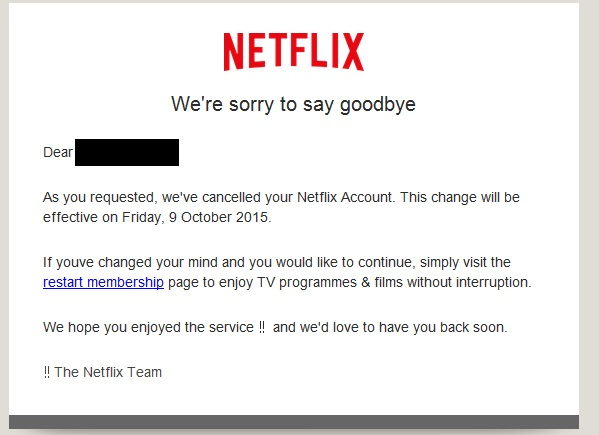
This phishing campaign is similar to others that have been recently sent to users of other online services. Phishing emails are devised to give the recipient a legitimate reason for handing over sensitive information, usually via webpage.
These include, but are not limited to:
- Upgrading security settings
- Performing essential system maintenance
- Verifying account details to prevent fraud
- Claiming a refund for a bill that has been paid
- Giving money back for an incorrect charge
- Offering you a free gift or service
Email scams often deliver malicious programs – malware – that has been created to steal confidential data such as account login names and passwords. Phishing campaigns are launched on social media, although email is the most common way that these scams are delivered.
Generally speaking, phishing campaigns can be categorized in three types:
Off-the-Shelf Jacking Toolkits
Criminals can purchase malware online which can be used to scam users into revealing passwords, which can subsequently be used to empty bank accounts, rack up debts, or hold people to ransom (the latter is becoming increasingly common and is referred to as ransomware). Once access is gained to an account or computer, Ransomware is used to encrypt data. The users are then required to pay a ransom to the perpetrator of the scheme in order to get their data unlocked.
These campaigns are usually opportunistic in nature, and involve millions of spam emails being sent. It is a numbers game, and some users will click on the phishing links and compromise their computers and networks.
Zero-day Vulnerability Exploits
The net is also cast similarly widely with these email phishing campaigns; however, the malware delivered is more complex, and the hackers behind these schemes are considerably more skilled. Zero-day vulnerabilities are new security flaws that have been discovered in software that have yet to be discovered by the software vendor. Consequently, patches do not exist to deal with the threat. Malware is created to exploit these vulnerabilities, which is usually delivered via an infected email attachment, although it can be downloaded when users visit a phishing website.
Spear Phishing Campaigns
These are targeted attacks that are conducted on individuals, or in some cases, organizations. The perpetrators of these schemes are skilled, and invest considerable time and effort into creating convincing campaigns. Oftentimes extensive information is gathered on the targets prior to the phishing emails being sent.
These schemes similarly use zero day vulnerabilities, and these advanced persistent threats (APT) have been used in a number of high profile attacks, such as the recent Carbanak malware attacks which have made the headlines recently.
How to Avoid Becoming a Phishing Victim
The best defense against attack is to be vigilant. Security awareness training for employees is essential. Staff members must be alerted to the risk, the consequences of clicking on a phishing link, and told how to identify scams. They should be instructed to check links before clicking (by hovering the mouse arrow over the link to check the real address).
It is also essential to keep all software patched and up to date. This applies to operating systems, applications, web browsers and other software. Software should be configured to update automatically wherever possible. Organizations should also develop concise patch management policies. Continuous security audits should be conducted and multi-layered network security controls developed.
There are a number of ways that spam and phishing emails can be prevented from being delivered to users, such as using a spam filter. Web filtering is particularly useful in prevent users from visiting known malware and phishing sites.
by G Hunt |
August 26, 2015 |
Spam News
In 1998, ICANN issued the first domain names and IP addresses. There were not many top level domains (TLDs) to choose from. Each country had its own domain suffix, but the choice was limited to .com, .org, .net, .edu, .mil and .gov. Over the years, a few more options have been introduced such as .me, .mobi, .tv and .biz, but the suffix that has caused the most controversy is .xxx – a TLD intended for websites containing images of a sexual nature.
The .xxx TLD was seen as a method of introducing a red light district to the Internet, cleaning it up aside from a dirty corner that could be policed and easily blocked. Some purveyors of pornography allegedly welcomed the move, while others were opposed to it.
There were protests, but the new TLD was released in December 2011, and ICM Registry – a Fort Lauderdale for-profit business – was assigned responsibility for allocating the TLDs. Incidentally, the contract for this was quite lucrative. ICM Registry expected to make in the region of $200 million per year out of the deal.
Sometimes a good idea on paper doesn’t always work out so well in practice. For instance, some companies had spent a long time building up a brand name. They operated their domain on the .com domain, had bought up the .net, .mobi, .org versions and all other TLDs to protect their brand. They did not like the idea of having to do that again with the XXX version, and neither would they be willing to move their main site over to the .xxx TLD.
Few were in favor of the new XXX TLD
Pornographers were not the only objectors to the introduction of the .xxx TLD. The Bush Administration was opposed to the release. In fact ICANN was asked to withdraw support for the proposal. Criticism of the proposal mounted and ICANN came under a considerable amount of pressure. The American Department of Commerce, that has power over ICANN, received over 6,000 complaints about the introduction of the .xxx TLD. Even politicians who had originally backed the idea in the year 2000 changed their mind a decade later. Naturally, conservative groups also applied pressure to block the proposal. It was not enough. The TLD was released – with a delay of a month – and a swathe of new porn websites were subsequently launched.
Unsurprisingly, there has not been a reduction in the number of .com porn websites on the Internet. The new domain has seen even more created. Go figure!
ICANN was subsequently sued on the grounds that it had created a monopoly and that the introduction of the TLD forced businesses to spend even more money registering domain names to protect their brands from being piggybacked. After a couple of years, the lawsuit was dropped.
Controls put in place to protect trademarks
ICM regulators created the new TLD in order to clean up the Internet apparently. The .xxx TLD was seen as a way to make it easier for people wanting to view pornography to find it (it wasn’t exactly difficult, it must be said – type “porn” into a search engine for example) and as a way of promoting a responsible attitude toward it. It would, in theory at least, eventually lead to a dedicated area where pornographic websites could be housed.
However, trademark and patent protection advocate Inventa pointed out that opposition to the new .xxx TLD was virtually universal. No one wanted it apart from ICANN (and ICM Registry).
As for the fears that domain-sitters and entrepreneurs would take advantage, there were controls to prevent this. Eligibility criteria needed to be met. A company owning the trademarked .com version of a website could purchase the corresponding .xxx TLD to use as an adult domain or to prevent others from using it. Amazon.xxx, for example, could only be bought by Amazon.com. The ICM Registry reserved it for them. If there was no trademark, the domain name could be bought by anyone.
Was it worth all the effort?
ICM Registry would be inclined to agree, but as for making the Internet a safer place for children, cleaning up some porn, and having a dedicated online red light district, that clearly hasn’t worked. The biggest names in Internet porn still use their dotcom websites and have not made the switch to XXX domains. People interested in viewing pornography do not need an .xxx TLD to be able to find it, and don’t care what the name of the website is let alone the TLD, provided it gives them what they are looking for.
It is no easier to block pornographic websites than it was before the release. Simply blocking access to XXX suffixed websites will make no discernable difference to the amount of porn that is viewable online.
Until laws are passed to force porn websites to use the XXX domain – which would be incredibly difficult to implement – the move has not been particularly effective.
The only way to block effectively access block pornography from being displayed is to use a web filter such as SpamTitan Technologies. By using real-time classification, URL filtering, blocklists, keyword filters and other tools, SpamTitan Technologies web filtering solutions prevent the websites from being viewable. Something very important for schools, universities, colleges, charities, and corporations.
Any organization believing written policies on allowable uses of the Internet are sufficient to stop inappropriate use, should bear in mind that surveys have revealed that 20% of men and 13% of women have admitted to downloading pornographic content while at work. A recent pool of 500 Human Resources professionals indicated two thirds had discovered pornographic content on work computers, and the majority of porn is viewed during office hours (between 9am and 5pm).
If you want to stop employees accessing pornography in the workplace, the only effective way of doing so is with a robust web filtering solution.
by G Hunt |
February 15, 2015 |
Spam News
Phishing emails may not account for a high percentage of total email traffic, but they are becoming more prevalent. In fact, since 2014 the growth of these malware spreading emails has tripled, according to a new report issued by Kaspersky Labs.
Kaspersky determined that the percentage of phishing emails in total email traffic is now 0.0071%. Compare that to spam emails which accounted for 66.34% of all email traffic in the first quarter of 2014, and the figure seems very small. However, the damage that can be caused by the emails is considerable. For some companies, the damage can be catastrophic. When phishing emails lead to financial losses, funds can rarely be recovered.
Phishing emails are becoming increasingly common, but spam appears to have declined a little. A fall of 6.42% was registered since the last quarter of 2013.
Social Media Overtakes Email as Main Method of Phishing Campaign Delivery
Phishing campaigns are frequently delivered to potential victims via email. A link to a malicious website is sent – often randomly – to individuals in the hope that they are fooled into clicking. That link will take the person to a website where they are required to enter confidential data such as login names and passwords. Oftentimes, visiting the website will result in malware being downloaded to the visitor’s computer.
Spam emails are still favored by cyber criminals in some countries such as China and South Korea; however, social media has now overtaken email as the main method of delivery of phishing campaigns according to Kaspersky.
This may not come as a surprise. Rather than hackers sending the campaigns to new victims, victims of phishing campaigns share the links voluntarily (and unwittingly) via Twitter and Facebook pages. Infecting new computers could not be any easier.
Infected email attachments are still a popular method of malware and virus delivery. If these attachments are opened, the user will install malware and viruses on their device.
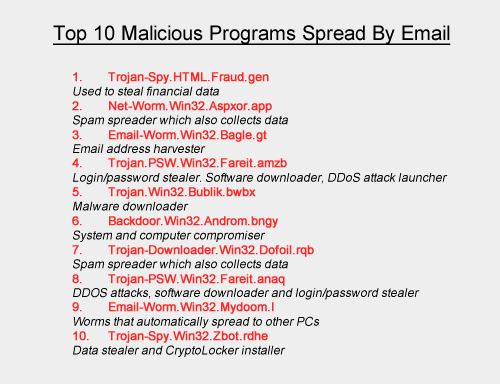
Top Ten Malicious Programs Spread by Email
Even with the rise in popularity of social media for malware delivery, spam emails are still responsible for spreading a huge volume of malware. In Quarter 2 of 2014 alone, Kaspersky Labs were able to block an incredible 528,799,591 malware attacks. The volume of different types of malware is also astonishing. During the same period, Kaspersky Labs detected and blocked 114,984,065 unique potentially unwanted objects.
Many of the viruses and malicious programs are camouflaged to look innocent. Take the most popular malicious program used by cyber criminals as an example. Trojan-Spy.HTML.Fraud.gen appears to be a standard HTML page containing a form for online banking. When data is entered, the information is transmitted to hackers who are then able to use the information to gain access to users’ bank accounts.
Cybercriminals Earning over $100 Billion a Year
Cybercriminal attacks are increasing in frequency and severity, and this is unlikely to change given the huge sums of cash that can be obtained. According to recent estimates by the FBI, the proceeds of cyber crime are in the region of $100 billion per year. The bad news is that criminals are devising ever more sophisticated ways of attacking organizations, and many of those organizations are ill-prepared to deal with the risks. Oftentimes even basic security measures against cyber attacks are found to be lacking. This is due to extremely limited IT security budgets, which hamper efforts to deal with all the threats.
Many organizations do not have clear and concise IT security policies in place, and do not place an individual in overall charge of cybersecurity. Sometimes there is not even a dedicated IT security professional employed and many organizations are still not providing all members of staff with security awareness training.
A failure to employ the appropriate staff, allocate sufficient budgets to IT security and train the staff can prove very costly indeed. Lost and stolen data, system downtime and drained bank accounts result in far heavier losses than the cost of implementing security measures to prevent attacks. Even the cost of new IT security staff will pay dividends in the long run.
Staff Security Awareness Training is Critical
Spam emails and phishing campaigns generally have one of two main aims: To trick users into revealing sensitive information or to fool people into downloading and installing malicious software and code. The latter allows hackers to take control of computers and infiltrate networks.
Spam and phishing emails can be very convincing, yet there are a number of tell-tale signs that emails are not all they appear to be. By providing training to staff members on these tell-tale signs, the risk of employees falling for a scam can be drastically reduced.
Email Security Solutions Must be Employed to Protect Sensitive Data from Attack
Can you be sure that staff members will be vigilant and security aware? Unfortunately, even with training, employees will make mistakes. They are human after all. It is therefore important to install security solutions that will limit the volume of spam emails that are delivered to employees’ inboxes.
One of the best solutions is a spam filter such as SpamTitan Anti-Spam. This data security solution has now been employed by IT security professionals in over 120 countries around the world. They benefit from being able to block over 99.7% of spam emails.
Since SpamTitan uses two separate anti-virus engines (Bitdefender and Clam AV) the catch rate is particularly high. Furthermore, SpamTitan includes an anti-phishing module as standard that filters out emails containing links to known malicious websites. This further reduces the risk of an employee accidentally clicking on a link and downloading malicious software. Consequently, SpamTitan is one of the best investments to protect against cyber attacks.
by G Hunt |
August 20, 2014 |
Spam News
Cyber criminals are using phishing to lure web visitors into revealing their sensitive data. Internet surfers are presented with a baited hook, which draws them into revealing login names, passwords, security keys and other valuable data.
The technique can be employed by individuals with little to no hacking skill, luring users to a malware-ridden website in exchange for payment. There are plenty of would-be criminals looking to make a quick buck, and since the campaigns can be so effective, online thieves and criminals are increasingly using this technique to make money.
Many online criminals use phishing in random campaigns sent via email. There is little skill involved. It is simply a numbers game. If enough emails are sent, sooner or later someone will respond and fall for the bait. However, we are now seeing much more sophisticated campaigns launched.
It used to be easy to spot a phishing email. They were littered with grammatical errors and spelling mistakes. Images were used that were clearly fake, and the emails would only fool the most unsuspecting computer user. They claimed victims, nonetheless, but only a few.
Some of the phishing emails now being sent are extremely convincing and very difficult to identify. Even well trained, security-conscious IT professionals have fallen for some of the scams. The reason? They work by exploiting traits in human behavior and use techniques that are particularly effective at drawing the required response.
Human Traits Successfully Being Manipulated by Hackers
Cyber criminals are exploiting human behavior to get users to click on links to malicious websites or open attachments. They rely on common traits that are all but guaranteed to get the desired response. The male of the species, for instance, is easily tricked into opening an apparent JPEG file if he is promised a glimpse of bare female flesh. An offer of sex from an unknown admirer can also work particularly well.
Not everyone is motivated by sex. For others the promise of financial gain does the trick. Criminals exploit greed to get users to click on a link. A money making scheme, or a hot stock tip, can entice many people to click on a link. Curiosity is also exploited. Major news events, conspiracy theories, celebrity news, and information on natural disasters have all been used by email spammers and scammers to get people to visit a malware site or open an email attachment.
Even the sense of duty has been exploited. Emails are sent from the accounts of work colleagues, bosses, civil authorities or law enforcement officers. These are effective at fooling users into complying with requests.
By exploiting human traits and evoking emotions, recipients of these scam and spam emails swallow the hook, and often the line and sinker too.
Spear Phishing: Effort Put in is Rewarded with More Victims
The sending of millions of mistake-ridden emails results in very few individuals falling for the scams. When email spam filtering software is employed, the filters will prevent these emails from even being delivered.
However, a little research goes a long way. Phishers who invest time into researching victims can see the time they spend on the campaign really pay off. A search on social media will reveal a considerable amount of information on an individual. Employers can be found on LinkedIn, Facebook can be used to find out friends’ names, and Twitter exploited to find out a user’s interests. With this information, highly effective campaigns can be developed.
These phishing campaigns are referred to as spear phishing. As the name suggests, the hacker goes after one fish. These campaigns can be incredibly effective as they exploit trust. If an email is sent that appears to be from a friend or colleague, it is far more likely to be opened. But how is this possible?
SMTP Weaknesses Are Exploited by Phishers
Unfortunately, the SMTP protocol contains a security weakness. Hackers can exploit this weakness to mask the true sender of an email and the return address. To the casual viewer it appears that the email has been sent from a known individual, and even replying to the mail appears to direct it to the correct mail recipient.
Fortunately, a spam or phishing email is not dangerous. It requires an action to be taken by the recipient. Deleting such an email will delete the risk. Only opening the attachment, downloading it, or visiting a link contained in the email will result in the delivery of malware, a virus or the installation of malicious code.
Unfortunately, while most employees know never to double click on a file with a .exe extension, file extensions can be all to easily masked. They can be made to appear as a PDF file or JPEG, or other supposedly innocent file type. Without training, users are likely to open these attachments, and unwittingly activate the executable file.
The way to prevent users from clicking on links and opening attachments is to provide them with security awareness training. Teach staff members how to identify phishing campaigns, and they can check the genuineness of emails before they take action. Developing a culture of security awareness is therefore essential in the fight against cyber crime.
Blocking the emails with a spam filter is even better. That way, the email will never be downloaded and delivered. Unfortunately, from time to time emails do slip through the net. When that happens, employees must know how to react.
Training is therefore important even if a robust and reliable spam filter is used. After all, it is best to be shown how to deal with a phishing email that never arrives than to fall for the first one that gets past a spam filter.
by G Hunt |
November 25, 2012 |
Spam News
Cyber Monday is one of the busiest online shopping days of the year, in fact the four days from Black Friday to Cyber Monday see huge volumes of people head online rather than travel to the shops.
This period is the busiest time of year for online shopping, with millions of shoppers going online to buy presents for Christmas. Over $1.5 billion is expected to be spent online on this single day, according to figures from ComScore. That represents a 20% increase in spending year on year. Ever since 2005 – the first Cyber Monday – online criminals have taken advantage of the unsuspecting. This frenetic period of shopping sees many internet surfers and bargain hunters let their guard down.
There are bargains galore, huge discounts to be had and a small fortune can be saved. However, it is a time when users and businesses need to be particularly vigilant. Financial ruin awaits the unwary. Spammers, scammers, phishers and other cyber criminals are very active during this four-day period and are waiting to take advantage of Internet users that do not take precautions.
Retailers do tend to concentrate efforts on Cyber Monday, but that is not to say that the remaining days in the run up to Christmas will not be busy. Cyber Monday is just the start of a long spell of intensive online shopping. Cyber criminals are aware of this. Individuals failing to take care could well become victims of fraud and identity theft. A high percentage of victims are created during the period from Black Friday to Christmas Eve.
A cybercrime report issued earlier this year suggests that 431 million adult victims have become victims of cyber crime in the past 12 months. The global losses from online criminal activity have now reached an incredible $114 billion a year.
Shopping Frenzy Sees Basic Email Security Measures Forgotten
Cyber Monday is not a holiday. It is just a particularly busy day for online shoppers. Since people are at work, the time available for online browsing is therefore limited. Time pressures combined with amazing bargains is only a good mix for online scammers. They take advantage of lapses in security precautions that inevitably occur when shoppers are concentrating on special offers and discounts.
Scammers use this time of year to send huge volumes of spam emails containing links to exclusive deals and special offers. Email attachments are commonly sent containing vouchers providing even greater savings. This is not just a problem for shopping addicts. Employers face an elevated threat of having their networks compromised during this busy period. According to recent research, 80% of all online shopping occurs during working hours, with employees sneaking online while at the office.
Employers must therefore ensure that their employees are not taking unacceptable risks that could compromise their computers and networks. Should malware be downloaded, or phishing links clicked, the consequences could prove to be catastrophic.
Should Access to Shopping Sites Be Banned at Work?
Human resource consulting firm, Robert Half Technology, recently conducted a survey that showed CIOs do not typically block access to internet shopping sites from the workplace. 77% of CIOs allowed fairly free access to the internet from work, with only 23% of CIOs banning online shopping. However, that said, internet access is closely monitored and action taken against employees found to be excessively surfing and shopping from work computers.
By permitting casual internet surfing and online shopping at work, CIOs are allowing employees to potentially engage in risky behavior. Many choose to reduce the risk of users visiting phishing sites by restricting access to the internet to secure websites only. This is often achieved by implementing a web filtering solution, which prevents employees from visiting specific websites or certain types of websites.
This is arguably one of the best methods of protecting business networks, without placing too many restrictions on the staff. Internet access can be allowed, which leads to happier staff, yet networks can be protected from phishing websites, viruses and malware.
The use of anti-spam filters will similarly prevent spam emails from being delivered to inboxes, further reducing the risk of employees clicking on links and opening attachments that could compromise a network. If these email security measures are employed and security awareness training is provided, the Black Friday to Cyber Monday period can be enjoyed safely. Many data security headaches will also be prevented.
by G Hunt |
June 20, 2012 |
Spam News
Ransomware is all the rage these days. Employees are fooled into downloading malware onto work computers, and hackers lock company data with powerful encryption software. Once encrypted, the data can only be accessed by using a security key. Unfortunately, they are all held by the hackers and will not be released unless a ransom is paid. Agree to pay the ransom and the data will be unencrypted. There is no guarantee that this will happen of course, but companies are often given no choice.
Ransoms are also demanded following the theft of corporate data. The criminals responsible are not looking to use the data personally. They just want a quick and easy payout. AmeriCash Advance, a well-known U.S. Pay Day loan provider, was recently attacked and had customer data stolen by a hacking group called Rex Mundi.
The group asked for a ransom to be paid, but AmeriCash refused to give in to the demand for $15,000. The company had been warned that if it didn’t pay up the stolen data would be posted online. Loan applicants and the company’s customers would then have their financial information sent out via Twitter and social media networks. This would place those individuals at a high risk of suffering fraud, having their identities stolen, or being targeted by phishers and scammers. That would likely result in customers taking their business elsewhere.
The refusal to pay means that is likely to now happen. Previous applicants for loans and AmeriCash customers must therefore be on their guard.
How much risk do victims face?
The level of risk depends on the data that have been stolen. If credit card numbers, full bank account information, Social Security numbers and account logins have been compromised, the risk of identity theft and fraud being suffered will be very high.
Any individual affected would need to put a credit freeze on their accounts, register for credit monitoring services and be extremely careful responding to emails and divulging any information. In the case of the latest attack, individuals had the last four digits of their Social Security numbers exposed, the amount of money they requested or had had loaned, and their names and email addresses. In this case only a small quantity of data was stolen and, although customers are still at risk, it could have been a whole lot worse.
Any person in possession of the data is unlikely to be able to steal the identities of the victims without obtaining further information. The first 5 digits of the Social Security number for example along with a date of birth. Criminals who have purchased data will likely attempt to obtain the further details they need. For that they will use phishing scams. These aim to fool users into revealing sensitive information and the campaigns can be very convincing.
What can be done to reduce risk following a successful cyberattack?
According to a report on CNet, AmeriCash did what all companies should to. The company made sure that its systems were secured to prevent further attacks. The relevant authorities were contacted and law enforcement agencies were notified.
Customers also needed to be advised that their data have been compromised and warned of the risk of phishing campaigns. That process was also performed.
Offering affected individuals free credit monitoring and identity theft resolution services can help reduce fallout. Some state laws demand that this is offered if Personally Identifiable Information (PII) or Protected Health Information (PHI) is exposed.
It is also wise to increase security measures to prevent future attacks. Web filtering solutions and anti-spam protection can reduce the risk of suffering data breaches. It can also prevent employees from falling for phishing campaigns that give hacking groups the information needed to gain access to corporate networks.
by G Hunt |
August 7, 2011 |
Spam News
Firefox is a popular web browser created by a global non-for-profit organization. It boasts excellent controls against viruses and has proved popular for its security features, anti-tracking functionality, and its speed. However, as with all web browsers, it requires frequent updates to remain 100% virus-free.
Updates must be installed promptly to keep the browser secure. Users are alerted to these new updates as and when they are released, and installing them is a quick and simple process.
These updates are announced via the browser. Users of Firefox are not emailed reminders to update their browser to the latest version. That said, a number of emails have recently been received by users of Firefox alerting them to the urgent need to download the latest version of the browser. These emails are part of a fake Firefox update scam.
Fake Firefox Update Scam Discovered
If you receive an email telling you to update your Firefox version “for security reasons” you will not be alone. Many other users have received similar emails. These are not genuine. They are part of a new email spam campaign that attempts to fool recipients that their browser is out of date and an update is essential.
To make it as easy as possible to install the necessary security protections, a handy link is included in the email. This will take the user to the Firefox website where they can download the latest version of the web browser. However, be warned. The link is fake, and by clicking the link and attempting to improve security, all you will be doing is downloading a Trojan to your device. That Trojan will be used to steal your passwords.
This is a common tactic used by email spammers. Emails are sent which contain important information on security updates to fool the unwary into downloading malicious software. The emails play on data security fears and warn of repercussions for not taking the requested action. Many email recipients are fooled into clicking links or opening infected attachments as a result.
SpamTitan regularly issues warnings about the latest spam campaigns, fake emails and new malware as they are discovered. Internet users are instructed to take precautions to protect themselves against these attacks.
Fortunately, there are some very easy steps that can be taken to reduce the risk of attack via email. Receiving a spam or phishing email will not compromise your system (generally speaking) unless an action is taken, such as opening an email attachment or clicking on a link supplied in the email. Consequently, protecting yourself from attack can be quite straightforward.
SpamTitan Financial Preservation Tips
Don’t give hackers the data they need to empty your bank accounts and max out your credit cards. Follow the simple instructions below and you can protect your hard earned cash.
- Do not open any suspicious attachments sent to you by email and do not download them to your computer. You must be sure of the genuineness of an attachment before you open it
- Do not click on links to websites that you do not know
- Check all links before clicking as they may have been faked. Hover your mouse arrow over the link and you will find out where that link will direct you. If you are unsure, never click
- Check the ‘From’ field. The name may be familiar, but the email address from which the email has been sent may not be. Do not take any chances. The ‘From’ field can easily be faked
- If you have not requested a new password, never click on a link that asks you to reset it
- Never divulge sensitive information in an email, even if requested to do so. IT departments and legitimate web service providers will never ask for your login details and passwords to be sent by email
- Always keep your anti-virus and anti-malware definitions up to date. They are released on a daily basis and sometimes every few hours. Set your software to download these automatically
- Install a spam filter to prevent spam and phishing emails from being delivered to your inbox