Cyberattacks on businesses increased during the pandemic and have continued at high levels since. Fortunately, businesses have responded and are taking cybersecurity seriously and have increased investment in cybersecurity. Data from ESG research suggests 65% of organizations are planning to increase investment in cybersecurity in 2023. While there is room for improving technical defenses to block more attacks and identify and address vulnerabilities faster before they can be exploited, it is important not to neglect the human element, which according to Verizon’s 2022 Data Breach Investigations Report, is a factor in 82% of data breaches.
While simple errors can easily lead to data breaches, many are the result of a lack of understanding of security. There is also a common view among employees that cybersecurity is the sole responsibility of the IT department. It is true that one of the roles of the IT department is to ensure that technical measures are implemented to block cyber threats and that vulnerabilities are identified and addressed promptly, but even companies that invest heavily in IT security still suffer data breaches, and that is because even sophisticated defenses can be bypassed.
Technology and hardware will block the majority of threats, but employees are still likely to encounter phishing, social engineering scams, business email compromise, and malware, and need to be provided with proper education to improve awareness of those threats and be taught the skills to allow them to identify and avoid cyber threats. The workforce needs to be educated on all aspects of security, not just how to identify a phishing email. Take password security for example. Password policies can be implemented, and employees provided with password managers, but as the recent credential stuffing attack on NortonLifeLock users revealed, many users of that password manager set a master password for their password vault that had been used elsewhere on the internet, which allowed the hackers to access their accounts.
By providing security awareness training, businesses can improve the baseline knowledge of the workforce, make sure everyone is aware of the threats they are likely to encounter, and security best practices can be taught, along with the importance of always following those best practices. The ultimate aim of security awareness training is to develop a security culture, where everyone in the organization understands that they have a role to play in the cybersecurity of the organization and that cybersecurity is not just a matter for the IT department.
Unfortunately, it is not possible to get to that point overnight. Providing a one-time security awareness training session is not enough and even conducting annual training sessions is unlikely to result in behavioral change. For training to be effective and to change employee behavior, training needs to be provided continuously, with short training sessions conducted regularly throughout the year. Training also needs to be individualized. There is no point in providing a single training course to every employee, as training needs to be role-specific and cover the specific threats each employee is likely to encounter.
The training also needs to be engaging to get employees to take the information on board, and training needs to be regularly reinforced. One of the best ways to do this is through phishing simulations, which test whether employees have understood the training and if they are applying that training day in, day out. Employees should also be empowered to help with cybersecurity by providing a phishing reporting button as an email client add-on, so they can alert the IT department when a suspicious email is encountered. Organizations that provide their workforce with training using the SafeTitan platform and conduct regular phishing simulations through the platform report significant improvements in security. Phishing simulation data also shows improvements in employee susceptibility to phishing attacks, with organizations seeing reductions of up to 92% in click rates by employees.
With 2023 looking like it will be another year with high levels of cyberattacks, January is the ideal time to review your security awareness training programs, make improvements, and implement a training program if you are not yet providing training to your employees. TitanHQ is here to help. Give the team a call today to find out more about how SafeTitan can benefit your business.
Phishers are constantly coming up with new ways to evade security solutions, steal credentials, and distribute malware. In January, two new tactics were observed in separate phishing campaigns, one hides malicious URLs from security solutions in a credential-stealing campaign, and the other uses OneNote attachments for distributing malware.
Blank Image Phishing Attacks
The blank image phishing attack involves hiding a Scalable Vector Graphics (SVG) image file within an HTML document sent via email. In this campaign, the email claims to include a DocuSign document, which office workers are likely to be familiar with. The email claims the document includes remittance advice. The user is required to click to view the document and will be directed to the legitimate DocuSign webpage if they do.
However, the attack starts when the user clicks to view the HTML document. The document contains a Base64 blank image file, which has embedded JavaScript that will redirect the victim to a malicious URL. The image itself contains no graphics, so does not render anything on the screen. It is just used as a placeholder for the malicious script. The URL that the user is directed to will prompt them to enter sensitive information. A similar technique using SVG files has previously been used to distribute QBot malware. Many email security solutions ignore HTML files, which increases the chance of the malicious email landing in inboxes. Security teams should consider blocking or quarantining HTML emails to protect against these types of attacks.
OneNote Attachments Used to Distribute Malware
Another campaign has been detected that uses OneNote attachments in phishing emails for distributing remote access malware, which can provide initial access to a victim’s system allowing further malicious payloads to be delivered, such as information stealers and ransomware. For many years, Office documents were the preferred attachment for distributing malware. These files can include macros that download a malicious payload, but Microsoft now blocks macros by default in Office files delivered via the internet, which has forced hackers to look for new ways to distribute their malware.
One new tactic is the use of OneNote attachments. OneNote is installed by default with Microsoft Office and Microsoft 365, which means OneNote files can be opened on most devices even if the user does not use the OneNote application. The lures used in these emails vary, although some of the intercepted emails claimed to be shipping notifications, with the details of the shipment included in the OneNote file.
OneNote files cannot contain macros, but it is possible to insert VBS attachments into a NoteBook. When opening the file, the user is told they must double-click to view the file. Doing so will launch the VBS script, which will download and install malware from a remote site. If the user does click, they will be warned that opening attachments can harm their computer. If that warning is ignored and the user chooses to open the attachment, the script will download a decoy OneNote file – a genuine file – so the user is unlikely to realize that anything untoward has happened, but the script will execute a batch file in the background and will install the second downloaded file, which is malware.
How to Defend Against Phishing Attacks
Cybercriminals are constantly developing new methods for distributing malware and stealing credentials, and phishing is the most common way to do this. Defending against these attacks requires a defense-in-depth approach, involving multiple overlapping layers of protection. If anyone measure fails to detect a threat, others are in place to detect and block the threat.
In addition to a secure email gateway or spam filter, businesses should consider a web filter for blocking the web-based component of the attack, multifactor authentication for all accounts, antivirus software/endpoint security solutions, and security awareness training for employees to help them identify and avoid phishing threats. For assistance improving your defenses against phishing, contact TitanHQ.
Toward the end of 2022, a new AI-based chatbot was made available to the public which has proven popular for creating written content. Concern is now growing about the potential for the tool to be used by cybercriminals for creating new phishing lures and for rapidly coding new malware.
ChatGPT was developed by OpenAI and was released on 30 November 2022 to the public as part of the testing process. Just a few days after its release, the chatbot had reached a million users, who were using the tool to write emails, articles, essays, wedding speeches, poems, songs, and all manner of written content. The chatbot is based on the GPT-3 natural language model and can create human-like written content. The language model was trained using a massive dataset of written content from the Internet and can generate content in response to questions or prompts that users enter into the web-based interface.
While articles written using the chatbot would be unlikely to win any awards, the content is grammatically correct, contains no spelling mistakes, and in many cases is far better than you could expect from an average high school student. One of the problems is that while the content may superficially appear to be correct, it is biased by the data it was trained on and may include errors. That said, the generated content is reasonable and sufficiently accurate to pass the Bar exam for U.S. lawyers and the US Medical Licensing exam, although only just. It is no surprise that many school districts have already implemented bans on students using ChatGPT.
To get ChatGPT to generate content, you just need to tell it what you want to create. It is no surprise that it has proven to be so popular, considering it is capable of writing content better than many humans could. While there are many benefits from using AI for chatbots that can create human-like text, there is growing concern that these natural language AI tools could be used for malicious purposes, such as creating social engineering scams and phishing and business email compromise attacks.
The potential for misuse has prompted many security researchers to put ChatGPT to the test, to see whether it is capable of generating malicious emails. The developer has put certain controls in place to prevent misuse, but those controls can be bypassed. For instance, asking ChatGPT to write a phishing email will generate a message saying the request violates the terms and conditions, but by experimenting with the queries it is possible to get the chatbot to generate the required content.
Further, it is possible to write a phishing email and spin up many different combinations that are all unique, grammatically correct, and free from spelling errors. The text is human-like, and far better than many of the phishing emails that are used in real phishing campaigns. The rapid generation of content has allowed security researchers to spin up an entire email chain for a convincing spear phishing attack. It has also been demonstrated that the technology can be rapidly trained to mimic a specific style of writing, highlighting the potential for use in convincing BEC attacks. These tests were conducted by WithSecure prior to public release and before additional controls were implemented to prevent misuse, but they continued their research after restrictions were added to the tool, clearly demonstrating the potential for misuse.
The potential for misuse does not stop there. The technology underlying the chatbot can also be used to generate code and researchers have demonstrated ChatGPT and its underlying codex technology are capable of generating functional malware. Researchers at CyberArk were able to bypass the restrictions and generate a new strand of polymorphic malware, then were able to rapidly generate many different unique variations of the code. Researchers at Check Point similarly generated malicious code, in fact, they generated the full infection process from spear phishing email to malicious Excel document for downloading a payload, and the malicious payload itself – a reverse shell.
At present, it is only possible to generate working malicious code with good textual prompts, which requires a certain level of knowledge, but even in its current form, the technology could help to rapidly accelerate malware coding and improve the quality of phishing emails. There are already signs that the tool is already being misused, with posts on hacking forums including samples of malware allegedly written using the technology, such as a new information stealer and an encryptor for ransomware.
With malicious emails likely to be generated using these tools, and the potential for new malware to be rapidly coded and released, it has never been more important to ensure that email security defenses are up to scratch. Email security solutions should be put in place that are capable of detecting computer-generated malware. SpamTitan includes signature-based detection mechanisms for identifying known malware along with email sandboxing. The sandbox is an isolated and secure testing environment where suspicious email attachments are subjected to behavioral analysis. The next-gen sandbox means SpamTitan can detect zero-day malware variants that would otherwise not be detected since their signatures have yet to be added to the blocklists. SpamTitan also uses machine learning mechanisms for detecting zero-day phishing threats, based on deviations from the standard messages received by companies.
TitanHQ also recommends implementing multifactor authentication, web filtering for blocking access to malicious websites, and security awareness training for employees. The quality of phishing emails may get better, but there will still be red flags that employees can be trained to recognize.
Cybercriminals are constantly coming up with new tactics for stealing credentials and other sensitive information. Phishing is one of the main ways that this is achieved, but most businesses have spam filters that block these malicious messages. If a phishing email is developed that can bypass email security measures and land in the inboxes of a business, there is a good chance that the emails will be clicked and at least some accounts can be compromised.
Spam filters such as SpamTitan incorporate a range of advanced measures for detecting phishing emails, including reputation checks of IP addresses, analyses of the message headers and bodies, and machine learning algorithms determine the probability that an email is malicious. Dual anti-virus engines are used for detecting known malware, and the next-gen email sandbox is used to detect zero-day malware threats by analyzing how files behave when opened, and hyperlinks in emails are scanned and followed to determine if they are malicious.
To bypass email security solutions, threat actors may link a legitimate website in an email, such as providing a URL for SharePoint, Google Drive, Dropbox, or another legitimate platform. These URLs are more difficult to identify as malicious as these websites pass reputation checks. Malicious URLs on these platforms are often reported and are then blocked by email security solutions, but the URLs often change and are never used for long.
A campaign has recently been detected that uses this tactic and attempts to direct users to the genuine Facebook.com site, with the phishing emails containing a link to a Facebook post. The phishing email comes from a legitimate-looking domain – officesupportonline.com – and warns the user that some of the features of their Facebook account have been deactivated due to copyright-infringing material. Like many phishing emails, the user is told they must take urgent action to prevent the deletion of their account. In this case, they are threatened with the deletion of their account if there is no response within 48 hours.
A link is supplied to a post on Facebook.com that the user is required to click to appeal the decision. The post masquerades as a Facebook.com support page from Facebook Page Support, which provides a link to an external webpage that the user is required to click to “Appeal a Page Copyright Violation”. The URL includes the name of Facebook’s parent company, Meta, although the domain is actually meta.forbusinessuser.xyz – A domain that is not owned by Meta or Facebook. URL shortening services are used in these campaigns to hide the true URL.
If the user clicks the link they will be directed to a page that closely resembles the genuine Facebook copyright appeal page. In order to appeal the decision, the user must complete a form that asks for their full name, email address, phone number, and Facebook username. If that information is submitted through the form, geolocation information is also collected along with the user’s IP address, and the information is sent to the scammer’s Telegram account.
The next stage of the scam sees the user redirected to another page where they are asked to provide a 6-digit one-time password, which they are told is required when a user attempts to sign into their account from a new device or browser. This is a fake 2-factor authentication box, and if the user enters any 6-digit code it will produce an error, but the code entered will be captured by the attacker. The user will be directed to the genuine Facebook site if they click the “need another way to authenticate?” option on the page.
Campaigns such as this highlight the importance of layered defenses. Spam filters are effective at blocking the majority of spam and phishing emails, but some messages will bypass spam filters and will be delivered to inboxes. One of the best ways to augment your phishing defenses is to provide security awareness training to your workforce, and this is key to combatting new phishing tactics such as this Facebook phishing scam.
Employees should be taught how to identify phishing attempts and what to do if a potentially malicious email is received. In addition to providing training, phishing simulations should be conducted on the workforce to give employees practice at identifying phishing threats while they are completing their usual work duties. If a simulation fails, the employee can be told what went wrong and how they could identify similar threats in the future.
TitanHQ offers businesses a comprehensive security awareness training and phishing simulation platform called SafeTitan. The platform includes an extensive range of training content on all aspects of security, and a phishing simulation platform with hundreds of phishing templates taken from real-world phishing attacks. SafeTitan automates the provision of training and is the only behavior-driven security awareness training platform that delivers intervention training in real-time in response to security mistakes by employees, ensuring training is provided at the time when it is likely to be most effective at changing employee behavior.
Phishing attempts are often very convincing as the emails mimic trusted brands, include their logos and color schemes, and the message format is often copied from genuine company messages. The most commonly spoofed brands are well-known companies that have millions of customers, which increases the chances of the message landing in the inbox of a person who has, at least at some point in the past, used that company’s products or services.
Every quarter, Check Point releases its Brand Phishing Report, which highlights the latest phishing trends and the brands being impersonated most often. LinkedIn, Microsoft, Google, and Netflix are regulars in the top 10 List, with LinkedIn being the most commonly spoofed brand in phishing attacks in the first half of the year; however, the top spot has now gone to the German logistics and package delivery firm, DHL.
DHL accounted for 22% of all worldwide phishing attempts in Q3, 2022. DHL itself issued a warning to customers in July after the company became aware that it was being spoofed in a massive phishing campaign that was being conducted globally. It is probable that DHL will remain in the top spot in Q4 due to the increase in online purchases in the run-up to Christmas.
While there is some variation in the phishing emails impersonating DHL, one of the most common appears to have been sent by DHL Express and alerts the recipient about an undelivered package. The message warns that it will not be possible to attempt redelivery of the package unless delivery information is confirmed. The phishing emails include a link to a website to allow that information to be provided; however, the link directs the user to a website where they are required to log in and provide their name, username, password, and other sensitive information, such as payment details.
While email phishing is the most common form, DHL has been spoofed in SMS messages that achieve the same purpose. Of course, SMS messages are not subject to spam filtering controls and mobile devices are less likely to be protected by web filters, which can detect and block attempts to visit malicious websites. SMS phishing – termed smishing – has been growing in popularity in recent years.
Unsurprisingly, given the number of users, Microsoft achieved second place, accounting for 16% of phishing emails in the quarter. The phishing emails spoofing Microsoft are more varied due to the extensive product range, although OneDrive phishing emails were common. These emails claim to be collaboration requests and target businesses and ask the recipient to click on a button to view a shared document. Like many phishing emails, the messages warn the recipient that urgent action is required, as the document will be deleted in 48 hours. The user is directed to a malicious website where they are asked to enter credentials for their Microsoft account.
It is unclear why LinkedIn has fallen out of favor slightly, although it still achieved 3rd spot and accounted for 11% of phishing attempts in the quarter. The rest of the top ten consists of Google (6%), Netflix (5%), We Transfer (5%), Walmart (5%), WhatsApp (4%), HSBC (4%), and Instagram (3%).
Phishing is one of the main ways that cybercriminals gain access to business networks. The attacks are easy to conduct, low cost, and do not require extensive technical knowledge. Businesses can block the majority of these malicious messages by implementing an advanced spam filter such as SpamTitan Cloud. They should also consider adding an extra layer to their defenses – A web filter such as WebTitan Cloud.
Technical defenses such as these are vital for protecting against phishing attempts, but it is also important for businesses to ensure that they provide regular security awareness training to their employees to make them aware of the threat of phishing and to teach them how to identify phishing emails. In addition to training, phishing simulations should be conducted on the workforce. These have been proven to reduce susceptibility to phishing attempts, as they give employees practice at identifying phishing and any failures are turned into a training opportunity.
With the SafeTitan security awareness training and phishing simulation platform, training is automatically triggered in real-time in response to phishing simulation failures and other security errors, when the training is likely to have the greatest effect.
If you run a business and want to improve your defenses against phishing, give TitanHQ a call. TitanHQ products are available on a free trial to allow you to put them to the test before making a decision about a purchase. MSPs that have yet to add spam filtering, web filtering, and security awareness training to their service stacks should give the TitanHQ channel team a call to find out more about these opportunities to improve their clients’ defenses against phishing and other cyberattacks.
When multifactor authentication is set up on accounts, attempts to access those accounts using stolen credentials will be prevented, as in addition to a correct username and password, another factor must be provided to authenticate users. Phishing attacks may allow credentials to be stolen, but that does not guarantee accounts can be accessed. More companies are implementing multifactor authentication which means phishing attacks need to be more sophisticated to bypass the protection provided by multifactor authentication.
One of the ways that multifactor authentication can be bypassed is by using a reverse proxy. In a phishing attack, an email is sent to a target and a link is provided to a malicious website hosting a phishing form that spoofs the service of the credentials being targeted – Microsoft 365 for example. Instead of just collecting the login credentials and using them to try to remotely access the user’s account, a reverse proxy is used.
The reverse proxy sits between the phishing site and the genuine service that the attacker is attempting to access and displays the login form on that service. When the credentials are entered, they are relayed in real-time to the legitimate service, and requests are returned from that service, such as MFA requests. When the login process is successfully completed, a session cookie is returned which allows the threat actor to access the genuine service as the victim. The session cookie can also contain the authentication token. In these attacks, once the session cookie has been obtained, the victim is usually presented with a notification telling them the login attempt has failed or they are directed to another site and will likely be unaware that their credentials have been stolen and their account is being accessed.
These attacks allow the victim’s account to be accessed for as long as the session cookie remains valid. If it expires or is revoked, the attacker will lose access to the account. To get around this and gain persistent access, account details may be changed or other authentication methods will be set up.
These types of phishing attacks are much more sophisticated than standard phishing attacks, but the extra effort is worth the investment of time, money, and resources. Many advanced persistent threat actors use reverse proxies in their phishing campaigns and have developed their own custom reverse proxies and tools. There are, however, publicly available kits that can be used in phishing campaigns such as Modlishka, Necrobrowser, and Evilginx2. These kits can be used at a cost and allow MFA to be bypassed, although they can be complicated to set up and use.
Now a new phishing-as-a-Service (PaaS) platform has been identified – EvilProxy – that is being pushed on hacking forums. EvilProxy allows authentication tokens to be stolen from a range of vendors including Microsoft, Apple, Twitter, Facebook, Google, and more, according to Resecurity which recently reported on the phishing kit.
EvilProxy lowers the bar considerably and makes conducting reverse proxy phishing attacks far simpler. The service includes instructional videos, provides a user-friendly graphical interface, and even supplies templates of cloned phishing pages for stealing credentials and auth tokens. Through the graphical interface, threat actors can set up and manage their phishing campaigns with ease. EvilProxy comes at a cost, starting at $150 for 10 days up to $400 for a month. While the service is not cheap, the potential rewards can be considerable. EvilProxy allows low-skill threat actors to gain access to valuable accounts, which could be used or sold on to other threat actors such as ransomware gangs.
Multifactor authentication is strongly recommended as it will block the majority of attacks on accounts; however, it can be bypassed by using reverse proxies. Protecting against reverse proxy phishing attacks requires a defense-in-depth approach. An email security solution – SpamTitan for example – should be implemented to block the initial phishing email. A web filter – WebTitan – should be used to block attempts to visit the malicious websites used in these man-in-the-middle attacks. Security awareness training is important for training employees on how to recognize and avoid phishing threats, and employers should conduct phishing simulation tests as part of the training process. TitanHQ’s SafeTitan platform allows businesses to conduct regular training and phishing simulations with ease.
Phishing attacks are mostly conducted via email but there has been a major increase in hybrid phishing attacks over the past 12 months, especially callback phishing. Here we explain what callback phishing is, why it poses such a threat to businesses, and why threat actors are favoring this new approach.
What is Callback Phishing?
Email phishing is used for credential theft and malware distribution, but one of the problems with this type of phishing is most businesses have email security solutions that scan inbound emails for malicious content. Phishing emails and malicious files distributed via email are often identified as such and are rejected or quarantined. Some threat actors conduct voice phishing, where an individual is contacted by telephone, and attempts are made to trick them into taking an action that benefits the scammer using a variety of social engineering tactics.
Callback phishing is a type of hybrid phishing where these two methods of phishing are combined. Initially, an email is sent to a targeted individual or company that alerts the recipient to a potential problem. This could be an outstanding invoice, an upcoming payment or charge, a fictitious malware infection or security issue, or any of a long list of phishing lures. Instead of further information being provided in an attachment or on a website linked in the email, a telephone number is provided. The recipient must call the number for more information and to address the issue detailed in the email.
The phone number is manned by the threat actor who uses social engineering techniques to trick the caller into taking an action. That action is usually to disclose credentials, download a malicious file, or open a remote desktop session. In the case of the latter, the remote desktop session is used to deliver malware that serves as a backdoor into the victim’s computer and network.
This hybrid approach to phishing allows threat actors to get around email security solutions. The only malicious element in the initial email is a phone number, which is difficult for email security solutions to identify as malicious and block. That means the emails are likely to reach their targets.
Major Increase in Callback Phishing Attacks
Callback phishing was adopted by the Ryuk ransomware threat group in 2019 to trick people into installing BazarBackdoor malware, in a campaign that was dubbed BazarCall/BazaCall. Typically, the lure used in these attacks was to advise the user about an upcoming payment for a subscription or the end of a free trial, with a payment due to be automatically taken unless the trial/subscription is canceled by phone.
The Ryuk ransomware operation is no more. The threat actors rebranded as Conti, and the Conti ransomware operation has also now shut down; however, three threat groups have been formed by members of the Conti ransomware operation – Silent Ransom, Quantum, and Zeon – and all have adopted callback phishing as one of the main methods for gaining initial access to victims’ networks for conducting ransomware attacks. These three groups impersonate a variety of companies in their initial emails and trick people into believing they are communicating with a genuine company. The aim is to get the user to establish a remote desktop session. While the user is distracted by the call, a second member of the team uses that connection to install a backdoor or probe for ways to attack the company, without the user being aware what is happening.
Callback phishing is also used by other threat groups for credentials theft and malware distribution, often by impersonating a cybersecurity firm and alerting the user to a security threat that needs to be resolved quickly. These attacks see the user tricked into installing malware or disclosing their credentials. According to cybersecurity firm Agari, phishing attacks increased by 6% from Q1, 2022 to Q2, 2022, and over that same time frame hybrid phishing attacks increased by an incredible 625%.
How to Protect Against Callback Phishing Attacks
As is the case with other forms of phishing, the key to defending against attacks is to implement layered defenses. Email security solutions should be implemented that perform a range of checks of inbound emails to identify malicious IP addresses. Email security solutions such as SpamTitan incorporate machine learning mechanisms that can detect emails that deviate from those normally received by an organization. Multi-factor authentication should be implemented on accounts to block attempts to use stolen credentials.
The best defense against callback phishing is to provide security awareness training to the workforce. Employees should be told about the social engineering tactics used in these attacks, the checks everyone should perform before responding to any email, and the signs of callback phishing to look out for. Callback phishing simulations should also be conducted to gauge how susceptible the workforce is to callback phishing. A failed simulation can be turned into a training opportunity to proactively address the lack of understanding.
TitanHQ offers a comprehensive security awareness training platform for businesses – SafeTitan – that covers all forms of phishing and the platform included a phishing simulator for conducting phishing tests on employees. For more information, give the TitanHQ team a call today.
Microsoft previously announced a new security feature that would see VBA macros automatically blocked by default, but there has been a rollback in response to negative feedback from users.
Phishing emails are commonly used for malware delivery which contain links to websites where the malware is hosted or by using malicious email attachments. Word, Excel, Access, PowerPoint, and Visio files are commonly attached to emails that include VBA macros. While there are legitimate uses for VBA macros, they are often used for malware delivery. When the documents are opened, the macros would run and deliver a malware loader or sometimes the malware payload directly.
Office macros have been used to deliver some of the most dangerous malware variants, including Emotet, TrickBot, Qakbot, Dridex. To improve security, in February 2022, Microsoft announced that it would be blocking VBA macros by default. If macros are blocked automatically, it makes it much harder for this method of malware delivery to succeed.
With autoblocking of macros, users are presented with a security alert if a file is opened that includes a VBA macro. When opening a file with a VBA macro, the following message is displayed in red:
“SECURITY RISK: Microsoft has blocked macros from running because the source of this file is untrusted.”
The user would not be able to click the warning to override the blocking, instead, they would be directed to a resource that provides further information on the risk of enabling macros. They would have the option of ignoring the warning but would be strongly advised not to. Previously, a security warning was displayed in a yellow warning box that says, “Security Warning: Macros have been disabled.” The user would be presented with a prompt to Enable Content, and thus ignore the warning.
Microsoft had rolled out this new security feature, but recently Windows users started to notice that the new security warning was no longer being displayed, instead, Microsoft appeared to have rolled back to its previous system without announcing it was doing so.
Microsoft did confirm that it is rolling back this security feature and that an update announcing that has been planned; however, it had not been announced before the rollback started. The process has been heavily criticized, not for the rollback itself (although there has been criticism of that), but for starting the rollback without first making an announcement.
Microsoft said the rollback was due to negative feedback it had received, but it is not known at this stage which users had complained. It is suspected that the change posed a problem for individuals who commonly use VBA macros, and the automatic blocking made the process of running macros cumbersome. Most SMB users, however, do not deal with macros frequently, so the rollback means a reduction in security.
It took several days for Microsoft to confirm that the rollback is temporary and that it was necessary to make changes to improve usability. Microsoft said it is still committed to blocking macros by default for users. So, while this is a U-turn, it is just a temporary one.
While automatically blocking macros is important to improve security, it is still strongly recommended to implement a robust email security solution, as macros are not the only way that malware is delivered via email. Also, blocking macros will do nothing to stop phishing emails from being delivered.
With SpamTitan Email Security, phishing and malware threats can be easily blocked. For more information, give the TitanHQ team a call.
If you want to create a culture of security in your organization, you need to provide comprehensive security awareness training to teach employees the skills they will need to be able to identify and avoid cyber threats. It is also important to conduct phishing simulations on all members of the workforce.
Phishing simulations are realistic but fake phishing emails that are sent to employees to determine the level of security awareness of the organization, assess whether employee security awareness training has been effective, identify any gaps in knowledge that need to be addressed, and to identify any individuals who require further training.
If phishing simulations are not used, organizations will be unaware whether their training has worked and has reduced the susceptibility of the workforce to phishing attacks, and gaps in knowledge could exist that could easily be exploited in real world phishing attacks.
Sending phishing emails to employees to see if they click links or open potentially malicious attachments is important, but to get the full benefits of phishing simulation exercises you need to create a structured phishing simulation program. To help you get started we have provided some tips on how to run effective phishing simulations in the workplace, and highlight some areas where businesses go wrong.
How to Run Effective Phishing Simulations at Work
One of most common assumptions made about phishing simulations is that in order to determine whether employees will respond to genuine phishing emails, employees should not be aware that you will be conducting phishing simulations. That is a mistake. When employers conduct phishing simulations on an unsuspecting workforce, it has the potential to backfire.
Employees often feel like they are being targeted and it can create friction between employees and the IT department, and that is best avoided. You should warn employees when you provide training that part of the training process will involve phishing simulations and that the simulations are not being conducted to catch employees out but to assess how effective training has been. Do not provide specific notice when you are conducting campaigns, just make the workforce aware that you do periodically run phishing simulations.
When you conduct phishing simulations, the emails you send need to be realistic. You should use templates that are based on real-world phishing attacks, after all, the aim of the simulations is to determine if employees will fall for real phishing emails. You should use a variety of lures and send different types of phishing emails, including emails with links, attachments, and Word documents with macros. You should also vary the difficulty of the simulations and include targeted spear-phishing attacks.
Before sending simulated phishing emails to the workforce, test out the emails in small numbers, as this will allow you to correct any problems. Do not send the same email to everyone at the same time, as this often results in employees tipping each other off and will not give you accurate data. Vary the emails you send in any one campaign, and this can be avoided. Each email should include at least two red flags that will allow it to be identified as a phishing attempt. Be careful about the lures you choose. If you send an email offering a pay rise – there are genuine phishing campaigns that do this – be prepared for a backlash, as such a campaign is likely to cause upset. These types of phishing simulations are best avoided.
The first phishing campaigns you send should serve as a baseline against which you can measure how awareness improves over time, so use a moderately difficult phishing attempt, not an incredibly difficult spear phishing email. Anyone can be fooled by a phishing email so ensure that everyone is part of the program, including board members. They too need to be taught how to recognize phishing emails and be tested to see how security aware they are. The C-suite is the top target for phishers.
It is important not to name and shame employees that fail phishing simulations. A failed phishing simulation should be seen as an opportunity for further training, not a reason for punishing an employee. If you opt for positive rather than negative reinforcement, you are likely to get much better results.
Security Awareness Training and Phishing Simulations from TitanHQ
SafeTitan from TitanHQ is a comprehensive security awareness training platform with an extensive library of training courses, videos & quizzes. The content is highly interactive and fun, with short and efficient testing and a phishing simulation platform with hundreds of real-world phishing templates to use. SafeTitan is also the only behavior-driven security awareness solution that delivers security training in real-time. Phishing simulations have shown that SafeTitan reduces staff susceptibility to phishing by up to 92%.
For more information and to arrange a product demonstration, give the TitanHQ team a call.
A new malware-as-a-service operation has been identified named Eternity Project which is offering a modular malware with extensive capabilities, allowing threat actors to conduct a range of malicious activities based on the modules they pay for. The capabilities of the malware are being enhanced to include further modules. Currently, the threat group is offering an information stealer, clipper, miner, dropper, worm, and ransomware, with distributed-denial-of-service (DDoS) bots to be provided in an upcoming module.
The threat actors claim the stealer module will allow users to obtain passwords stored in multiple browsers, data from email clients, instant messaging services, password managers, VPN clients, gaming software, system credentials, cryptocurrency wallets, and more. The miner allows victim devices to become cryptocurrency mining slaves, the clipper allows data to be stolen from the clipboard, which specifically targets cryptocurrency wallets and replaces them with the threat actors’ crypto-wallet addresses, with the ransomware allowing data encryption, although no data exfiltration. The worm module allows the user to infect other devices on the network, with the dropper used to drop the payload of choice onto infected devices. The Eternity Project malware was analyzed by researchers at Cyble, who report that the malware is being offered via a Telegram channel which, at the time of publication, had over 500 subscribers, as well as on the threat group’s TOR website.
Malware-as-a-service operations such as the Eternity Project give unskilled hackers the capability to conduct a range of attacks that they would otherwise not be able to perform. According to Cyble, the malware modules are being offered from as little as $90 up to $490 for the most expensive module – ransomware. Those costs could easily be recovered from the capabilities provided. The methods used to distribute Eternity malware will depend on the capabilities of the threat actors that pay for the modules. Since multiple methods of distribution could be used, defending against Eternity malware and other malware-as-a-service offerings requires a defense-in-depth approach and for security best practices to be followed.
Email Security
Phishing remains the number one vector for delivering malware. Campaigns are easy and cheap to conduct, and phishing campaigns can be very effective. Email security solutions are fed threat intelligence and have anti-virus components, but many solutions rely on signature-based detection and are only effective at detecting known malware. Behavior-based detection methods are needed for detecting heavily obfuscated malware and zero-day threats. SpamTitan combines signature-based threat detection using dual AV engines and a Bitdefender-powered sandbox for identifying zero-day malware threats and allows the blocking of specified attachments such as zip files and executable files. SpamTitan protects against malicious links in emails and scans all inbound emails in real-time, using advanced threat protection methods such as Bayesian analysis, machine learning, greylisting, and heuristics which provide a market-leading 99.99% spam catch rate with a 0.003% false-positive rate
DNS Filtering
Defense-in-depth against phishing is critical for blocking malware threats. Protection can be significantly improved using DNS filtering. DNS filtering is used to block the web-based component of phishing attacks by providing time-of-click protection to prevent users from visiting malicious web pages linked in phishing emails. DNS filtering is used to filter out malicious websites by preventing users from visiting those sites when web browsing, blocking redirects to malicious sites, and category and keyword-based filters to control the content that users can access, preventing access to risky websites. DNS filters can also be used to block downloads of certain file types from the Internet, such as those associated with malware.
The WebTitan DNS Filter provides these capabilities without latency, and protections can be applied for users on or off the network, no matter where they access the Internet. WebTitan is fed threat intelligence from more than 500 million endpoints worldwide and provides AI-based protection against active and emerging phishing URLs and zero-minute threats.
Security Awareness Training & Phishing Simulations
Technical measures to block email and web-based threats are essential, but it is also important to provide security awareness training to the workforce on security best practices and to teach employees how to recognize and avoid threats such as phishing. Security awareness training should be provided regularly, and phishing simulations conducted to identify gaps in knowledge to allow them to be addressed before they can be exploited.
SafeTitan is the only behavior-driven security awareness solution that delivers security awareness training in real-time in response to specific user behaviors and includes an extensive library of training content that is delivered in easy-to-digest chunks for creating a human firewall to augment your technical cybersecurity measures.
Enforce Multifactor Authentication
Multifactor authentication should be implemented on all accounts and services to prevent compromised, stolen, or leaked credentials from being used to gain access to accounts. It is especially important to apply multifactor authentication to administrator accounts and for remote access services. Multifactor authentication requires an additional factor to be provided before access is granted, in addition to a password.
Backup Regularly
To protect against destructive malware attacks involving wipers and ransomware, it is essential to back up data regularly and to test backups to ensure that file recovery is possible. A good approach to take is the 3-2-1 method for backing up – make three copies, stored on at least two different media, and ensure that one copy is stored securely off-site. Backup files should also be encrypted.
Patch Promptly
You should ensure that updates for software and operating systems are applied promptly, with patching prioritized to address the most critical vulnerabilities first.
Change Default Credentials and Set Strong Passwords
Default credentials should be changed, as should the default configurations of off-the-shelf software and strong, unique passwords should be set to protect against brute force attacks. Threat actors can easily gain initial access to the network through brute force attempts to steal passwords, such as password spraying – using passwords compromised in previous data breaches.
Phishing is commonly used to gain access to credentials to hijack email accounts for use in business email compromise (BEC) attacks. Once credentials have been obtained, the email account can be used to send phishing emails internally, with a view to obtaining the credentials of the main target. Alternatively, by spear phishing the target account, those steps can be eliminated.
If the credentials are obtained for the CEO or CFO, emails can be crafted and sent to individuals responsible for wire transfers, requesting payments be made to an attacker-controlled account. A common alternative is to target vendors, in an attack referred to as vendor email compromise (VEC). Once access is gained to a vendor’s account, the information contained in the email accounts provides detailed information on customers that can be targeted.
When a payment is due to be made, the vendor’s email account is used to request a change to the account for the upcoming payment. When the payment is made to the attacker-controlled account, it usually takes a few days before the non-payment is identified by the vendor, by which time it may be too late to recover the fraudulently transferred funds. While BEC and VEC attacks are nowhere near as common as phishing attacks, they are the leading cause of losses to cybercrime due to the large amounts of money obtained through fraudulent wire transfers. One attack in 2018 resulted in the theft of $23.5 million dollars from the U.S. Department of Defense.
In this case, two individuals involved in the scam were identified, including a Californian man who has just pleaded guilty to six counts related to the attack. He now faces up to 107 years in jail for the scam, although these scams are commonly conducted by threat actors in overseas countries, and the perpetrators often escape justice. The scam was conducted like many others. The BEC gang targeted DoD vendors between June 2018 and September 2018 and used phishing emails to obtain credentials for email accounts. An employee at a DoD vendor that had a contract to supply Aviation JA1 Turbine fuel to troops in southeast Asia for the DoD received an email that spoofed the U.S. government and included a hyperlink to a malicious website that had been created to support the scam.
The website used for the scam had the domain dia-mil.com, which mimicked the official dla.mil website, and email accounts were set up on that domain to closely resemble official email accounts. The phishing emails directed the employee to a cloned version of the government website, login.gov, which harvested the employee’s credentials. The credentials allowed the scammer to change bank account information in the SAM (System for Award Management) database to the account credentials of the shell company set up for the scam. When the payment of $23,453,350 for the jet fuel was made, it went to the scammers rather than the vendor.
Security systems were in place to identify fraudulent changes to bank account information, but despite those measures, the payment was made. The SAM database is scanned every 24 hours and any bank account changes are flagged and checked. The scammers learned of this and made calls to the Defense Logistics Agency and provided a reason why the change was made and succeeded in getting the change manually approved, although flags were still raised as the payment was made to a company that was not an official government contractor. That allowed the transfer to be reverted. Many similar scams are not detected in time and the recovery of funds is not possible. By the time the scam is identified, the scammers’ account has been emptied or closed.
The key to preventing BEC and VEC attacks is to deal with the issue at its source to prevent phishing emails from reaching inboxes and teach employees how to identify and avoid phishing scams. TitanHQ can help in both areas through SpamTitan Email Security and the SafeTitan security awareness training and phishing simulation platform. Businesses should also implement multifactor authentication to stop stolen credentials from being used to access accounts.
It is important for security to implement an advanced spam filtering solution to block email threats such as phishing and malware, but security awareness training for the workforce is still necessary. The reason why phishing attacks are successful is that they target a weak point: employees. Humans make mistakes and are one of the biggest vulnerabilities as far as security is concerned. All it takes is for one phishing email to sneak through your defenses and land in an inbox and for the recipient to click a link in the email or open a malicious attachment for a threat actor to get the foothold they need in your network.
The easiest way to target employees is with phishing emails. The majority of phishing emails will be blocked by your spam filter, but some emails will be delivered. It doesn’t matter how advanced and effective your spam filter is, it will not block every single phishing email without also blocking an unacceptable number of genuine emails.
Phishing emails are used to achieve one of three aims: To trick individuals into disclosing credentials, to trick them into emailing sensitive data, or to trick them into installing malware. There are many tactics, techniques, and procedures (TTPs) employed in phishing attacks to make the emails realistic, convincing, and to get employees to act quickly. The emails may closely match standard business emails related to deliveries, job applications, invoices, or requests for collaboration. Spoofing is used to make the messages appear to have come from a trusted sender. Emails can spoof brands and often include the correct corporate logos, formats, and color schemes. While phishing emails include red flags that indicate all is not what it seems, busy employees may not notice those flags. Further, sophisticated, targeted phishing attacks contain very few red flags and are very difficult to identify. Even system administrators can be fooled by these attacks.
Businesses cannot expect every employee to be an expert at identifying phishing emails and other email threats, nor should they assume that employees have a good understanding of security practices that need to be employed. The only way to ensure employees know about security practices and how to recognize a phishing email is to provide security awareness training.
Security Awareness Training Improves Resilience to Phishing Attacks
The purpose of security awareness training is to make the workforce aware of the threats they are likely to encounter and to provide them with the tools they need to recognize and avoid those threats. Security awareness training is not a checkbox item that needs to be completed for compliance, it is one of the most important steps to take to improve your organization’s security posture and it needs to be an ongoing process. You could provide a classroom-based training session or computer-based training session once a year, but the TTPs of cyber threat actors are constantly changing, so that is not going to be sufficient. More frequent training, coupled with security reminders, newsletters, and updates on the latest threats to be wary of will ensure that security is always fresh in the mind, and it will help you to develop a security culture in your organization.
One of the most effective strategies is to augment training with phishing simulations. Phishing simulations involve sending fake but realistic phishing emails to employees to see how they respond. If you do not conduct these tests, you will not know if your training has been effective. The simulations will identify employees that require further training and the simulations will give employees practice at recognizing malicious emails. Reports from these simulations allow security teams to assess how resilient they are to phishing attacks and other email threats and will allow them to take action and focus their efforts to make immediate improvements.
SafeTitan Security Awareness Training & Phishing Simulations
TitanHQ can now help businesses create a human firewall through SafeTitan Security Awareness Training. SafeTitan is the only behavior-driven security awareness platform that delivers training in real-time and will greatly improve resilience to social engineering and advanced phishing attacks.
If you want to improve your resilience to cyberattacks, prevent more data breaches, and avoid the costs and reputation damage caused by those incidents, you need to be training your workforce and running phishing simulations. Get in touch with TitanHQ today for more information and get started creating your human firewall.
Phishing remains the top cybersecurity threat to businesses. Phishing scams can be realistic and difficult for people to identify for the scams that they are. The sender field is often spoofed to make it appear that the emails have been sent by known individuals or trusted companies, the body of the messages often contains well-known branding, and templates are used for messages that are carbon copies of the genuine emails they impersonate.
The emails may contain malicious attachments if the aim is to install malware, and malicious hyperlinks if credential harvesting is the goal. The hyperlinks direct users to a website where they are asked to enter their credentials – a web page that is difficult to distinguish from the genuine web page being spoofed. As if those messages were not convincing enough, there is now a new Chrome phishing toolkit that makes credential theft even easier.
Most Internet users will be familiar with websites that use Single Sign-on popups to authenticate users. Rather than requiring website users to register an account, they can authenticate using an existing Google, Apple, or Facebook account. This way of logging in is popular, as users do not need to create and remember another set of login credentials. There is, however, a problem with this approach, and that is that single sign-on popups are easy to spoof in Chrome.
As previously mentioned, phishing scams can be convincing, but there are often red flags and the biggest flag is the URL of the website used for phishing. If you are expecting to sign in to Facebook for example, and you are directed to what is clearly not a Facebook-owned domain, the phishing scam can be easily identified.
The latest toolkit does not produce this red flag. The single sign-on popup generated on the webpage looks exactly the same as the genuine popup being spoofed, including the URL. If an individual is directed to one of these fake phishing forms, it is highly unlikely that they would be able to identify it as malicious and their credentials will be stolen.
A phishing email could be sent advising the recipient that a file has been shared with them, inviting them to log in to Dropbox for instance. The link is clicked, and the user will be directed to the website and will be presented with the login box which includes the address bar with the URL of the login form. For example, if you attempt to log in with your Google account, the URL will start with accounts.google.com/. The phishing toolkit uses pre-made templates that are fake, but incredibly realistic. These Chrome popup windows allow a custom address URL and title to be displayed.
This toolkit was created by the security researcher dr. d0x, who made them available on GitHub. They allow any would-be hacker to quickly and easily create a highly convincing SSO pop-up window, which could be added to any website and be used for a browser-in-the-browser phishing attack. This attack method is nothing new, as fake SSO pop-up windows have been created in the past, but previous attempts have not been particularly convincing, as they do not exactly replicate the genuine pop-ups. The popups have previously been used on fake gaming websites to harvest credentials from the unwary. This kit is different as it is so convincing, and could easily be used to steal credentials and even 2FA codes.
Less than two months after hiring channel chief Jeff Benedetti, TitanHQ has announced 12 further strategic new hires who will form a new North American team to service the US and Canadian Managed Service Provider (MSP) market.
The new team members have extensive channel experience, having previously held positions at the likes of Datto, Skout Cybersecurity, Agile Blue, and Barracuda and are based in TitanHQ’s new North American base in Shelton, Connecticut, headed up by Channel Chief Benedetti.
The new team includes Eric Morano, who has been appointed Director of Channel Development. Eric has 15 years of sales leadership and GTM experience at Datto, Skout Cybersecurity (BarracudaMSP), AgileBlue XDR, CDW, and Verizon. Moreno will be responsible for optimizing TitanHQ’s partner engagement and growth.
New Channel Account Managers include Craig Somma, who has 25 years of technology sales GTM leadership that was gained at Tech Dept, Micro Warehouse, and Gov Connection, Joseph Rende who has 10+ years of channel sales experience at Gartner and Datto, Pat DeAngelis who has 10+ years of MSP technology experience at Datto, Threatlocker and Armor Cybersecurity, and Jeff Brown has 10+ years of sales experience at Datto, SKOUT Cybersecurity, Agile Blue. New Account Executives include Alex De Los Santos, who has 8 years of sales experience at Datto and ADP, Alex Nankervis, who has 8 years of sales experience at Datto and Indeed, Kyle Leyerzapf, who has 5 years of sales experience at Datto, Patrick Barry who has 6 years of sales and accounts experience with Accu-Tech Corporation and Maxim Healthcare, and Jamal Ibrahim, who has 4 years account management experience with Altium and RCG. Marc Bonnaci has also joined the Sales Development team and has 7 years of sales and professional experience most recently at Agile Blue.
The new TitanHQ North American Team
The past three months have seen significant activity at TitanHQ. In addition to bringing in Benedetti to head the channel team, TitanHQ launched its SpamTitan Plus Anti Phishing solution in December 2021 and announced the acquisition of Cyber Risk Aware in February, and launched SafeTitan Security Awareness Training.
SpamTitan Plus is a cutting-edge, AI-driven anti-phishing solution with more comprehensive “zero-day” threat protection and intelligence than all of the current market leaders, with significant uplifts in phishing link detections and much faster detection speeds. This new addition to the SpamTitan product family has been very well received.
Cyber Risk Aware is a global leader in security awareness training to mitigate human cyber risk, and the platform is used by many companies to train their workforces to improve threat awareness. The platform, which has been re-launched as SafeTitan, is an intuitive, real-time security awareness training platform that improves awareness and human resilience to ransomware, malware, BEC attacks, and phishing. Demand for the new SafeTitan security awareness training and phishing simulation platform has been exceptional, with huge interest coming from MSPs and IT departments globally.
On top of these major launches, TitanHQ recorded record-breaking growth in January and February 2022 and has generated the highest revenue and new MSP partner figures in its 20-year history. More than 2,200 MSPs now use TitanHQ’s best-in-class SaaS Cybersecurity Platform daily, with the numbers continuing to grow at an incredible rate, especially in the United States and Canada, hence the need to open a new U.S. office and bring in a wealth of new talent.
Business Email Compromise (BEC) is the leading cause of financial losses to cybercrime. The U.S. Federal Bureau of Investigation (FBI) Internet Crime Complaint Center (IC3) received 19,369 complaints about BEC scams in 2020, resulting in adjusted losses of $1.87 billion. While BEC crime ranked number 10 based on victim count, it topped the list in terms of the losses sustained by victims, with three times as much lost to the scams as the second-biggest loss to cybercrime – Confidence/romance fraud.
Business Email Compromise scams usually start with a phishing attack to gain access to email credentials. The attackers seek the credentials of the CEO, CFO, or another executive, and either target those individuals directly with spear phishing emails or compromise the email accounts of lower-level employees and use their email accounts to send phishing emails to the targeted individuals. Once the right credentials have been obtained, the executive’s email account is used to send messages to individuals responsible for wire transfers to trick them into making substantial wire transfers to attacker-controlled bank accounts. While these scams require planning and research, the time spent setting up the scams is well spent, as BEC attacks are often successful.
While BEC scams are usually conducted via email, BEC scammers are increasingly using virtual meeting platforms such as Microsoft Teams and Zoom in their scams. The scammers have taken advantage of the increase in remote working due to the pandemic and the popularity of virtual meeting platforms for communication and collaboration.
Once the scammers have access to the CEO’s email account, they identify their next target and send a request for a virtual meeting. When the target connects to the meeting, the scammer explains that they are having problems with their audio and video, so the meeting proceeds with the scammer on text chat. Oftentimes they will insert a picture of the CEO for added realism. The scammer then provides a reason for the out-of-band request, then asks the employee to make a wire transfer, either in the meeting or after the meeting via email.
The FBI has recently issued a warning to businesses about the increase in the use of virtual meetings for BEC scams, having observed an increase in the use of these platforms for BEC scams between 2019 and 2021. Scammers are also compromising employee email accounts and are inserting themselves into work meetings to gather information about the day-to-day processes at businesses. Since the scammers use genuine email accounts to connect, and audio/visual problems are relatively common, they are able to gather information and steal funds without being detected. The scammers also use compromised CEO email accounts to send emails to employees claiming they are stuck in a virtual meeting and unable to arrange an important wire transfer and ask an employee to initiate the transfer on their behalf.
There are several steps that businesses can take to improve their defenses against BEC attacks. Defending against these attacks should start with an advanced email security solution to block the phishing attacks that allow scammers to gain access to email accounts. SpamTitan has industry-leading detection of phishing URLs in emails and can prevent employees from visiting the web pages where credentials are harvested.
Security awareness training is important as some malicious emails bypass all spam filters. Employees need to be trained on how to identify scam emails. Security awareness training is concerned with creating a ‘human firewall’ to augment technical defenses and should make employees aware of BEC scams and how to identify scam emails from internal email accounts. TitanHQ has recently launched a new security awareness platform called SafeTitan to help businesses with training. SafeTitan is the only behavior-driven security awareness platform that provides real-time training to deal with threats targeting employees.
It is also recommended to implement policies and procedures that require secondary channels or two-factor authentication to verify requests for any changes to account information or atypical requests for bank transfers.
If you provide security awareness training to the workforce, you will no doubt have highlighted the risk of opening Microsoft Office email attachments, especially when sent from unknown individuals. Microsoft Office files can include macros, which if allowed to run, can silently deliver malicious payloads. Comma-separated values (CSV) files are often not viewed as malicious, as they are simple text files, but a campaign has been identified by security researcher Chris Campbell that uses CSV files to deliver BazarBackdoor malware.
BazarBackdoor is a fileless malware that is believed to have been created by the threat actors behind the TrickBot banking Trojan. BazarBackdoor is used as the first stage of an attack that provides threat actors with remote access to an infected device, which can be leveraged to conduct more extensive compromises and deliver other malicious payloads. BazarBackdoor is fileless malware, which makes it difficult to detect. It resides in the memory, does not touch the hard drive, and does not leave a footprint.
Throughout the pandemic, BazarBackdoor has been delivered using COVID-19-themed and business-related lures via embedded hyperlinks in emails. The links direct users to a web page where they are tricked into downloading and running an executable file. The landing pages often claim to be web-hosted PDF, Word, or Excel files. When the file is downloaded and executed, it delivers BazarBackdoor malware. The latest campaign is a departure from the typical method of malware delivery and is one that could easily fool users as CSV files are often viewed as benign.
CSV files are often used to transfer data between different applications, such as databases and spreadsheets. A CSV file contains text separated by commas, with each comma denoting a new column and each line denoting a new row. Since a CSV file is a text file, it cannot contain any macros and cannot, by itself, execute any malicious code; however, that does not mean CSV files are entirely benign, as this latest campaign demonstrates.
The issue is not the CSV file itself, but a feature of Microsoft Excel that allows CSV files to be used in a malicious way. Excel supports Dynamic Data Exchange (DDE), which is a message-based protocol for sharing data between applications running under Windows systems. DDE can be used to execute commands that have their output inputted into an open spreadsheet, including CSV files.
The CSV files used in this campaign are like any other, with data separated by commas; however, the file includes a WMIC call that launches a PowerShell command. If the CSV file is opened using Excel – on most devices CSV files are associated with Excel – DDE uses WMIC to create a PowerShell process, which opens a remote URL that uses PowerShell to download a .jpg file, which is saved as a DLL file and executed using rundll32.exe. The DLL file installs BazarLoader, which in turn downloads and executes BazarBackdoor. If the CSV file is opened in Excel, two warnings will be generated, but users may ignore those warnings, and it would appear many have done so.
Since BazarBackdoor and other fileless malware are difficult to detect, the key to protecting against campaigns such as this is to block the threat before the malware can be delivered, which requires a combination of technical measures and end user training.
The lures and techniques used to deliver malware via phishing emails are diverse and new methods are constantly being developed to fool end users and email security solutions. While the use of Office files for delivering malware is common, other files can also be used so it is important to teach employees to be wary of any email file attachment and to never ignore any security warnings. An advanced email security solution is required to identify malicious email attachments, but antivirus engines alone will not block threats such as this. Email security solutions that include sandboxing are important. An email sandbox is a secure and isolated environment where files can be inspected for any malicious properties. Email sandboxing is now a vital component of email security solutions due to the speed at which new malware variants are being released. It is also recommended to use a web filter to block access to malicious websites and control the files that can be downloaded to users’ devices.
If you want to improve your defenses against email- and web-based cyber threats, give the TitanHQ team a call. TitanHQ has developed advanced, effective, and easy-to-use cloud-based cybersecurity solutions for SMBs, enterprises, and managed service providers to protect against all email- and web-delivered threats. You may be surprised to discover how little it costs to implement these solutions and ensure malware and phishing threats never trouble your business.
TitanHQ has appointed channel veteran Jeff Benedetti as the company’s new Vice President of Sales – North America.
Jeff Benedetti – TitanHQ VP of Sales, North America
TitanHQ is the leading web filtering, email filtering, and email archiving Software-as-a-Service (SaaS) business and already has a strong presence in North America, with the North American operations run from TitanHQ’s U.S. base in Tampa, Florida. TitanHQ has been enjoying strong growth in the region and the new appointment will help to ensure the growth continues over the long term.
Jeff Benedetti has nearly two decades of experience in sales and go-to-market leadership in the technology and security markets. Benedetti joins the TitanHQ Go-to-Market leadership team from SKOUT Cybersecurity, where he led the Sales and Marketing teams. The firm was acquired by Barracuda Networks last summer. Prior to the position at SKOUT Cybersecurity, Benedetti served as the Director of US Sales at Datto where he played a key role in improving partner growth and expansion in the U.S. while Datto achieved unicorn status and an acquisition by Vista Private Equity. Benedetti has also held leadership roles at Apple Inc. and Tech Depot.
“End-user compromise is the #1 threat vector for bad actors and causes 99% of security breaches. As the cyber problem compounds, MSPs continue to be a single resource to secure their customers’ users, networks, and infrastructure,” said Benedetti. “The opportunity to enable our partners with a best-in-class security platform and partner program built for growth is massive.”
TitanHQ has been providing security solutions to business and managed service providers (MSPs) for more than 20 years and now provides email security, DNS security, email archiving, and email encryption services to more than 8,500 businesses worldwide. Among TitanHQ’s customers are more than 2,500 MSPs, which use TitanHQ solutions to protect themselves and their clients from malware, ransomware, botnets, viruses, phishing attacks, and other cyber threats.
TitanHQ has developed its solutions to meet the needs of MSPs, with MSP needs factored into the products at the development stage. The company has grown to become the leading provider of cloud-based email and web cybersecurity solutions for MSPs serving the SMB market, and the company is enjoying continued, strong growth. TitanHQ is looking to continue to build long-term growth and as the IT service provider of choice for MSPs.
“We are thrilled Jeff has joined TitanHQ to further expand our already strong growth in the U.S. market. As a well-respected International sales executive within cybersecurity, Jeff is an important addition to TitanHQ. His decades of expertise will be pivotal in driving growth and will benefit partners and customers as TitanHQ continues to innovate and grow,” said TitanHQ CEO Ronan Kavanagh.
Cyberattacks are now being reported at an incredible rate, with many of those attacks having devastating consequences for small- and medium-sized businesses. According to Cybersecurity Ventures, around 60% of small- to medium-sized companies go out of business within 6 months of suffering a data breach. Cyberattacks are becoming much more sophisticated, but oftentimes these incredibly damaging attacks are not conducted by highly skilled hackers. The bar for conducting these attacks can be incredibly low, which means anyone with a modicum of skill can conduct attacks and profit. One of the ways that would-be hackers can start conducting attacks is by taking advantage of the many ransomware-as-a-service and malware-as-a-service offerings on hacking forums and darknet marketplaces. Take Redline malware for example.
Redline malware is a commodity information stealer that is easily obtained on hacking and cybercrime forums. The malware costs between $100-$200, and payment can be made anonymously using cryptocurrencies. At such a low price it is available to virtually anyone, and conducting attacks requires little effort or skill.
The Redline stealer was first identified in March 2020 and soon became one of the most prevalent malware threats with the number of attacks continuing to grow. Redline malware has been used in attacks on a wide range of businesses, with the manufacturing and healthcare sectors two of the most commonly attacked sectors.
Redline malware has been updated several times since it first emerged, with new features added such as the ability to exfiltrate credentials, steal cryptocurrency wallets, FTP authentication data, passwords stored in browsers, and gather information about the infected system. It is also capable of loading remote payloads and uses a SOAP API for C2 communication. One successful attack could see the attacker recover the purchase cost many times over.
Like many other malware variants, the most common method of delivery is email. Emails are broadcast using huge mailing lists, which can also be purchased at a low cost on cybercrime forums. Alternatively, more targeted campaigns can be conducted on specific businesses, with the emails often having a much higher chance of success due to the personalization of the emails.
The emails usually contain a malicious hyperlink and use social engineering techniques to trick employees into clicking. When the link is clicked, the binary file is downloaded and installed on the user’s device. While antivirus software should identify and block the malware threat, there have been many cases where AV engines have failed to detect the malware.
Redline malware will obtain a list of processes running on an infected device, including the security solutions in place. Attackers can interact with the malware remotely and view information about the infected system, can create and download remote files, silently run commands on an infected machine, and steal highly sensitive information. One of the biggest threats is the ability to steal data from browsers, including passwords stored in the Chrome, Edge, and opera browsers. Most browsers encrypt stored passwords, but Redline malware can programmatically decrypt the password store in Chromium-based browsers, provided they are logged in as the same user. Redline malware runs as the user that infected the device and can steal that user’s passwords from their password file.
Not everyone stores their passwords in their browser, but there is still a threat. When the browser suggests storing a password and the request is refused, a record is kept about that refusal so a further request will not be suggested next time the user visits that particular website. That record can be stolen from the browser, so the attacker will discover what accounts the user has and can then conduct phishing campaigns to obtain the passwords or use credential stuffing attacks. Much of the data stolen in redline malware attacks can easily be monetized on cybercrime forums.
Malware-as-a-service has opened up cyberattacks to a much broader range of individuals, but ultimately the attacks depend on employees being tricked into clicking links in emails or opening infected email attachments. Blocking those emails is the best approach to blocking the malware threats, which is where SpamTitan is invaluable.
SpamTitan Plus includes 100% of all current market-leading anti-phishing feeds. That translates into a 1.5x increase in phishing URL detections and 1.6x faster phishing detections than the current market leaders. 10 million net new, previously undiscovered phishing URLs are identified every day, and it takes just 5 minutes from a phishing URL being detected to all end users’ inboxes being protected. Time-of-click verification of links in emails involves multiple dynamic checks of redirects and there are dual anti-virus engines and a Bitdefender-powered sandbox to identify any malicious files attached to emails.
If you want to protect against malware and phishing attacks and ensure your company does not suffer an incredibly damaging cyberattack and data breach, give the TitanHQ team a call for more information on SpamTitan.
Phishing is the attack vector of choice for many cybercriminals. Attacks are easy to perform, they are often successful, and they provide the foothold in business networks that is required for more extensive compromises. The best defense against phishing is to implement a technological solution – a spam filter – to prevent phishing emails from reaching inboxes. If phishing emails are blocked at the email gateway, they will not arrive in inboxes where they can fool employees.
End-user training is also important, as no spam filter will block all malicious emails. A recent large-scale study has been conducted to determine whether end-user training and phishing warnings are effective, how vulnerability to phishing attacks evolves over time, which employees are most likely to fall for a phishing scam, and whether employees can actually play an important role in phishing email detection, The results of the survey are interesting and provide insights into susceptibility to phishing attacks that can be used by businesses to develop effective employee training programs.
The study was conducted on 14,733 participants by researchers at ETH Zurich and over a period of 15 months and involved another company sending phishing email simulations to see who opened the messages and who clicked on links in the emails. The employees that were tested had no knowledge that simulations were being conducted to make the simulations closely mirror real-world phishing attacks.
There were notable differences in susceptibility to phishing attacks with different age groups, with younger employees more likely to respond to the phishing emails than all other age groups. 18- and 19-year-olds were by far the most likely age group to fall for phishing emails, with the over 60s the least likely. From ages 20 to 59, the percentage of dangerous actions taken in response to phishing emails increased for each age group, with 20- to 29-year olds the least likely to take dangerous actions.
Individuals who are not required to use computers for their day-to-day jobs might be considered to be most at risk of falling for a phishing scam, but that was not the case. Infrequent computer users were the least likely to fall for the scams followed by frequent users, with individuals who use specialized software for repetitive tasks the most susceptible to phishing emails.
In this study, men and women were found to be equally susceptible to phishing emails across the entire study. This contrasts with several other studies that suggest there is a gender bias, with women less likely to fall for phishing scams than men. However, there were differences between the genders when combined with the frequency of computer use data. Men who use specialist software to automate tasks were the most likely to fall for phishing emails, followed by women who used specialist software, then women who are frequent users of computers, and men who are infrequent users. Female infrequent users were the least likely to fall for phishing scams.
The study confirmed the findings of several others in that some individuals are prone to respond to phishing emails. After responding to one simulated phishing email they would go on to respond to more. 30.62% of individuals who clicked on one phishing email were repeated clickers, and 23.91% of individuals who took dangerous actions such as enabling macros in email attachments did it on more than one occasion. These findings show the importance of conducting phishing email simulations to identify weak links who can receive additional training.
Phishing simulations are often conducted by businesses to test the effectiveness of their training programs, but one notable finding was that voluntary training when a simulated phishing email attracted a response was not effective. In fact, not only was this not effective, it appeared to make employees even more susceptible to phishing emails.
Another interesting finding related to adding warnings to emails. When warnings about potential phishing emails, such as emails coming from an external email address, were included in emails, employees were less likely to be duped. However, the lengthier the warning, the less effective it is. Detailed warnings were less likely to be read and acted upon.
When a phishing email reporting option was added to the mail client, employees often reported phishing emails. This feature involved a phishing email button that sent a warning to the IT team. There did not appear to be any waning of reporting over time, with employees not appearing to suffer from reporting fatigue. A few reports would be submitted within 5 minutes of an email arriving, around 30% of reports were within 30 minutes, and over 50% came within 4 hours. The reports could give IT security teams time to take action to remove all instances of phishing emails from the mail system or send warnings to employees.
What the study clearly demonstrated is that even employees who are adept at identifying phishing emails are likely to fall for one eventually, so while security awareness training is important, having an effective spam filtering solution is vital. Even individuals who were regularly exposed to phishing emails were eventually duped into clicking a phishing link or taking a dangerous action. Across the entire study, 32.1% of employees clicked on at least one dangerous link or opened a potentially dangerous email attachment.
The Federal Bureau of Investigation (FBI) has issued a warning about an increase in spear phishing campaigns impersonating big name brands. Brand phishing is incredibly common and is an effective way of getting individuals to disclose sensitive information such as login credentials or install malware.
Brand phishing abuses trust in a brand. When individuals receive an email from a brand they know and trust, they are more likely to take the action requested in the email. Brand phishing emails usually include the logo of the targeted brand, and the emails use the same message formats as genuine communications from those brands. Links are usually included to malicious web pages that are often hidden in buttons to hide the true destination URL.
If a user clicks the link, they are directed to an attacker-controlled domain that similarly uses branding to fool the victim and make them think they are on the genuine website of the spoofed brand. These webpages include forms that harvest sensitive data. Alternatively, malicious files may be downloaded, with social engineering techniques used to trick victims into opening the files and installing malware.
Cyber threat actors are offering scampage tools on underground marketplaces to help other cybercriminals conduct more effective phishing campaigns. These scampage tools are offered under the product-as-a-service model and allow individuals to conduct convincing phishing campaigns, even people who do not possess the skills to conduct phishing campaigns. With phishing opened up to would-be cybercriminals, the threat to individuals and businesses increases.
The FBI says the scampage tools now being offered can recognize when individuals use their email address as their login ID for a website. Websites require a unique username to be provided when creating an account, and many use an individual’s email address as their username by default.
The scampage tools can identify when a user has set their email address as their username, and when that is detected, they will be directed to a scampage for the same email domain. The user is required to enter their password to log in, which will allow the threat actor to obtain the password and access the victim’s email. With access to the email account, attackers can intercept 2-factor authentication codes, thus bypassing this important control mechanism. With 2FA codes, the attacker will be able to gain access to accounts and make changes, including updating passwords to lock users out of their accounts or change security rules before the owner of the account can be notified.
“Much like the threat with ransomware-as-a-service, this type of product-as-a-service distribution of scampage and credential harvesting tools presents an increased nationwide risk to private sector businesses and their consumers,” said the FBI in its public service announcement. “Brand-phishing email campaigns and scampage tools that help bypass 2FA security measures represent another aspect to this emerging cyber threat.”
To counter the threat, businesses should implement an advanced spam filtering solution to block phishing emails and prevent them from being delivered to employee inboxes. Password policies should be created that require strong passwords to be set, and checks performed to ensure commonly used or weak passwords cannot be set on accounts. Employees should be told to never reuse passwords on multiple accounts and to ensure that all business accounts have unique passwords. Security awareness training should be provided to the workforce to teach email security best practices and train employees on how to identify phishing emails and other scams.
Given the increase in the use of scampage tools, if there is the option, users should set a unique username for an account that is not associated with their primary email address. 2-factor authentication should be configured, and where possible, a software-based authenticator program should be used or a USB security key as the second factor. Alternatively, provide a mobile number for a 2FA code and avoid using a primary email address to receive 2FA codes. If an email address is required, it is best to use an alternative email account.
The stock trading platform Robinhood has announced a major breach of the personal data of 7 million of its customers, who now face an elevated risk of phishing attacks.
Phishing attacks on businesses are incredibly common. While phishing can take many forms, the most common method involves sending emails to company employees and using social engineering tactics to get them to take a specific action. That action is often to click on a malicious hyperlink in the email that directs them to a website where they are asked to provide sensitive information such as their login credentials.
Phishing can also occur via SMS messages, instant messaging platforms, or social media networks. While it is less common for phishing to occur over the telephone – termed vishing – this method actually predates email phishing attacks. Vishing attacks are more labor-intensive and are a form of spear phishing, where a small number of individuals are targeted.
Vishing Attack Allowed Attacker to Obtain 5 Million Email Addresses
It was a vishing attack that allowed a threat actor to obtain the personal data of Robinhood customers. The threat actor called a Robinhood customer service employee and used social engineering techniques over the phone to get the employee to disclose sensitive information. The information obtained allowed the threat actor to access its customer service system, through which it was possible to obtain a limited amount of data of a portion of its customer base.
It is unclear what tactics the threat actor used, although, in these types of attacks, tech support scams are common. This is where a threat actor impersonates the IT department and tricks an employee into disclosing credentials under the guise of a software update or a fix for a malware infection.
Regardless of the lure, the threat actor was able to access its system and stole a list of 5 million customer email addresses, a list of the full names of 2 million individuals, and the names, dates of birth, and zip codes of 310 individuals.
No financial information or Social Security numbers are believed to have been obtained in the attack, but the Robinhood data breach is still serious for affected individuals who now face an elevated risk of phishing attacks.
Robinhood said after the customer lists were exfiltrated, a ransom demand was received. Robinhood did not say whether the ransom was paid, only that the cybersecurity firm Mandiant was investigating, and the incident has been reported to law enforcement.
Risk of Phishing Attacks in Wake of Robinhood Data Breach
Attacks such as this where an attempt is made to extort money from a company after sensitive data are stolen are commonplace. If a company refuses to pay, the attack is monetized by selling the stolen data. Even if a ransom is paid, there is no guarantee that data will not be sold. A list of the email addresses of users of a trading platform would be highly sought after by cybercriminals, who could craft convincing phishing emails to obtain sensitive data to allow users’ accounts to be accessed.
There have been many cases where email addresses have been used in phishing campaigns that reference the breach itself, spoofing the company that was attacked although all manner of lures could be used. There is a fair probability that phishing campaigns will be conducted using the stolen data, so users of the Robinhood platform should be on high alert.
Robinhood has advised customers to be wary of any emails that claim to be from the company and said it would never send a hyperlink in an email to access an account, instead users should only trust Robinhood messages that are sent within the app. For further protection, 2-factor authentication should be enabled, and users of the app should be cautious when opening any email messages, and to be particularly wary about any message that requests sensitive information or includes a hyperlink or email attachment, especially if it is an unsolicited email from an unknown sender.
TitanHQ has released a new version of its award-winning email security solution that includes a new security feature – Geo-blocking email filtering, as well as several other security updates and fixes to improve usability.
Geo-blocking is a feature that has been requested by customers and has now been included in the product at no additional cost to users. Geo-blocking, as the name suggests, allows SpamTitan users to block or allow emails originating from certain geographical locations, based on either IP address or country. This feature allows businesses to add an extra layer of protection to block geographic threat vectors and stop malware, ransomware, and phishing emails from reaching inboxes.
The new feature allows businesses and organizations to block emails coming from any country. This extra control is important, as most malware-containing emails come from a handful of overseas countries – Countries that most small- to medium-sized businesses do not normally work with. Blocking emails from those countries eliminates threats, without negatively impacting the business.
Activating the geo-blocking feature could not be any easier. SpamTitan users can click to restrict emails from any country in the SpamTitan Country IP Database and all emails coming from those countries will be blocked. There will naturally be instances where things are not so cut and dry, but that is not a problem. Geo-blocking can be activated for a specific country, and IP addresses, domains, or email addresses of trusted senders within those countries can simply be whitelisted to ensure their messages are delivered.
“Geoblocking has been a much-requested feature and as always we listen to our customers and provide what they need to implement the very best email security they can,” said TitanHQ CEO Ronan Kavanagh. “After experiencing 30% growth in 2021, TitanHQ expects these product enhancements and new features to make 2021 another record-breaking year.”
Several other security enhancements have been made to further improve the already excellent threat detection and blocking mechanisms within SpamTitan. SpamTitan 7.11 includes an upgraded email sandboxing feature to provide even greater protection against malware, ransomware, phishing, spear-phishing, Advanced Persistent Threats, and malicious URLs embedded in emails. These enhancements also provide more detailed information about new threats to help SpamTitan users mitigate risk.
As always with a new release, recently reported bugs have been fixed, and SpamTitan has been further improved with enhanced email rendering in Mail Viewer. Users also now have the ability to remove quarantine report token expiry and improve domain verification, to name but a few of the enhancements.
SpamTitan is delivered either as a 100% cloud-based solution or as an anti-spam gateway, which is run as a virtual appliance on existing hardware. Existing SpamTitan Cloud customers need to do nothing to upgrade to the new version of the solution, released on September 14, 2021. SpamTitan Cloud is automatically updated to the latest version.
Users of SpamTitan Gateway will need to manually upgrade to the latest version via System Setup > System Updates.
Ransomware attacks have increased significantly since the start of 2020 and that increase has continued in 2021. While these attacks are occurring more frequently than ever, the threat from phishing has not gone away and attacks are still rife. Phishing attacks may not make headline news like ransomware attacks on hospitals that threaten patient safety, but they can still be incredibly damaging.
The aim of many phishing attacks is to obtain credentials. Email credentials are often targeted as email accounts contain a treasure trove of data. That data can be extremely valuable to cybercriminals. In healthcare for example, email accounts contain valuable healthcare data, health insurance information, and Social Security numbers, which can be used to commit identity theft, obtain medical treatment, and for tax fraud. Entire email accounts are often exfiltrated in the attacks and the accounts used to send tailored phishing emails to other individuals in the company.
Many data breaches start with a phishing email, with phishing often used by an attacker to gain a foothold in a network that can be used in a much more extensive attack on an organization. Phishing emails are often the first step in a malware or ransomware attack.
Multiple surveys have recently been conducted on IT leaders and employees that show phishing is a very real and present danger. Two recent surveys conducted in the United States and United Kingdom indicate almost three quarters of businesses have experienced a data breach as a result of a phishing attack in the past 12 months. One study indicated over 50% of IT leaders had seen an increase in phishing attacks in the past 12 months, while the other put the figure at 80%.
During the pandemic, many businesses were faced with the option of switching to a remote workforce or shutting down. The increase in remote working was a godsend for phishers, who increase their attacks on employees. Many IT departments lacked visibility with a remote workforce and found it harder to block phishing attacks than when employees are in the office. Staff shortages in IT have certainly not helped.
Staff training is important to raise awareness of the threat from phishing, but remote working has made that harder. Training needs to be provided regularly as it can easily be forgotten and bad habits can slip in. Phishing tactics are also constantly changing, so regular training is needed to keep employees aware of the latest threats and phishing techniques, so they know what to look for. It does not help that phishing attacks are increasingly targeted and more sophisticated and can be difficult for employees to spot even if they have received regular training.
So how can businesses combat the threat from phishing and avoid being one of the three quarters of companies that experience a phishing data breach each year? Training is important, but the right technology is required.
Two of the most important technical solutions that should be implemented to block phishing attacks are spam filters and web filters. Both are effective at combatting phishing, albeit from different angles. When both are used together, protection is better than the sum of both parts.
A spam filter must have certain features to block sophisticated phishing threats. Blacklists are great for identifying emails from known malicious IP addresses, but IP addresses frequently change. Machine learning approaches are needed to identify previously unseen phishing tactics and threats from IP addresses not known to be malicious. Multiple AV engines can help block more malware threats, while email sandboxing can identify new malware variants. DMARC is also vital to block email impersonation attacks, while outbound scanning is important to rapidly detect compromised mailboxes. All of these features are employed by SpamTitan, which is why the solution has such a high block rate (over 99.97%) and low false positive rate.
Web filters are primarily used to restrict access to malicious and undesirable websites, whether they are sites with pornographic content or malicious sites used for phishing and malware distribution. Web filters, especially DNS-based filters, greatly improve protection against threats and will block access to known malicious websites. They will also block malware downloads and restrict access to questionable websites that serve no work purpose but increase risk. WebTitan will do this and more, and can easily be configured to protect remote workers, no matter where they choose to access the Internet.
With phishing attacks increasing it is important that businesses deploy solutions to counter the threat to stay one step ahead of the phishers. For further information on SpamTitan and WebTitan, and how they can protect your business, give the TitanHQ team a call. Both solutions are available on a free trial to allow you to see for yourself the difference they make. You can sign up for a free trial of SpamTitan here, and WebTitan on this link.
Phishing is the most common way that cybercriminals gain access to business networks, and the primary defense against these attacks is a spam filter. Spam filters inspect all inbound emails for the signatures of spam, phishing, and malware and keep inboxes free of these threats.
There are many spam filtering services on the market that can protect against advanced email threats, but why have so many managed service providers (MSP) chosen TitanHQ has their email security solution provider? What does SpamTitan provide that is proving to be such a bit hit with MSPs?
Why Managed Service Providers Choose SpamTitan Email Security for Their Clients
SpamTitan in a multi-award-winning anti-spam solution that incorporates powerful features to protect against phishing and other email-based attacks. The solution is currently used by more than 1,500 MSPs worldwide with that number growing steadily each month.
We have listed 10 of the main reasons why SpamTitan is proving to be such a popular choice with MSPs.
Excellent malware protection
SpamTitan includes dual anti-virus engines from two leading AV providers and email sandboxing that incorporates machine learning and behavioral analysis to safely detonate suspicious files.
Defense in depth protection for Office 365 environments
SpamTitan includes multiple protection measures that provide defense in depth against email threats, with easy integration into Office 365 environments to significantly improve defenses against phishing and email-based malware attacks.
Advanced email blocking
SpamTitan supports upload block and allow lists per policy, advanced reporting, recipient verification and outbound email scanning, with the ability to whitelist/blacklist at both a global level as well as a domain level.
Protection against zero-day attacks
SpamTitan uses machine learning predictive technology to block zero-day threats, with AI-driven threat intelligence to block zero-minute attacks.
Data leak prevention
Easily set powerful data leak prevention rules and tag data to identify and prevent internal data loss.
Simple integration
SpamTitan is easy to integrate into your existing Service Stack through TitanHQ API’s and MSPs benefit from streamlined management with RMM integrations.
Competitive pricing with monthly billing
MSPs benefit from a fully transparent pricing policy, competitive pricing, generous margins, and monthly billing. There is also a short sales cycle – only 14 days of a free trial is required to fully test the solution.
White label option to reinforce your brand
SpamTitan can be provided to managed service providers as a white label version that can be fully rebranded to reinforce an MSPs brand.
Intuitive multi-tenant dashboard
MSP-client hierarchy enables you to keep clients separated and choose whether to manage client settings in bulk or on an individual basis. SpamTitan is also a set and forget solution, requiring minimal IT service intervention.
Industry-leading customer support
TitanHQ provides the best customer service in the industry. MSPs benefit from world class pre-sales and technical support and sales & technical training. MSPs get a dedicated account manager, assigned sales engineer support, access to the Global Partner Program Hotline, and 24/7 priority technical support.
If you have not yet started offering SpamTitan to your clients, give the TitanHQ channel team a call today for more information, to get started on a free trial, or for a product demonstration.
Cybercriminals often impersonate trusted entities in phishing campaigns. While Microsoft tops the list of the most impersonated brand, phishing scams impersonating tax authorities are also common. In the United Kingdom, Her Majesty’s Revenue and Customs (HMRC) – the UK government department responsible for tax collection – it is often impersonated, and phishing attacks are on the rise. In the past 12 months, the number of phishing attacks impersonating HMRC increased by 87%.
The number of HMRC phishing attacks jumped from 572,029 in 2019/2020 to 1,069,522 in 2020/2021, according to official figures obtained by Lanop Outsourcing under a Freedom of information request.
Phishing can take many forms, but email scams are the most common. The number of HMRC phishing attacks conducted via email increased by 109% to 630,193 scams in 2020/2021. The most common lures used in these phishing campaigns were fake notifications about tax rebates and refunds, which were up 90% year-over-year. There were also major increases in text-based phishing (smishing) scams, which rose 52% year-over-year, and voice phishing (vishing) scams which increased by 66%.
There was an even bigger increase in phishing scams impersonating the Driver and Vehicle Licensing Agency (DVLA). In 2019/2020, HMRC received 5,549 reports of phishing scams impersonating the DVLA, but in 2020/2021 there was a whopping 661% increase with 42,233 reports.
Phishing scams impersonating HMRC and the DVLA target individuals, but they are dangerous for businesses too. The aim of these scams is to obtain sensitive data such as passwords, which could then be used in attacks on businesses. Phishing scams are also conducted to distribute malware. If malware is downloaded onto the business network, the attackers can use the access provided by the malware to move laterally and compromise an entire network.
Protecting against phishing scams requires a defense in depth approach. End user training is important as it is employees who are targeted. Employees need to be taught how to identify phishing scams and told what to do if a suspicious email is received. This is even more important at a time when employees are working from home as IT departments often lack visibility into the devices of remote workers.
Even with training, employees make mistakes. One study conducted on home workers revealed many have taken security shortcuts when working from home which has put their organization at risk. It is therefore important to implement technical defenses to ensure phishing emails do not reach inboxes.
An advanced spam filtering solution is a must. A spam filter is the most important technical measure to implement to block phishing attacks. While spam filters are good at blocking phishing emails from known malicious IP addresses, advanced spam filters such as SpamTitan have superior detection rates and can identify never-before-seen phishing scams. SpamTitan uses predictive technologies and AI to identify zero-day attacks involving IP addresses that have yet to be identified as malicious. Email sandboxing provides protection from malware that has yet to have its signature added to antivirus engines, while DMARC is used to block email impersonation attacks such as those impersonating HMRC.
In phishing attacks, a lure is sent via email but the harvesting of credentials takes place on an attacker-controlled website. Links in emails to known malicious sites will be blocked, but protection can be significantly improved by using a web filter. A web filter will also block attempts to visit malicious sites via smishing messages and through web browsing as well and will block downloads of files associated with malware.
If you want to protect your business from phishing attacks, malware and ransomware and avoid costly data breaches, give the TitanHQ a team a call and find out more about improving your security posture by blocking more email- and web-based threats.
Threat actors seized the opportunities provided by the pandemic and conducted many phishing campaigns using COVID-19 themed lures. These campaigns took advantage of global interest in the novel coronavirus and preyed on fears of contracting COVID-19 to get people to open the emails, click on malicious hyperlinks, or open attachments that downloaded malware and ransomware payloads. Now that a large percentage of the population has been vaccinated, employers are opening up their offices again and employees are returning to the workplace.
The return to offices has presented another opportunity for scammers, who have launched a new phishing campaign targeting workers returning to offices. The emails appear to be a message from the CIO welcoming employees back to the workplace and claims to provide information about post-pandemic protocols and the procedures that have been put in place to accommodate returning workers to reduce the risk of infection.
The emails have been crafted to make them appear as if they have been sent internally, and include the logo of the targeted company and are signed by the CIO. The emails include a hyperlink that directs employees to a fake Microsoft SharePoint page that hosts two documents, both of which have the company’s branding. The documents are a COVID-19 factsheet and an implementation letter that includes steps that the company has taken based on updates provided by the Centers for Disease Control and Prevention (CDC), World Health Organization (WHO), and local health officials.
Most phishing campaigns would simply direct people to a landing page that hosts a phishing form where they are asked to enter their Office 365 credentials. This campaign is more sophisticated and includes an additional step. Nothing happens when an employee lands on the page. They are first required to click to open a document before the phish is activated. When the document is clicked, a fake Microsoft login prompt appears and credentials must then be entered in order to view the documents.
If credentials are entered, a message is then generated advising the employee that their account or password is not correct, and they are made to reenter their credentials several times before they are finally redirected to a genuine Microsoft page and are given access to the documents on OneDrive, most likely unaware that their credentials have been phished.
This COVID-19 phishing scam, like many others conducted throughout the pandemic, has a plausible lure. In this case, the emails have been well written and have been targeted for specific companies, making them very believable and likely to fool a great many employees. It is unclear what aims the attackers have once credentials have been harvested. They could be used to plunder sensitive information in Office 365 email accounts, would give the attackers a foothold in the corporate network for a more extensive compromise, or they could be sold to other threat groups such as ransomware gangs.
The best way to counter the threat is to prevent the malicious emails from arriving in inboxes, which requires an advanced spam filtering solution such as SpamTitan. With SpamTitan in place, phishing threats such as this will be identified and blocked at the gateway to ensure that employees’ phishing email identification skills are not put to the test.
If you want to improve your security posture and block more phishing threats, give the TitanHQ team a call today to discover how SpamTitan Email Security and the WebTitan DNS Filter can improve cybersecurity in your organization.
Following on from a supply chain attack that saw the software update feature of the Passwordstate password manager hijacked the threat group developed a convincing phishing campaign targeting enterprise users of the password manager solution.
The supply chain attack was used to infect users of the password manager with malware dubbed Moserpass. Between April 20 and April 22, users of the password manager who downloaded an update through the In-Pass Upgrade mechanism may have had a malicious file downloaded – a malformed Passwordstate_upgrade.zip file.
Downloading the file started a chain of events that resulted in Moserpass being installed, which collected and exfiltrated information about the computer, users, domains, running services and processes, along with password data from the Passwordstate app. The malware also had a loader module, so could potentially download other malware variants onto victims’ devices. Since passwords were potentially compromised, affected users have been advised to reset all of their passwords.
The attack only lasted 28 hours before it was identified and blocked, but in order to remove the malware from customers’ devices, Click Studios, the developer of the password app, emailed customers and encouraged them to apply a hotfix to remove the malware.
Some customers who received the email from Click Studios shared a copy of the message on social media networks. The threat group behind the attack were monitoring social media channels, obtained a copy of the genuine Click Studios email about the hotfix, and used the exact same email for a phishing campaign. Instead of directing users to the hotfix to remove Moserpass malware, the phishing email directed users to a website not under the control of Click Studios which installed an updated version of Moserpass malware.
Since the Passswordstate breach notification emails were virtual carbon copies of genuine communications from Click Studios they were very convincing. Users who followed the instructions in the email would likely think they were removing malware, when they were actually installing it. The fake versions of the emails do not have a domain suffix used by Click Studios, request the hotfix is downloaded from a subdomain, and claim an ‘urgent’ update is required to fix a bug, but it is easy to see how these messages could fool end users.
Click Studios supplies its password manager to around 29,000 enterprises and the solution has hundreds of thousands of users, many of whom will have heard of the breach and be concerned about a malware infection. Click Studios said only a very small number of its customers were affected and had the malware installed – those who downloaded the update in the 28-hour period between April 20 and April 22 – but anyone receiving the fake email could well have been convinced that the email was genuine and taken the requested action.
Phishers often use fake security warnings as a lure, and data breach notifications are ideal for use in phishing attacks. This Passswordstate breach notification phishing campaign highlights the importance of carefully checking any message for signs of phishing, even if the email content seems genuine and the message includes the right branding, and the risks of posting copies of genuine breach notification letters on social media networks.
Many phishing attacks are sophisticated, and it can be difficult for employees to differential between genuine and malicious messages, which is why advanced spam and phishing defenses are required. If you want to improve your defenses against phishing, get in touch with TitanHQ and discover how SpamTitan Email Security can improve your security posture and better protect your organization from phishing and other email-based threats.
A previously unknown malware variant dubbed Saint Bot malware is being distributed in phishing emails using a Bitcoin-themed lure. With the value of Bitcoin setting new records, many individuals may be tempted into opening the attachment to get access to a bitcoin wallet. Doing so will trigger a sequence of events that will result in the delivery of Saint Bot malware.
Saint Bot malware is a malware dropper that is currently being used to deliver secondary payloads such as information stealers, although it can be used to drop any malware variant. The malware was first detected and analyzed by researchers at Malwarebytes who report that while the malware does not use any novel techniques, there is a degree of sophistication to the malware and it appears that the malware is being actively developed. At present, detections have been at a relatively low level but Saint Bot malware could develop into a significant threat.
The phishing emails used to distribute the malware claim to include a Bitcoin wallet in the attached Zip file. The contents of the Zip file include a text file with instructions and a LNK file that has an embedded PowerShell script. A PowerShell downloader delivers an obfuscated .Net dropper and downloader, which in turn deliver a BAT script that disables Windows Defender and the Saint Bot malware binary.
The malware is capable of detecting if it is in a controlled environment and terminates and deletes itself should that be the case. Otherwise, the malware will communicate with its hardcoded command and control servers, send information gathered from the infected system, and download secondary payloads to the infected device via Discord.
The malware has not been linked with any specific threat group and could well be distributed to multiple actors via darknet hacking forums, but it could well become a major threat and be used in widespread campaigns to take advantage of the gap in the malware-as-a-service (MaaS) market left by the takedown of the Emotet Trojan.
Protecting against malware downloaders such as Saint Bot malware requires a defense in depth approach. The easiest way of blocking infections is to implement an advanced spam filtering solution such as SpamTitan to block the phishing emails that deliver the malware. Antivirus software should also be installed on all endpoints and set to update automatically, and communication with the C2 servers should be blocked via firewall rules.
In addition to technical defenses, it is important to provide security awareness training to the workforce to help employees identify malicious emails and condition them how to respond when a potential threat is detected.
How SpamTitan Can Protect Against Phishing and Malware Attacks
SpamTitan is an award-winning anti-spam and anti-phishing solution that provides protection against the full range of email threats from productivity-draining spam to dangerous phishing and spear phishing emails, malware and ransomware.
SpamTitan has a catch rate in excess of 99.99% with a low false positive rate and uses a variety of methods to detect malicious emails, including dual antivirus engines, email sandboxing for detecting new malware variants, and machine learning techniques to identify zero-day threats.
SpamTitan’s advanced threat protection defenses include inbuilt Bayesian auto learning and heuristics to defend against sophisticated threats and evolving cyberattack techniques, with 6 specialized Real Time Blacklists to block malicious domains and URLs, DMARC to block email impersonation attacks, and outbound email policies for data loss prevention.
SpamTitan is quick and easy to set up and configure and is frequently praised for the level of protection provided and ease of use. SpamTitan is a 5-star rated solution on Spiceworks, Capterra, G2 Crowd and has won no less than 37 consecutive Virus Bulletin Spam awards.
If you want to improve your email defenses at a very reasonable price and benefit from industry-leading customer support, give the TitanHQ team a call today. Product demonstrations can be arranged, and you can trial the solution free of charge, with full support provided during the trial to help you get the most out of SpamTitan.
It has been an exceptionally busy year for TitanHQ with global demand for TitanHQ solutions has skyrocketing. Enterprises, SMBs and Managed Service Providers (MSPs) have been turning to TitanHQ to provide the security they need to protect their now largely distributed workforces from email and web-based attacks during the pandemic and block malware, ransomware, phishing attacks and other growing threats.
TitanHQ’s email security solution – SpamTitan; web security solution – WebTitan; and email archiving solution – ArcTitan, have now been adopted by more than 12,000 businesses worldwide, including more than 2,500 MSPs, with customers including well-known names such as Pepsi, Virgin, T-Mobile, O2, Nokia, Datto, Viasat, and Purple.
The past year has seen tremendous organic year-on-year growth and during the pandemic the company received significant investment from the Livingbridge investor group, which has really helped turbocharge company growth with significant investment in product development.
While many businesses have been forced to contract during the pandemic, business has gone from strength to strength for TitanHQ, as can clearly be seen from the huge investment in people. TitanHQ has embarked upon a major recruitment drive that has seen the TitanHQ workforce almost double since September 2020, with many of the new members of the workforce widely distributed and working remotely.
“As a result of increased demand globally for our solutions, we have invested heavily and embarked on a recruitment campaign to double our workforce in a programme that will allow that growth to continue,” said TitanHQ CEO, Ronan Kavanagh. “We have also invested because while we believe remote working is a by-product of the current pandemic, it is very much going to be the mode of future work. The quick move to remote working last year has made us all aware of how important it is to be adaptable and have the right security solutions in place to protect users, customers, company data, and systems.”
The ambitious growth plans are sent to continue, with new roles created across many departments including sales, technical support, software development, and marketing, with the expanded workforce helping the company to achieve even greater heights and reach even more clients internationally.
If you want to join the growing team at TitanHQ and become a member of an innovative and growing workforce, positions are still available.
Ransomware attacks are soaring and phishing and email impersonation attacks are being conducted at unprecedented levels. In 2020, ransomware attacks ran amok. Security experts estimate the final cost to global businesses from ransomware in 2020 will be $20 billion. They also predict that the ransomware trend will continue to be the number one threat in the coming years. Why? Because ransomware makes money for cybercriminals.
Ransomware criminals know no boundaries in their rush to make money. Every social engineering trick in the book has played out over the years, from sextortion to phishing. Feeding the loop of social manipulation to generate a ransom demand is the proliferation of stolen data, including login credentials: credential stuffing attacks, for example, are often related to ransomware attacks, login to privileged accounts allowing malware installation. Cybersecurity defenses are being tested like never before.
Find out more about securing email accounts and blocking email impersonation attacks. Sign up for a free SpamTitan demo today. Book Free Demo
Personal Data is Targeted
Large enterprises are big targets as they store vast quantities of personal data which can be used for identity theft. Retailers are being attacked to obtain credit/debit card information and attacks on hospitals provide sensitive health data that can be used for medical identity theft.
Small businesses are not such an attractive target, but they do store reasonable amounts of customer data and attacks can still be profitable. A successful attack on Walmart would be preferable, but attacks on SMBs are far easier to pull off. SMBs typically do not have the budgets to invest in cybersecurity and often leave gaps that can be easily exploited by cybercriminals.
One of the most common methods of attacking SMBs is phishing. If a phishing email makes it to an inbox, there is a reasonable chance that the message will be opened, the requested action taken and, as a result, credentials will be compromised or malware will be installed.
The 2018 KnowBe4 Phishing Industry Benchmarking Report shows that on average, the probability of an employee clicking on a malicious hyperlink or taking another fraudulent request is 27%. That means one in four employees will click a link in a phishing email or obey a fraudulent request.
Email impersonation attacks are often successful. They involve sending an email to an individual or small group in an organization with a plausible request. The sender of the message is spoofed so the email appears to have been sent from a known individual or company. The email will use a genuine email address on a known business domain. Without appropriate security controls in place, that message will arrive in inboxes and several employees are likely to click and disclose their credentials or open an infected email attachment and install malware. Most likely, they will not realize they have been scammed.
One method that can be used to prevent these spoofed messages from being delivered is to apply Domain-based Message Authentication, Reporting and Conformance (DMARC) rules. In a nutshell, DMARC consists of two technologies – Sender Policy Framework (SPF) and DomainKeys Identified Mail (DKIM).
SPF is a DNS-based filtering control that helps to identify spoofed messages. SPF sets authorized sender IP addresses on DNS servers. Recipient servers perform lookups on the SPF records to make sure that the sender IP matches one of the authorized vendors on the organization’s DNS servers. If there is a match the message is delivered. If the check fails, the message is rejected or quarantined.
DKIM involves the use of an encrypted signature to verify the sender’s identity. That signature is created using the organization’s public key and is decrypted using the private key available to the email server. DMARC rules are then applied to either reject or quarantine messages that fail authentication checks. Quarantining messages is useful as it allows administrators to check to make sure the genuine emails have not been flagged incorrectly.
Reports can be generated to monitor email activity and administrators can see the number of messages that are being rejected or dropped. A sudden increase in the number of rejected messages indicates an attack is in progress.
DMARC seems complex, but with the right setup, it’s an invaluable security tool that defends against phishing and malicious email content. With phishing one of the most common ways attackers steal data, it’s important for organizations to implement the right solutions and rules that stop these messages before they can reach a user’s inbox.
While SPF provides a certain degree of protection against email spoofing, DMARC is far more dependable. SpamTitan email security incorporates DMARC authentication to provide even greater protection against email spoofing attacks. DMARC is not a silver bullet that will stop all email impersonation and phishing attacks. It is an extra layer of security that can greatly reduce the number of threats that arrive in inboxes.
Find out more about securing email accounts and blocking email impersonation attacks. Sign up for a free SpamTitan demo today. Book Free Demo
Organizations must adapt to Cyber-Threats
Phishing, Impersonation attacks, ransomware – all must be stopped before the point of entry and not left to be dealt with after an attack has taken hold. The use of social engineering to manipulate users, along with stolen data and credentials to propagate attacks, and adaptive tools that evade detection, makes ransomware a formidable security threat.
Endpoint protection is clearly not enough. A powerful anti-spam solution like SpamTitan can detect threats in real-time before they become an infection. Unlike traditional endpoint anti-malware, smart monitoring platforms perform real-time updates and protect against active and emerging phishing URLs and threats. Cybercriminals are masters of invention and have many tricks up their sleeve, however, businesses can fight back, but to do so, they must take real-time action.
TitanHQ’s anti-phishing and anti-spam solution – SpamTitan – incorporates DMARC to stop email impersonation attacks along with advanced anti-malware features, including a Bitdefender-powered email sandbox.
For further information securing email accounts and blocking email impersonation attacks, contact TitanHQ today.
FAQs
Can you explain how to stop email impersonation with DMARC?
You need to create a DMARC record with your DNS hosting provider. You create a new TXT record, add a _DMARC host value, add value information by setting v=DMARC1 and the p tag as p=none or p=quarantine or p=reject. Then perform a DMARC check to verify the values and syntax are correct. Start with p=none to verify, then change to p=quarantine or p=reject once you have checked the validity of the record. The p record tells the receiving mail server what to do with a message that doesn’t pass DMARC checks.
How to stop email impersonation using DMARC on SpamTitan
Configuring DMARC settings in SpamTitan is quick and easy. You can do this by navigating to System Setup > Mail Authentication > DMARC. We have produced a step-by-step guide on how to enable and configure DMARC in SpamTitan, which can be found in the SpamTitan Gateway Admin Guide.
How does DMARC prevent an email impersonation attack?
DMARC is a protocol that works in conjunction with SPF and DKIM to ensure a message is sent from a sender indicated in the From header. DMARC uses the SPF and DKIM authentication checks and authenticates them against the same domain that is visible in the From header field. In short, DMARC checks whether the message was really was sent from the email address that is visible to the recipient.
I need to know how to prevent impersonation attacks on our clients
SpamTitan helps to stop impersonation and manipulation attacks on clients by scanning outbound emails. In the event of a mailbox being compromised, outbound scanning will alert your SpamTitan administrator about any email impersonation attack being attempted from that mailbox, as well as identifying mailboxes that are being used for spamming or malware delivery.
Do employees need to be taught how to prevent impersonation attacks?
With SpamTitan, email impersonation attacks can be blocked; however, it is still recommended to provide training to the workforce on how to identify phishing emails and other malicious messages. Training should include telling employees the signs of an email impersonation attack and should be tailored to user groups based on the level of risk. Training should be reinforced throughout the year.
Find out more about securing email accounts and blocking email impersonation attacks. Sign up for a free SpamTitan demo today. Book Free Demo
A new PayPal phishing scam has been identified that attempts to obtain an extensive amount of personal information from victims under the guise of a PayPal security alert.
Fake PayPal Email Notifications
The emails appear to have been sent from PayPal’s Notifications Center and warn users that their account has been temporarily blocked due to an attempt to log into their account from a previously unknown browser or device.
The emails include a hyperlink that users are asked to click to log in to PayPal to verify their identity. A button is included in the email which users are requested to click to “Secure and update my account now !”. The hyperlink is a shortened bit.ly address, that directs the victim to a spoofed PayPal page on an attacker-controlled domain via a redirect mechanism.
If the link is clicked, the user is presented with a spoofed PayPal login. After entering PayPal account credentials, the victim is told to enter a range of sensitive information to verify their identity as part of a PayPal Security check. The information must be entered to unlock the account, with the list of steps detailed on the page along with the progress that has been made toward unlocking the account.
First of all, the attackers request the user’s full name, billing address, and phone number. Then they are required to confirm their credit/debit card details in full. The next page requests the user’s date of birth, social security number, ATM or Debit Card PIN number, and finally the user is required to upload a proof of identity document, which must be either a scan of a credit card, passport, driver’s license, or a government-issued photo ID.
Request for Excessive Information
This PayPal phishing scam seeks an extensive amount of information, which should serve as a warning that all is not what it seems, especially the request to enter highly sensitive information such as a Social Security number and PIN.
There are also warning signs in the email that the request is not what it seems. The email is not sent from a domain associated with PayPal, the message starts with “Good Morning Customer” rather than the account holder’s name, and the notice included at the bottom of the email telling the user to mark whitelist the sender if the email was delivered to the spam folder is poorly written. However, the email has been written to encourage the recipient to act quickly to avoid financial loss. As with other PayPal phishing scams, many users are likely to be fooled into disclosing at least some of their personal information.
Consumers need to always exercise caution and should never respond immediately to any email that warns of a security breach, instead they should stop and think before acting and carefully check the sender of the email and should read the email very carefully. To check whether there is a genuine issue with the account, the PayPal website should be visited by typing in the correct URL into the address bar of the browser. URLs in emails should never be used.
To find out more about current phishing scams and some of the key protections you can put in place to improve your resilience against attacks, contact the SpamTitan team today.
Do you use the same password across online accounts?
Make your password hard to guess – use a combination of upper and lower case letters, numbers, and special characters.
Change your password frequently.
Never use the same password with more than one account. If you do and you password is stolen you are exposed and hackers could potentially gain access to every single account that that email address is associated.
If you receive one of these Paypal texts, to delete it immediately. Always read your messages before you click, or even better – don’t click on the link and contact PayPal directly.
Phishing Sources
Phishing messages can come from a range of sources, including:
Email
Phone calls
Fraudulent software
Social Media messages
Advertisements
Text messages
SpamTitan provides phishing protection to prevent whaling and spear phishing by scanning all inbound email in real-time. SpamTitan searches for key indicators in the email header, domain information, and content. SpamTitan also performs reputation analysis on all links (including shortened URLs) contained in emails and block malicious emails before being delivered to the end user. How SpamTitan protects from phishing attempts:
URL reputation analysis during scanning against multiple reputations.
Detect and block malicious spear-phishing emails with either existing or new malware.
Heuristic rules to detect phishing based on message headers. These are updated frequently to address new threats.
Easy synchronization with Active Directory and LDAP.
Spam Confidence Levels can be applied by user, user-group and domain.
Whitelisting or blacklisting senders/IP addresses.
Infinitely scalable and universally compatible.
SpamTitan checks every URL in an email against known blacklists – with 100% active web coverage. Protect your users from email links to malicious sites with SpamTitan. SpamTitan’s sandboxing feature protects against breaches and sophisticated email attacks by providing a powerful environment to run in-depth, sophisticated analysis of unknown or suspicious programs and files.
Our free trial gives you the opportunity to evaluate our industry-leading email security solution in your own environment, and your clients the opportunity to provide feedback on how effective SpamTitan is at preventing all types of malware, ransomware and phishing attacks from entering your network.
SpamTitan is a multi-award-winning email protection, anti-phishing, and email filtering solution. Start your free trial for SpamTitan today to discover how we can prevent malware attacks.
Phishing attacks are extremely complex and increasing. The best way to protect against phishing scams is with a modern, robust email security solution such as SpamTitan. SpamTitan utilizes an array of anti-phishing tools such as antivirus scanning, heuristic analysis, DMARC authentication and sandboxing. Few vendors offer all of these solutions in one package.
Find out about some of the key protections you can put in place to improve your resilience against attacks. Book a free SpamTitan demo today. Book Free Demo
A PayPal phishing scam was first detected in 2019 – the scam used unusual activity alerts as a lure to get users to login to PayPal to secure their account. This is a common tactic that has been used to steal PayPal credentials before, but this campaign was different as the attackers are after much more than just account credentials. This PayPal phishing campaign stole credentials, credit card details, email addresses and passwords, and security questions and answers.
This PayPal phishing scam has mutated over the years and has proved to be one of the most dangerous to date in terms of the financial harm caused. PayPal accounts can be drained, credit cards maxed out, sensitive information can be stolen from email accounts, and email accounts can be then used for further phishing scams on the victim’s family members, friends, and contacts.
The PayPal phishing scams usually start with a warning designed to get the recipient to take immediate action to secure their account. They are informed that their PayPal account has been accessed from a new browser or device. They are told PayPal’s security controls kicked in and as a result, the user is required to login to their account to confirm their identity and remove limitations that have been placed on the account.
The email points out that PayPal could not determine whether this was a legitimate attempt to access their account from a new browser or device, or a fraudulent attempt to gain access to their PayPal Account. Either way, action is required to confirm their identity. A link is included to allow them to do that.
If the link is clicked, the user will be directed to a fake PayPal website where they are required to login to restore their account. In this first stage, PayPal account credentials are obtained. The user is then directed to a new page where they are asked to update their billing address. In addition to their address, they are also asked for their date of birth and telephone number.
The next page asks for their credit card number, security code, and expiry date, which it is claimed will mean they do not need to re-enter that information again when using PayPal. They are also then asked to confirm the details in a second step, which is an attempt to make sure no errors have been made entering credit card information.
The user is then taken to another page where they are asked for their email address and password to link it to their PayPal account. After all the information has been entered, they are told the process has been completed and their account has been secured and successfully restored.
All of these phishing pages have the feel of genuine PayPal web pages, complete with genuine PayPal logos and footers. The domains used for the scam are naturally fake but have some relevance to PayPal. The domains also have authentic SSL certificates and display the green padlock in the browser.
Security experts are still finding fake paypal websites that impersonate PayPal. Using advanced social engineering techniques they try to trick users into handing over sensitive data including log in credentials.
Discover how SpamTitan blocks phishing threats with a free demo. Book Free Demo
Read more on current phishing scams and how to prevent attacks.
IT professionals are seeing an enormous number of Covid-19 themed email phishing attacks. SpamTitan is blocking increasing levels of these phishing emails. What started out as dozens of Covid 19 phishing websites has morphed to tens of thousands – more are being identified and blocked daily. With a large percentage of the workforce working from home, cybercriminals are trying to capitalize on the heightened anxieties of the public during the current crisis.
COVID-19 phishing scams are the most sophisticated versions of phishing emails the industry has seen. Are your employees and customers aware and are they protected?
COVID-19 vaccine scams
Cybercriminals are now shifting their focus to phishing email around Covid-10 vaccines. These vaccine themed phishing emails use subject lines referencing vaccine registration, locations to receive the vaccine, how to reserve a vaccine, and vaccine requirements.
For your employees looking for vaccination information on company devices the consequences are obvious. If the user falls for the scam email they may divulge sensitive or financial information, open malicious links or attachments exposing the organization to attack. These phishing campaigns are sophisticated and may impersonate trusted entities, such as health or government agencies playing a central role in the COVID vaccination rollout.
Preventing Phishing Attacks
Naturally you should take any security warning you receive seriously, but do not take the warnings at face value. Google, PayPal, and other service providers often send security warnings to alert users to suspicious activity. These warnings may not always be genuine and that you should always exercise caution.
The golden rule? Never click links in emails.
Always visit the service provider’s site by entering the correct information into your web browser to login, and always carefully check the domain before providing any credentials.
Discover how SpamTitan provides phishing protection with a free demo. Book Free Demo
Phishing Protection
Without the right security tools in place, organizations are vulnerable to phishing attacks. SpamTitan provides phishing protection by scanning all inbound email in real-time. SpamTitan searches for key indicators in the email header, domain information, and content and performs reputation analysis on all email links, ultimately blocking malicious emails before they reach the end-user.
SpamTitan checks every URL in an email against known blacklists – with 100% active web coverage. SpamTitan’s sandboxing feature protects against sophisticated email attacks by providing a powerful environment to run in-depth analysis of unknown or suspicious programs.
Phishing attacks are increasingly complex and growing in number. One of the most effective ways to protect against phishing scams is with a powerful email security solution such as SpamTitan. SpamTitan utilizes an array of anti-phishing tools such as antivirus scanning, heuristic analysis, DMARC authentication and sandboxing. Few vendors offer all of these solutions in one package.
To protect against advanced phishing threats you need advanced protection.
How can I tell if an email from PayPal is genuine?
Generally speaking, emails originating from PayPal will always address you by your full name in capital letters – e.g., JOHN SMITH rather than John Smith. Also, PayPal will never ask for your bank account number, debit, or credit card number. It will also never ask for your full name, your account password, or the answers to your PayPal security questions in an email. If you have any concerns about an email from PayPal, forward the email to spoof@paypal.com where PayPal´s security experts will have a look at it and let you know whether or not it is genuine.
How does SpamTitan mitigate the threat of PayPal phishing scams?
There are several ways in which SpamTitan mitigates the threat of phishing scams. The most effective is DMARC authentication – an authentication process jointly developed by PayPal which leverages existing authentication processes (i.e., Sender Policy Frameworks and Domain Keys Identified Mail) to give domain owners control over emails sent from their domain names. DMARC authentication quickly identifies “spoof” emails claiming to be from PayPal and either rejects them or marks them as spam depending on how the authentication process is configured.
Other than DMARC authentication, how else does SpamTitan protect customers from PayPal phishing scams?
SpamTitan provides the option to “greylist” all inbound emails – which involves returning emails from unknown sources to the originating mail server with a request to resend the email. SMTP-compliant mail servers resend greylisted emails automatically. However, spammers´ servers are rarely SMTP-compliant, so the phishing email is never returned. In the event a phishing email is resent, SpamTitan´s anti-spam engine will run a series of tests to determine a spam score for the email. Whether the email is rejected, marked as spam, or delivered, will depend on the spam score threshold applied by the system administrator.
Doesn´t the greylisting process delay the delivery of genuine emails?
When you configure SpamTitan to greylist inbound emails, you can specify a number of successful deliveries after which the greylisting process is suspended for each sender. Therefore, if you set the “auto-allow” field to “2”, the first two emails from a sender will be greylisted; and – provided the first two emails are successfully returned – no further emails from that sender will be greylisted. You can also exempt senders by name or IP address, and exempt emails sent to specific recipients (although recipient email exemptions are not recommended).
What is the difference between a PayPal phishing scam and a COVID-19 vaccine scam?
Although both scams have the objective of obtaining sensitive information, COVID-19 vaccine scams tend to request Medicare and Medicaid numbers in return for illegitimate COVID-19 tests, vaccines, and treatments. Healthcare information such as this can be used to commit medical identity theft which enables the scammer to receive medical treatment under your name. If Medicare or Medicaid subsequently denies the claim for fraudulently-provided healthcare treatment, the victim of the COVID-19 vaccine scam could be liable for the cost.
Discover how SpamTitan blocks phishing threats with a free demo. Book Free Demo
How many times have you had a phone call or an email from a manager in your organization asking for you to give them the password of an employee to enable them to access their email account?
This request is often made when an individual is on leave and a call is received from a client or colleague wanting to know if they have actioned a request sent before they left. All too often a client has sent an email to their account manager before he or she went on vacation, but it was accidentally missed.
Access to the email account is necessary to avoid embarrassment or to ensure that a sales opportunity is not missed. Maybe the employee in question has failed to set up their Out of Office message and clients are not aware that they need to contact a different person to get their questions answered.
In years gone by, managers used to keep a log of all users’ passwords in a file on their computer. In case of emergency, they could check the password and access any user account. However, this is risky. Nowadays this is not acceptable behavior. It also invades the privacy of employees. If a password is known by any other individual, there is nothing to stop that person from using those login credentials any time they like. Since passwords are frequently used for personal accounts as well as work accounts, disclosing that password could compromise the individual’s personal accounts as well.
Maintaining lists of passwords also makes it harder to take action over inappropriate internet and email use. If a password has been shared, there is no way of determining whether an individual has broken the law or breached company policies. It could have been someone else using that person’s login.
IT staff are therefore not permitted to give out passwords. Instead they must reset the user’s password, issue a temporary one, and the user will need to reset it when they return to work. Many managers will be unhappy with these procedures and will still want to maintain their lists. Employees will be unhappy as they often use their work email accounts to send personal emails. Resetting a password and giving a manager access could be seen as a major invasion of privacy.
Learn more about password security and some of the key protections you can put in place. Book a free SpamTitan demo today. Book Free Demo
What is the solution?
There is a simple solution which will ensure that the privacy of individuals is assured, while forgotten Out of Office auto-responders can be set. Important emails will not be missed either. To do this you can set up shared mailboxes, although these are not always popular.
Do this in Outlook and a manager may need to have many set up in their Outlook program. It will also be necessary for them to train staff members how to use the shared mailboxes, and policies might need to be written. They may need to have to permanently keep the mailboxes of multiple teams open in Outlook.
Is there an easier option?
There is another choice, and that is to delegate permissions. It is more complicated to implement this control as it requires an MS Exchange Administrator to provide Delegate Access. Using Delegate Access will make it possible for an individual, with the appropriate permissions, to send an email on behalf of another employee. This means mailboxes do not have to be open all the time. They can just be opened when an email needs to be sent. This may be ideal, but it will not allow a manager to set up a forgotten Out-of-Office auto-responder.
That would require a member of the IT department, a domain manager, to do it. A ticket would need to be submitted requesting the action. This may not be popular with managers, but it is the only way for the task to be performed without revealing the user’s login credentials or setting up a temporary password which would breach their privacy.
You might be unpopular, but security is vital
If you encounter resistance, you must explain the reasons why password sharing is not permitted: The risks it poses and the problems it can cause.
These matters should be included in a company’s computer, Internet and email usage policies. If the sharing of passwords contravenes company policies, any requests to share passwords would result in the IT department breaching those policies. Requests to divulge that information would therefore have to be denied.
Of course, Out-Of-Office auto-responders are not an IT issue. This is an issue that should be dealt in staff training. It is also a check that a manager should make before a member of staff leaves and goes on holiday, while the employee is still at work.
Learn more about password security and some of the key protections you can put in place. Book a free SpamTitan demo today. Book Free Demo
The dangers of password sharing
Organizations are facing an ever-growing threat from cybercriminals. In 2019 and 2020, we have seen many high-profile data breaches, resulting in serious financial repercussions and damaged brand reputation. Password-sharing at work carries a massive risk for organizations. 81% of breaches originate with stolen or weak passwords. When hackers gain entry to your system, shared passwords make it easier for them to access other parts of your network.
If by chance an intruder finds a document full of shared passwords in a employee’s Google drive that opens up the entire system to attack. This also exposes your organization to legal issues if customers’ privacy rights are violated.
Why do employees share passwords ?
Sharing passwords is extremely risky for the organization . Oftentimes the reason cited for doing this is easier collaboration with colleagues. Sometimes employees share passwords because it’s the company policy. In these situations it’s vital for I.T. to intervene and provide a better way for employees to collaborate, and potentially serious consequences down the road.
Reasons why passwords should never be shared, even with a manager
Passwords are private: This is a fundamental element of IT and network security. This rule cannot be broken or bent
There are alternatives to sharing of passwords that will achieve the same aim: ticket requests, shared mailboxes, and delegate permissions these should be used instead
The sharing of passwords violates an individual’s privacy
If a password is shared, the results of an account audit cannot be trusted.
Password reuse– Many people use the same password to access multiple accounts and platforms. By sharing reused passwords, employees increases the risk a single stolen password poses for companies.
You’re responsible for any activity conducted under your username. If someone else is logged in under your account, you’re still responsible for whatever happens.Data security is more important than an auto-responder
Bring Your Own Device (BYOD) – Employees are increasingly working from home and use their personal smartphones and laptops in addition to company-issued devices. The WFH trend has led to productivity gains. Unfortunately, the benefits can easily be wiped out if passwords shared with friends or family gives unauthorized access to your network and confidential data.
Acceptable Usage Policies would be violated
Learn more about password security and some of the key protections you can put in place. Book a free SpamTitan demo today. Book Free Demo
Multi-Factor authentication to stop password sharing
When MFA is in place, access is only possible when the user validates using two authentication factors. For example, they initially enter their password but must then complete a second authentication request. This could be a code received via a device. Multi-factor authentication, like any security approach, works best when used in tandem with other security strategies.
If a ban on password sharing does not exist in your organization, it must be implemented as a priority. You will not be able to do this without the support of senior managers. You may not feel that it is your job to try to implement a ban, but you should make a case for it. It will help your department protect the network, it will save you time in the long run, and it will be better for the business.
To find out more about password security and some of the key protections you can put in place to improve your resilience against attacks, contact the SpamTitan team today.
A round up of some of the phishing campaigns and phishing tactics identified over the past few days in campaigns targeting businesses in the banking and IT sectors, and individuals seeking unemployment benefits.
Fake Google ReCAPTCHA Used in Ongoing Phishing Campaigns
The use of CAPTCHA, an acronym for “Completely Automated Public Turing test to tell Computers and Humans Apart”, is now common in phishing campaigns. CAPTCHA involves an image test, such as identifying all images in a group that contain cars, a test to identify characters in a slightly obfuscated image, or simply confirming that “I am not a robot.”
The Google reCAPTCHA is used on websites to distinguish human traffic from machines to protect against abusive activities by malicious code and software. ReCAPTCHA is a sign of security and the use of this system on a website helps to inspire trust. That trust is being abused by cybercriminals who have added fake Google ReCAPTCHAs to phishing sites. This tactic is becoming much more common.
One recently identified campaign uses emails with a message about a voicemail message that impersonate company communication tools. The attachment directs the user to a phishing website where they are presented with a CAPTCHA challenge. In this campaign, the user must complete the standard ‘I am not a robot’ challenge and will then be presented with a Microsoft 365 login prompt. In addition to using Microsoft logos, the corporate logo of the company being targeted is also included. When credentials are entered, the user is told they have successfully validated and will proceed to a generic voicemail message. The lures used in these campaigns change frequently, with requests to review documents also common.
This campaigns targets business executives in the banking and IT sectors, although the same tactic has been used throughout 2020 on targets in other industry sectors.
NFA Impersonated in Phishing Campaign Targeting Member Firms
A phishing campaign has been detected targeting the financial industry which impersonates the National Futures Association (NFA). The tactics used in this campaign are common in phishing scams – Impersonating a trusted entity and abusing that trust to get individuals to install malware.
The emails in this campaign have been sent from an email address on a domain that closely resembles the legitimate NFA domain. The official NFA domain is nfa.futures.org, whereas the phishing emails have been sent from the domain nfa-futures[.]org.
The emails appear to have been sent by legitimate NFA staff members, with the signature including their name, job title, and the correct address of the office, with fake phone numbers. The signature of the email lists two websites: The official domain and also the fake domain.
As with many phishing campaigns, the recipient is told urgent action must be taken. The message says the NFA has made many attempts to contact the recipient about a matter that requires an urgent response. These emails are being used to direct individuals to malicious website or convince them to open malicious attachments with the aim of delivering malware.
Phishing Campaign Impersonates State Workforce Agencies Offering Unemployment Benefits
Cybercriminals are creating fake websites that mimic genuine state workforce agencies (SWAs) in the United States in order to steal sensitive personal information that can be used for identity theft and fraud. The tactics are similar to the above campaign, although the aim is to obtain sensitive information rather than install malware on a business network.
The state workforce agency websites that the malicious sites impersonate are used by individuals to apply for unemployment benefits. In order to receive those benefits, individuals must provide personally identifiable information. Campaigns are being conducted to impersonate these sites and trick people into believing they are on the genuine website. After landing on the malicious page, a series of questions must be answered as part of a fake application for unemployment insurance benefits.
Traffic to the fake unemployment benefit websites is generated through phishing emails and text messages that impersonate an SWA, encouraging recipients to apply for benefits. These messages have been created to closely resemble official communications, using the official logos and color schemes of each SWA, with the domain linked in the email closely resembling the official SWA website.
Solutions to Improve Defenses Against Phishing Attacks
Phishing attacks are often sophisticated and highly targeted, and tactics, techniques, and procedures continually change to bypass technical and human defenses. To stay one step ahead of the scammers, businesses need to adopt a defense in depth approach to cybersecurity and implement multiple overlapping layers of security to block threats. If phishers and hackers manage to bypass one layer of security defenses, others will be in place to provide protection.
Human defenses, such as training the workforce how to identify phishing emails is important. When a threat is encountered, employees will know how to react. It is also possible to condition employees not to take risks, such as opening emails attachments in unsolicited messages from unknown senders. The sophistication of campaigns, spoofing of email addresses, lookalike domains, and email impersonation tactics make it difficult for some phishing emails to be distinguished from genuine email communications.
Technical defenses will ensure most threats are blocked and do not reach inboxes. An email security gateway solution is a must and should also be used on Office 365 environments. The standard Office 365 spam filter is simply not good enough at blocking threats. Spam filters with machine learning capabilities and greylisting will help to ensure more threats are blocked, and multiple malware detection methods should be used, including email sandboxing to detect new malware threats. A web filter should also be considered for blocking the web-based component of phishing attacks. A web filter will provide time-of click protection and prevent individuals from visiting malicious sites and downloading potentially malicious files.
For more information on improving your phishing defenses and to register for a free trial of two award-winning anti-phishing solutions, contact the TitanHQ team today.
Tax season has begun and so have the annual scams targeting tax professionals. Each year in the run up to the tax filing deadline, cybercriminals conduct scams in order to obtain electronic filing identification numbers (EFINs).
In the United States, the Internal Revenue Service (IRS) issues EFINS to tax professionals and individuals to allow them to file tax returns electronically. If cybercriminals obtain these EFINs they can file fraudulent tax returns in victims’ names to obtain tax rebates. Obtaining an e-file number of a tax professional will allow tax returns to be filed for many individuals, so these scams can be very lucrative.
These scams usually start with a phishing email using a lure to get the recipient to visit a malicious website where they are asked to provide information or upload documents that contain sensitive information. Alternatively, recipients are told to download files which silently install a malware downloader which ultimately gives the attackers full control of the victim’s computer.
Commonly, the spam emails spoof the IRS and instruct tax professionals to provide information or documents in order to prevent the suspension of their account. At such as busy time of year, suspension of an account is best avoided. Faced with this threat, tax professionals may provide the requested information.
One of the phishing emails recently intercepted spoofed the IRS by using the sender name “IRS Tax E-Filing,” with the subject line “Verifying your EFIN before e-filing.” The emails looked convincing and required “authorized e-file originators” to reverify prior to filing returns through the IRS system. The emails claimed the IRS had started using this new security measure to prevent unauthorized and fraudulent activities. The scammers requested a PDF file/scan of the EFIN acceptance letter and both sides of the individual’s driver’s license. Similar scams have been conducted that require tax preparers’ ID numbers and e-services usernames and passwords to be provided.
This year, in addition to the usual phishing emails spoofing the IRS, campaigns have been detected where the attackers claim to be potential clients looking for tax preparers ahead of the filing deadline. Attachments are provided that would typically be needed by tax preparers, but they are laced with malicious scripts that install keylogging malware that records and exfiltrates keystrokes, with are likely to include usernames and passwords.
Tax preparers that fall victim to these scams can suffer catastrophic damage to their reputations, so it is important to exercise caution when opening any emails and to stop and think carefully about any request to provide sensitive information or download files.
One of the easiest ways to protect against these scams is to implement an advanced spam filtering solution that can identify and block these malicious messages. SpamTitan is a powerful email security solution that identifies and blocks malware and documents containing malicious scripts with dual antivirus engines, sandboxing, and machine learning techniques. In addition to blocking malware threats, SpamTitan is highly effective at blocking phishing emails containing malicious links.
The award-winning spam filter is quick and easy to implement and maintain, requiring no technical knowledge. You can be up and running in minutes and protecting your inbox from phishing and malware attacks, which will allow you to concentrate on your business at this busy time of year and avoid costly cyberattacks.
For more information about SpamTitan, to book a product demonstration or to register for a free trail, give the SpamTitan team a call today.
A new Adidas phishing scam has been detected that offers free shoes and money. The messages claim that Adidas is celebrating its 93rd anniversary and is giving 3000 lucky customers a free pair of Adidas sneakers and a free $50 a month subscription.
“Adidas is giving away 3000 Free Pair of Shoes to celebrate its 93rd anniversary. Get your free shoes at <link>”
The very same scam was run in 2019 claiming to celebrate 69th anniversary and on that occasion was giving 2,500 lucky customers a free pair of Adidas sneakers and a free $50 a month subscription. The scammer saw success previously and have clearly decided it’s worth trying again.
The Scam Adidas Email
There is also an email version of the scam. The fake Adidas email claims the recipient has won a large sum of money and all they need to do to claim the cash is send their personal details via email.
Scam emails are now a very effective form of cyber attack. Most successful hacking attacks today begin with a phishing email. Scam emails containing ransomware or BEC are a challenge for corporate security.
A successful breach can cost an organization millions but defending against this kind of attack requires powerful anti-spam and malware technology. To defend against this kind of phishing attack you need a cutting edge email security solution to stop scam emails, a security aware workforce to identify a scam email and spot a spoof email, and powerful web protection that blocks user from accessing dangerous websites
WhatsApp phishing scam
The WhatsApp phishing scam is targeting users on mobile devices in specific locations. If the user clicks the link in the message and is determined not to be using a mobile device, they will be directed to a webpage that displays a 404 error. The scam will also only run if the user is in the United States, Pakistan, India, Norway, Sweden, Nigeria, Kenya, Macau, Belgium or the Netherlands.
Provided the user is on a mobile device and located in one of the targeted countries, a series of four questions will be asked. The responses to the questions are irrelevant as all users will be offered a “free” pair of sneakers after answering the four questions.
In order to be able to claim the prize, users must share the offer with their contacts on WhatsApp. Regardless of whether the user does this, they will be directed to another webpage where they are asked further questions and are finally offered a “free” pair of sneakers worth $199.
There is another catch. In order to claim their free sneakers, the user must pay $1. The user is advised that they will also be charged $49.99 a month for the subscription at the end of the month if they do not cancel. The user is told they can cancel at any point.
On the payment screen the user is told that the payment will be processed by organizejobs.net. Proceeding with the payment will see the user charged $1, followed by the subscription cost of $49.99 in 7 days.
The campaign is being run on WhatsApp, although similar scams have been conducted via email and SMS messages. Several variations along the same theme have also been identified spoofing different shoe manufacturers.
The link supplied in the WhatsApp phishing message appears to be genuine, using the official domain for the country in which the user is located. While the domain looks correct, this is an example of a homoglyph attack. Instead of the domain adidas.de, the i is replaced with a vertical line – a homoglyph attack.
These types of scams are commonplace. Homoglyph scams take advantage of the ability to use non-ASCII characters in domain names. Similar scams use a technique called typosquatting – where domains closely matching real brand names are registered: Incorrect spellings for instance, such as “Addidas” instead of Adidas, or with an i replaced with a 1 or an L.
In this case, the attackers appear to be earning a commission for getting users to sign up, although disclosing debit and credit card details could easily see the information used to run up huge bills or drain bank accounts.
There are various warning signs indicating this is an Adidas phishing scam. Close scrutiny of the domain will reveal it is incorrect. The need to share the message to contacts is atypical, being notified of a charge after being told the shoes are free, the failure to ask the user to choose a pair of shoes or even select their size, and an odd domain name is used to process payment. However, even with these tell-tale signs that the offer is not genuine, this adidas phishing scam is likely to fool many people.
Be warned. If you receive any unsolicited WhatsApp message offering you free goods, best to assume it is a phishing scam.
To find out more about some of the key protections you can put in place to improve your resilience against email scams and phishing attacks, contact the SpamTitan team today.
Ransomware attacks in 2020 were conducted at twice the rate of the previous year, with many organizations falling victim and having to pay large ransoms to recover their data or risk sensitive information being published or sold to cybercriminal organizations.
At the start of 2020, data exfiltration prior to the deployment of ransomware was still only being conducted by a small number of ransomware gangs, but that soon changed as the year progressed. By the end of the year, at least 17 cybercriminal gangs were using this double extortion tactic and were stealing sensitive data prior to encrypting files. Faced with the threat of publication of sensitive data, many attacked organizations felt they had little alternative other than to pay the ransom demand.
The extent of ransomware attacks in 2020 has been highlighted by various studies by cybersecurity researchers over the past few weeks. Chainalysis recently released a report that suggests more than $350 million has been paid to cybercriminals in 2020 alone, based on an analysis of the transactions to blockchain addresses known to be used by ransomware threat groups. Of course, that figure is likely to be far lower than the true total, as many companies do not disclose that they have suffered ransomware attacks. To put that figure into perspective, a similar analysis in 2019 estimated the losses to be around $90 million. Those figures are for ransom payments alone, not the cost of resolving attacks, which would be several orders of magnitude higher.
The increase in attacks can be partly attributed to the change in working practices due to the pandemic. Many companies switched from office-based working to a distributed remote workforce to prevent the spread of COVID-19 and keep their employees protected. The rapid change involved hastily implementing remote access solutions to support those workers which introduced vulnerabilities that were readily exploited by ransomware gangs.
Most Ransomware Attacks Now Start with Phishing
Throughout 2020, phishing was commonly used as a way to gain access to corporate networks, accounting for between 25% and 30% of all ransomware attacks, but new data released by the ransomware attack remediation firm Coveware shows the attack methods changed in the last quarter of 2020. As companies and organizations addressed vulnerabilities in remote access solutions and VPNs and improved their defenses, phishing became the most common attack method. Coveware’s analysis shows that in the final quarter of 2020, more than 50% of ransomware attacks started with a phishing email.
Ransomware can be delivered directly through phishing emails, although it is more common to use intermediary malware. The most commonly used malware variants for distributing ransomware are Trojans such as Emotet and TrickBot, both of which are extensively delivered via phishing emails. These malware variants are also capable of self-propagating and spreading to other devices on the network.
Access to compromised devices is then sold to ransomware gangs, who access the devices, steal sensitive data, then deploy their ransomware payload. The Emotet botnet played a large role in ransomware attacks in 2020, and while it has now been disrupted following a joint law enforcement operation, other malware variants are certain to take its place.
The same report also highlighted the nature of businesses attacked with ransomware. Far from the gangs targeting large enterprises with deep pockets, most attacks are on small- to medium-sized businesses with under 250 employees. 30.2% of attacks were on businesses with between 11 and 100 employees, with 35.7% on businesses with 101 to 1,000 employees. Healthcare organizations, professional services firms, and financial services companies have all been targeted and commonly fall victim to attacks, although no sector is immune.
70% of ransomware attacks now involve data theft prior to encryption, so even if backups exist and can be used to restore data, it may not be possible to avoid paying the ransom. There is also a growing trend for data to be permanently deleted, which leaves businesses with no way of recovering data after a ransomware attack.
Steps to Take to Block Ransomware Attacks
What all businesses and organizations need to do is to make it as hard as possible for the attacks to succeed. While there is no single solution for blocking ransomware attacks, there are measures that can be taken that make it much harder for the attacks to succeed.
With most ransomware attacks now starting with a phishing email, an advanced email security solution is a must. By deploying best-of-breed solutions such as SpamTitan to proactively protect the Office365 environment it will be much easier to block threats than simply relying on Office 365 anti-spam protections, which are commonly bypassed to deliver Trojans and ransomware.
A web filtering solution can provide protection against ransomware delivered over the internet, including via links sent in phishing emails. Multi-factor authentication should be implemented for email accounts and cloud apps, employees should be trained how to identify threats, and monitoring systems should be implemented to allow attacks in progress to be detected and mitigated before ransomware is deployed.
DMARC email authentication is an important element of phishing defenses, but what is DMARC email authentication, what does it do, and how does it protect against email impersonation attacks?
There is some confusion about what DMARC email authentication is and what it can do. In this post we explain in clear English what DMARC means and why it should be part of your anti-phishing defenses.
What is DMARC
DMARC is short for Domain-based Message Authentication, Reporting, and Conformance. Its purpose is to make it harder for threat actors to conduct phishing attacks that spoof brands and get those messages delivered to inboxes. DMARC is a critical component of email cybersecurity that reduces an attacker’s ability to get email threat to an end user’s inbox.
With DMARC, organizations can create a record of who is authorized to send emails from their domain. This helps to prevent misuse of a company brand in phishing campaigns.
If DMARC is implemented on email, a business can have all incoming emails checked against DMARC records and any email that fails the check can be subjected to certain actions.
The message can be delivered as normal with a warning and the email will be included in a report of emails that failed the check. The message could automatically be sent to quarantine for manual approval before delivery is made. Alternatively, the message could be rejected or subjected to a custom policy. An organization can select the best policy to adopt based on their level of risk tolerance.
DMARC will not stop all phishing emails from being delivered, but it is an important measure to implement to stop email spoofing and reduce the number of phishing emails that reach inboxes. DMARC is just one of several rules that are used to determine whether emails are genuine and should be delivered or if the messages have been sent from an unauthorized user.
Sender Policy Framework (SPF), DomainKeys Identified Mail (DKIM), and DNS records are also used to determine whether the email server being used is authorized to send emails for the organization.
Find out more about improving your email security defenses. Sign up for a free SpamTitan demo today. Book Free Demo
What is Sender Policy Framework (SPF)
The Sender Policy Framework (SPF) is an email-authentication technique used to restrict who can send emails from your domain. It allows your mail server determine when a message comes from the domain that it uses. SPF has three major elements: a policy framework, an authentication method and specialized headers to convey the information.
An email message contains two sender addresses:
The From:header, displaying the name and email address of the sender
The Envelope From:or Return-Path email address.
Both types of sender addresses can be easily spoofed.
SPF uses a DNS record to verify the Envelope From:only. This means that if a spammer spoofs the Envelope From: address using a domain where SPF is enabled, the mail will be caught by the receiving server. If the spammer spoofs the From: header, SPF will not catch this. The SPF record indicates which email servers are authorized to send mail on behalf of a domain. This would be the organization itself and any third parties, such as marketing companies. The SPF record is a DNS TXT record that includes IP addresses and hostnames that are allowed to send emails from a particular domain. The SPF record is the first thing checked by DMARC rules.
Together with the DMARC related information, this gives the receiver (or receiving systems) information on how trustworthy the origin of an email is. SPF is, just like DMARC, an email authentication technique that uses DNS (Domain Name Service). This gives you, as an email sender, the ability to specify which email servers are permitted to send email on behalf of your domain.
DKIM
DKIM is more advanced and uses a TXT record and asymmetric public-private key encryption. With DMARC enabled, the signature is encrypted with the public key and the key is published on DNS servers. The domain’s private key is then used at the recipient’s email server for verification.
If DKIM is enabled, the public key-encrypted signature is compared with the message that is decrypted using a newly generated key to confirm that the message has not been altered. DKIM also confirms that the sender is from the listed domain and that the sender has not been spoofed.
DMARC offers a much greater level of protection than SPF and is more dependable, so both should be implemented. Both SPF and DMARC are incorporated into SpamTitan to better protect users from email spoofing attacks. Enabling SPF, DKIM and DMARC will help greatly reduce the amount of spoof emails recieved, and that is only good.
A new phishing campaign has been identified that abuses the Windows Finger command to download a malware variant called MineBridge.
The Finger command in Windows can be used by a local user to obtain a list of users on a remote machine or, alternatively, to obtain information about a specific remote user. The Finger utility originated in Linux and Unix operating systems but is also included in Windows. The utility allows commands to be executed to find out whether a particular user is logged on, although this is now rarely used.
There are also security concerns with the finger utility, and it has been abused in the past to find out basic information about users that can be targeted in social engineering attacks. Vulnerabilities in the finger protocol have also been exploited in the past by some malware variants.
Recently, security researchers discovered Finger can be used as a LOLBin to download malware from a remote server or to exfiltrate data without triggering alerts from security solutions. Finger is now being used in at least one phishing campaign to download malware.
MineBridge malware is a Windows backdoor written in C++ that has previously been used in attacks on South Korean companies. The malware was first identified in December 2020 by researchers at FireEye and in January 2020 several campaigns were identified distributing the malware via phishing emails with malicious Word attachments.
The latest campaign sees the attackers impersonate a recruitment company. The email is a recommendation of a candidate for consideration for a position at the targeted firm. The sender recommends even if there are no current openings, the CV should be checked, and the candidate considered. The email is well written and believeable.
As is common in phishing campaigns, if the document is opened a message will be displayed that tells the user the document has been created in an old version of Windows and to view the content the user needs to ‘enable editing’ and then ‘enable content’. Doing so will run the macro, which will fetch and download a Base64 encoded certificate using the Finger command. The certificate is a malware downloader that used DLL hijacking to sideload the MineBridge backdoor. Once installed, MineBridge will give the attacker control over an infected device and allow a range of malicious actions to be performed.
It is easiest to block attacks like this by installing an advanced spam filtering solution to block the malicious emails and prevent them from reaching inboxes. As an additional protection against this and other campaigns that abuse the Finger.exe utility in Windows, admins should consider disabling finger.exe if it is never used.
Cybercriminals are leveraging interest in COVID-19 vaccination programs and are conducting a range of COVID-19 vaccine phishing scams with the goal of obtaining sensitive data such as login credentials or to distribute malware. Several government agencies in the United States have recently issued warnings to businesses and consumers about the scams including the Department of Health and Human Services’ Office of Inspector General and the Centers for Medicare and Medicaid Services, and law enforcement agencies such as the FBI.
COVID-19 vaccine scams can take many forms. Campaigns have already been detected that offer early access to COVID-19 vaccines. These scams require a payment to be made as a deposit or a fee to get to the top of the waiting list. Other scams offer the recipients a place on the waiting list if they apply and provide personal information.
COVID-19 vaccine phishing scams are being conducted via email; however, it is likely that fraudsters will advertise on websites, social media channels, or conduct scams over the telephone or via SMS messages and instant messaging platforms. While many of these scams target consumers, there is potential for businesses to be affected if employees access their personal emails at work or if the scam emails are sent to work email addresses.
Scam emails often include links to websites where information is harvested. These links may be hidden in email attachments to hide them from email security solutions. Office documents are also commonly used for delivering malware, via malicious macros.
The emails typically impersonate trusted entities or individuals. COVID-19 vaccine scam emails are likely to impersonate healthcare providers, health insurance companies, vaccine centers, and federal, state, or local public health authorities. During the pandemic, there have been many cases of fraudsters impersonating the U.S. Centers for Disease Control and Prevention (CDC) and the World Health Organization (WHO) in Covid-19-related phishing scams.
The U.S. Department of Justice recently announced that two domains have been seized that impersonated vaccine developers. The domains were virtual carbon copies of the legitimate websites of two biotechnology companies involved in vaccine development. The malicious content has been removed, but there are likely to be many more domains registered and used in COVID-19 vaccine phishing scams over the coming weeks.
Warnings have also been issued about the risk of ransomware attacks that take advantage of interest in COVID-19 vaccines and provide the attackers with the foothold in networks they need to conduct their attacks.
There are four important steps that businesses can take to reduce to risk of falling victim to these scams. Since email is extensively used, it is essential to have an effective spam filtering solution in place. Spam filters use blacklists of malicious email and IP addresses to block malicious emails, but since new IP addresses are constantly being used in these scams, it is important to choose a solution that incorporates machine learning. Machine learning helps to identify phishing threats from IP addresses that have not previously been used for malicious purposes and to identify and block zero-day phishing threats. Sandboxing for email is also important for identifying and blocking zero-day malware threats that have yet to have their signatures incorporated into the virus definition lists of antivirus engines.
While spam filters can identify and block emails that contain malicious links, a web filtering solution is also recommended. Web filters are used to control the websites that employees can access and prevent visits to malicious websites through general web browsing, redirects, and clicks on malicious links in emails. Web filters are constantly updated via threat intelligence feeds to provide protection against recently discovered malicious URLs.
Businesses should not neglect end user training and should regularly provide refresher training to employees to help them identify phishing threats and malicious emails. Phishing simulation exercises are also beneficial for evaluating the effectiveness of security awareness training.
Multi-factor authentication should also be applied as a last line of defense. In the event of credentials being compromised, multi-factor authentication will help to ensure that stolen credentials cannot be used to remotely access accounts.
With these measures implemented, businesses will be well protected from malware, COVID-19 vaccine phishing scams, and other phishing threats.
For further information on spam filtering, web filtering, and protecting your business from malware and phishing attacks, give the TitanHQ team a call today.
Recently, a new technique has been identified that is being used by hackers to conduct cross-site scripting attacks from within PDF files.
PDF files have long been used by hackers for phishing attacks and malware delivery. Oftentimes, emails are sent with PDF file attachments that contain hyperlinks to malicious websites. By adding these links into the files rather than the body of the email message, it is harder for security solutions to identify those malicious links.
The latest attack method also uses PDF files, but instead of tricking employees into revealing their login credentials or visiting a malicious website where malware is downloaded, the attackers attempt to obtain sensitive information contained in PDF files.
The technique is similar to those used to by hackers in web application attacks. Cross-site scripting attacks – or XXS attacks for short – typically involve injecting malicious scripts into trusted websites and applications. When a user visits a website or a hacked application, the script executes. The scripts give the attackers access to user information such as cookies, session tokens, and sensitive data saved in browsers, such as passwords. Since the website or application is trusted, the web browser will not recognize the script as malicious. These attacks are possible in websites and web applications where user input is used to generate output without properly validating or encoding it.
The same technique has been shown to also work within PDF files and is used to inject code and capture data. This is achieved by taking advantage of escape characters such as parentheses, which are commonly used to accept user input. If the input is not validated correctly, hackers can inject malicious URLs or JavaScript code into the PDF files. Even injecting a malicious URL can be enough to capture data in the document and exfiltrate it to the attacker-controlled website, as was demonstrated at the Black Hat online conference this month.
What sort of data could be captured in such an attack? A substantial amount of sensitive data is contained in PDF files. PDF files are used extensively for reports, statements, logs, e-tickets, receipts, boarding passes, and much more. PDF files may contain passport numbers, driver’s license numbers, bank account information, and a range of other sensitive data. The presenters at the conference explained they found some of the largest libraries of PDF files worldwide were sensitive to XXS attacks.
In the most part, the vulnerabilities in PDF files that allow XXS attacks are not due to the PDF files themselves, but improper coding. If PDF libraries fail to properly parse code of escape characters and allow unprotected formats, they will be vulnerable. Fortunately, Adobe released an update on December 9 which prevents this type of security vulnerability from being exploited, although companies that create PDF files must update their software and apply the update to be protected.
This is just one way that malicious attachments can be used to obtain sensitive information. As previously mentioned, malicious macros are commonly added to office documents, executable files are added as attachments to emails and masquerade as legitimate files, and malicious code can be injected into a range of different file types.
One of the best ways to protect against attacks via email using malicious attachments is to use an advanced email security solution that can detect not just known malware but also never-before-seen malicious code. This is an area where SpamTitan Email Security excels.
SpamTitan incorporates dual anti-virus engines (Bitdefender/ClamAV) to catch known malware threats and email sandboxing to identify malicious code that has been added to email attachments. Files are subjected to in-depth analysis in the security of the sandbox and are checked for any malicious actions.
To find out more about protecting your organization from malicious emails and malware, give the TitanHQ team a call.
Banking Trojans have long posed a threat to businesses, but one in particular has stood head and shoulders above the rest in 2020: The Emotet Trojan.
Emotet: The Biggest Malware Threat in 2020
The Emotet Trojan first appeared in 2014 and was initially a banking Trojan, which was used to steal sensitive data such as bank account information from browsers when the user logs into their bank account. The Emotet Trojan has since been developed and it has now evolved into a much bigger threat.
Emotet is now far more effective at spreading to other devices, using a worm like element to infect other devices on the network as well as hijacking the user’s email account and using it to send copies of itself to victims’ contacts. Infected devices are added to the Emotet botnet, and have been used in attacks on other organizations. The operators of Emotet have now joined forces with other cybercriminal operations and are using their malware to deliver other Trojans such as TrickBot and QakBot, which in turn are used to deliver ransomware.
Data from HP Inc. revealed Emotet infections increased by 1,200% from Q2 to Q3, showing the extent to which activity has increased recently. Data from Check point show Emotet is the biggest malware threat, accounting for 12% of all infections in October 2020. TrickBot, which is delivered by Emotet, is the second biggest threat, accounting for 4% of infections.
Emotet and TrickBot are Driving the Increase in Ransomware Infections
The Emotet and TrickBot Trojans are driving the increase in ransomware infections globally, especially attacks on healthcare organizations. The healthcare industry in the United States is being targeted by ransomware gangs due to the increased chance of the ransom being paid. In many cases, the recent ransomware attacks have been made possible due to previous Emotet an TrickBot infections.
Unfortunately, due to the efficient way that Emotet spreads, removing the malware can be problematic. It is probable that more than one device has been infected, and when the Trojan is removed from one device, it is often reinfected by other infected devices on the network.
Emotet is primarily spread via phishing emails, most commonly using malicious macros in Word documents and Excel spreadsheets, although JavaScript attachments are also known to be used. The lures used in the phishing emails are highly varied, often using topical lures linked to recent news events, COVID-19, and holiday season lures in the run up to Halloween, Black Friday, and Cyber Monday.
The best way of preventing attacks is stopping the Emotet emails from reaching inboxes and making sure that employees are trained how to recognize phishing emails.
How SpamTitan Can Protect Your Organization
SpamTitan use a wide range of different techniques to identify phishing emails that are used to deliver malware such as Emotet. These measures provide layered protection, so should one check fail to identify the threat, several others are in place to provide protection.
SpamTitan uses dual antivirus engines to identify previously seen malware variants and email sandboxing to identify new (zero day) malware threats. Suspicious email attachments are sent to the sandbox where they are subjected to in depth analysis to identify malicious actions such as command and control center callbacks.
Users can set controls to quarantine or reject messages with certain types of email attachments, and while blocking Word and Excel documents and spreadsheets is not practical for most businesses, setting rules to quarantine these files for manual review if they have macros is certainly wise, as is blocking JavaScript files and other file types commonly used to install malware.
SpamTitan uses Sender Policy Framework (SPF) and DMARC to block spoofing and email impersonation attacks, which are used to convince employees to open attachments and click malicious links. SpamTitan also includes outbound scanning, which detects devices that have potentially been infected and prevents messages from spreading Emotet internally and to business contacts.
There are many cybersecurity solutions that can provide protection against malware, but finding one that is easy to use, effective, and reasonably priced can be a challenge.
SpamTitan ticks all of those boxes. It is the most and best ranked email security solution on Capterra, GetApp and Software Advice, has achieved a rating of 4.9 out of 5 on Google reviews, and is listed in the top three in the email security gateway, MSP email security, and email security for Office 365 categories.
If you want to protect your organization from Emotet and other malware and phishing attacks, give the TitanHQ team a call to find out more about SpamTitan Email Security.
Black Friday and Cyber Monday are fast approaching and this year even more shoppers will be heading online to secure their Christmas bargains due to the COVID-19 pandemic. In many countries, such as the UK, lockdowns are in place that have forced retailers to close the doors of their physical shops, meaning Black Friday deals will only be available online. 2020 is likely to see previous records smashed with even more shoppers opting to purchase online due to many shops being closed and to reduce the risk of infection.
Surge in Phishing Attacks in the Run Up to Black Friday
The fact that many consumers have been forced to shop online due to COVID-19 has not been missed by cybercriminals, who have started their holiday season scams early this year. Every year sees a sharp rise in phishing emails and online scams that take advantage of the increase in sales in the run up to Christmas, but this year the data show cybercriminals have stepped up their efforts to spread malware, steal sensitive data, and fool the unwary into making fraudulent purchases.
Recent figures released by Check Point show there has been a 13-fold increase in phishing emails in the past 6 weeks with one in every 826 emails now a phishing attempt. To put that figure into perspective, 1 in 11,000 emails in October 2020 were phishing emails. Check Point reports 80% of the phishing emails were related to online sales, discounts, and special offers, and as Black Friday and Cyber Monday draws ever closer, the emails are likely to increase further.
Local lockdowns have piled pressure on smaller retailers, who are at risk of losing even more busines to the large retailers such as Amazon. In order to get their much-needed share of sales in the run up to Christmas, many have started conducting marketing campaigns via email to showcase their special offers and discounts. Those messages are likely to make it easier for cybercriminals to operate and harder for individuals to distinguish the genuine special offers from the fraudulent messages.
Cybercriminals have also started using a range of different techniques to make it harder for individuals to identify phishing and scam messages. Some campaigns involved the use of CAPTCHAs to fool both security solutions and end users, and the use of legitimate cloud services such as Google Drive and Dropbox for phishing and malware distribution is also rife.
With the scams even harder to spot and the volume of phishing and other scam emails up considerably, it is even more important for businesses to ensure their security measures are up to scratch and scam websites and phishing emails are identified and blocked.
How to Improve your Defenses Against Black Friday Phishing Scams and Other Threats
This is an area where TitanHQ can help. TitanHQ has developed two security solutions that work seamlessly together to provide protection from phishing and malware attacks via email and the Internet, not just protecting against previously seen threats, but also zero-day malware and phishing threats.
The SpamTitan email security and WebTitan web security solutions use a layered approach to threat detection, each incorporating multiple layers of protection to ensure that threats are identified and blocked. Both solutions leverage threat intelligence using a crowd sourced approach, to provide protection against emerging and even zero-minute threats.
SpamTitan uses smart email filtering and scanning, incorporating machine learning and behavioral analysis techniques to detect and isolate suspicious emails, dual antivirus engines, sandboxing to trick cybercriminals into thinking they have reached their target, and SPF, DKIM, and DMARC to detect and block email impersonation attacks.
WebTitan is an AI-powered cloud-based DNS web filtering solution that provides protection from online threats such as malware and ransomware and the web-based component of phishing attacks. The solution uses automation and advanced analytics to search through billions of URLs/IPs and phishing sites that could lead to a malware or ransomware infection or the compromising of employee credentials. The solution is an effective cybersecurity measure for protecting against web-based threats for office-based employees and remote workers alike.
If you want to protect your business this holiday season and beyond and improve your defenses against email and web-based threats, give the TitanHQ team a call. Product demonstrations can be arranged, advice offered on the best deployments, and if the solutions are not suitable for your business, we will tell you so. You can also trial both solutions free of charge to evaluate their performance in your own environment before making a decision on a purchase.
An email archive is important for compliance, but there are also several departmental benefits of email archiving. The improvements in efficiency as a result of implementing an email archiving solution can deliver cost savings and ease the burden on your workforce, with the benefits felt by al employees in your organization.
Most businesses choose to implement an email archiving solution to ensure emails can be found and quickly produced in the event of HR issues, customer disputes, legal actions, and to comply with federal, state, and industry regulations.
An email archive acts as a black box flight recorder for email. All emails that need to be retained are sent to the archive for long term storage. In the event of a compliance audit or eDiscovery request, the archive can be quickly searched, and important emails can be found and exported in minutes. An email archive is also important for disaster recovery, allowing business-critical emails to be recovered in the event of corruption, deletion or a cyberattack.
Businesses that implement an email archiving solution often discover there are many other benefits that come from the secure archiving of emails in a dedicated repository, separate from the mail server.
Email Archiving Benefits for the IT Department
Some of the biggest benefits are enjoyed by the IT department. Storing the millions of emails that are sent and received by the organization, along with their attachments, can consume a lot of expensive storage space. Email archiving solutions deduplicate emails before they are sent to the archive and will only store one copy of a message. The removal of duplicates and compression of data greatly reduces storage space resulting in significant cost savings.
The IT support team will undoubtedly receive many requests from employees to recover important emails that have been misfiled or accidentally deleted. Many email archiving solutions can be configured to allow employees to access their own archives. When an email is lost, or is accidentally deleted, the employee can search their own archive for the missing email without bothering the IT department. The same is true for HR investigations, which will no longer need to involve the IT department to such a large degree.
By sending emails to the archive, they do not need to be stored locally in PST files or on the mail server. PST files are a security risk and are a management headache that can be avoided. An email archive saves considerable maintenance time and freeing up space on the mail server improves performance. In the event of disaster, such as hardware failure or a cyberattack, emails can be quickly and easily restored from the archive, saving the IT department considerable time which can be put to much better use.
Benefits of Email Archiving for the HR and Legal Departments
When there are employee disputes, email investigations need to be conducted. That involves the HR department contacting the IT department to get them to find the emails that have been sent or received by a particular employee. HR departments will not have to wait for a busy IT department to respond and can simply search for the emails they need in the archive.
An archive will help to ensure compliance and if an eDiscovery request is received, rather than taking hours or days to compile all the necessary email data, the eDiscovery process is a quick and easy. An email archive ensures there is an immutable record of emails, which is essential in any legal actions. The legal department can be 100% sure that emails will not have been accidentally deleted, and since a full audit trail is maintained, access attempts can easily be identified along with any attempted changes to email content. Email archiving can save hours of time, which can be put to more productive uses.
Benefits for All Employees
A study conducted by Adobe found that employees spend a huge amount of their time on email. In 2019, a typical employee spent around 5 hours a day checking their email accounts. Emails are often misplaced or are accidentally deleted, resulting in productivity losses. Being able to access their own archives means employees will never lose an email, as a quick search can easily be performed on the archive.
Employees can prove that they sent or did not receive an email, access to emails is much faster, inboxes are easier to clear, and searches are more efficient.
ArcTitan Cloud – Secure Email Archiving with Lightning Fast Searches
ArcTitan Cloud is a 100% cloud-based, secure email archiving service from TitanHQ. ArcTitan is fully compliant with HIPAA, SOX, GDPR, Federal Rules of Civil Procedure and other key regulations that have data retention requirements.
ArcTitan stores a copy of every message that is sent and received by your organization (subject to user-defined policies). The archive is self-maintaining and self-healing, which ensures a reliable service with minimal or no disruption during an outage. The archive is stored securely on Replicated Persistent Storage on AWS S3, and the archive is automatically backed up to prevent data loss. All data are encrypted at rest and in transit, with strong authentication controls to prevent unauthorized access.
A set and forget solution, ArcTitan ensures that emails will never be lost again. When you need to perform a search and find emails, searching is lightning fast. A search of 30 million messages takes less than a second.
If you are not currently archiving your emails, take advantage of a free demonstration of ArcTitan to find out more about how the solution can help your business. If you are already archiving and are unhappy with your current provider, give the TitanHQ team a call to find how much you can save by switching provider and the additional benefits that ArcTitan offers.
Several SBA loan phishing scams identified in recent weeks that impersonate the U.S. Small Business Administration in order to obtain personally identifiable information and login credentials for fraudulent purposes.
Due to the hardships suffered by businesses due to the COVID-19 pandemic, the SBA’s Office of Disaster Assistance is offering loans and grants to small businesses to help them weather the storm.
Hundreds of millions of dollars have been made available by the U.S. government under the Coronavirus Aid, Relief, and Economic Security Act (CARES Act) to help struggling individuals and companies during the pandemic. Cybercriminals have been quick to develop campaigns to fraudulently obtain those funds, raid bank accounts, steal sensitive information, and distribute malware and ransomware.
Several phishing campaigns have been launched since April 2020 targeting businesses that are considering or have already applied for loans under the SBA’s Economic Injury Disaster Loan Program.
Phishing emails have been sent encouraging small businesses to apply for a loan. One such campaign confirms that the business is eligible for a loan and the loan has been pre-approved. The purpose of the scam is to obtain business information that allows the scammers to apply for a loan on behalf of the business and pocket the funds.
Another scam impersonates the SBA and claims an application for a loan is complete and payment will be made once supporting documents have been received. The emails include an attached form that must be completed and uploaded to the SBA website. The email attachment appears to be a .img file but has a hidden double extension and is actually a .exe executable. Double-clicking and running the file will see GuLoader malware installed, which is a downloader that can deliver a range of different malicious payloads.
The same email address used for that campaign was used in a different attack that included a PDF form that requested bank account information and other sensitive data, which needed to be completed and uploaded to a spoofed SBA website.
In the past few days, yet another SBA loan phishing scam has come to light. Phishing emails were sent to Federal Executive Branch, and state, local, tribal, and territorial government agencies. The phishing scam relates to an SBA application for a loan with the subject line “SBA Application – Review and Proceed.” The emails links to a cleverly spoofed SBA web page that indistinguishable from the genuine login page apart from the URL that attempts to steal credentials. The scam prompted the DHS’ Cybersecurity and Infrastructure Security Agency (CISA) to issue an emergency alert warning of the scam.
These SBA loan phishing scams use a variety of lures and have multiple aims, but they can be avoided by following good cybersecurity best practices.
First and foremost, you should have an advanced spam filtering solution in place such as SpamTitan. SpamTitan checks email headers and message content for signs of spam, phishing, and scams and uses DMARC and sender policy framework (SPF) to identify and block email impersonation attacks.
Dual antivirus engines detect 100% of known malware and sandboxing is used to subject attachments to deep analysis to identify malicious code and malware that has not been seen before. Machine learning technology is also used to identify new phishing scams, along with multiple threat intelligence feeds to identify known phishing scams.
Prior to opening any downloaded document or file it should be scanned using antivirus software that has up-to-date virus definitions. Check the properties of files to make sure they are what they claim to be and do not have a double extension.
Care should be taken when opening any email or email attachment, even emails that are expected. Steps should be taken to verify the legitimacy of any request received via email, especially one that requires the provision of personally identifiable information or requests for bank account and other highly sensitive information.
Emails and websites may look legitimate and have SBA logos, but that does not guarantee they are genuine. Always carefully check the sender of the email – Genuine SBA accounts end with sba.gov. The display name can easily be spoofed so click reply and carefully check the email address is correct. Care should be taken when visiting any website linked in an email. Check the full URL of any website to make sure it is a legitimate domain.
CISA also recommends monitoring users’ web browsing habits and restricting access to potentially malicious websites. The easiest way to do this is by using a web filtering solution such as WebTitan. WebTitan allows businesses to monitor Internet activity in real time, send automatic alerts, block downloads of certain file types, and carefully control the types of websites that can be accessed by employees.
For more information on spam filtering and web filtering solutions to protect your business from phishing and other cyberattacks, give the SpamTitan team a call today.
Over the past few months, cyberattacks involving Netwalker ransomware have been steadily increasing and Netwalker has now become one of the biggest ransomware threats of 2020.
Netwalker ransomware is the new name for a ransomware variant called Mailto, which first appeared a year ago in August 2019. The threat actors behind the ransomware rebranded their malware as Netwalker in late 2019 and in 2020 started advertising for affiliates to distribute the ransomware under the ransomware-as-a-service model. In contrast to many RaaS offerings, the threat group is being particularly choosy about who they recruit to distribute the ransomware and has been attempting to build a select group of affiliates with the ability to conduct network attacks on enterprises that have the means to pay large ransoms and the data to warrant such large payments if attacked.
Netwalker ransomware was used in an attack in February on Toll Group, an Australian logistics and transportation company, which caused widespread disruption although the firm claims not to have paid the ransom. Like several other ransomware gangs, the Netwalker gang took advantage of the COVID-19 pandemic and was using COVID-19 lures in phishing emails to spread the ransomware payload via a malicious email attachment, opting for a Visual Basic Scripting (.vbs) loader attachments.
Then followed attacks on Michigan State University and Columbia College of Chicago, with the frequency of attacks increasing in June. The University of California San Francisco, which was conducting research into COVID-19, was attacked and had little choice other than to pay the $1.14 million ransom demand to regain access to essential research data that was encrypted in the attack. More recently Lorien Health Services, a Maryland operator of assisted living facilities, also had files encrypted by the Netwalker gang.
The recent attacks have seen the attack vector change, suggesting the attacks have been the work of affiliates and the recruitment campaign has worked. Recent attacks have seen a range of techniques used in attacks, including brute force attacks on RDP servers, exploitation of vulnerabilities in unpatched VPN systems such as Pulse Secure VPNs that have not had the patch applied to correct the CVE-2019-11510 vulnerability. Attacks have also been performed exploiting user interface components of web apps, such as the Telerik UI vulnerability CVE-2019-18935, in addition to vulnerabilities in Oracle WebLogic and Apache Tomcat servers.
With the ransoms paid so far, the group is now far better funded and appears to have skilled affiliates working at distributing the ransomware. Netwalker has now become one of the biggest ransomware threats and has joined the ranks of Ryuk and Sodinokibi. Like those threat groups, data is stolen prior to file encryption and threats are issued to publish or sell the data if the ransom is not paid.
The increase in activity and skill of the group at gaining access to enterprise networks prompted the FBI to issue a flash alert warning of the risk of attack in late July. The group appears to be targeting government organizations, educational institutions, healthcare providers and entities involved in COVID-19 research, and the attacks are showing no sign of slowing, in fact they are more than likely to increase.
Defending against the attacks requires a defense in depth approach and adoption of good cyber hygiene. An advanced spam filtering solution should be used to block email attacks, end users should be taught how to recognize malicious emails and shown what to do if a suspicious email is received. Vulnerabilities in software are being exploited so prompt patching is essential. All devices should be running the latest software versions.
Antivirus and anti-malware software should be used on all devices and kept up to date, and policies requiring strong passwords to be implemented should be enforced to prevent brute force tactics from succeeding. Patched VPNs should be used for remote access, two-factor authentication should be implemented, web filters used for secure browsing of the internet, and backups should be performed regularly. Backups should be stored on a non-networked device that is not accessible over the internet to ensure they too are not encrypted in an attack.
Football is big business and large quantities of money are often transferred electronically between clubs to bring in new players. If scammers were to insert themselves into the communications between clubs, huge payments could easily be diverted. In 2018, the Italian football club Lazio was targeted with a phishing scam that resulted in a payment of €2 million being sent to an account under the control of scammers. The money was never recovered.
Now it appears that the sports industry is being targeted again. Recently, a similar scam was conducted on a Premier League football club in England. The hackers gained access to the email account of the managing director of the club through a phishing campaign after directing the MD to a domain where Office credentials were harvested. Those credentials were then used to access the MD’s email account, and the scammers inserted themselves into and email conversation with another club looking to purchase a player. Fortunately, the scam was detected by the bank and a £1 million fraudulent payment was blocked.
This type of scam starts with a phishing email but is referred to as a Business Email Compromise (BEC) scam. BEC scams are commonplace and often successful. They range from simple scams to complicated multi-email communications between two parties, whether one party believes they are communicating with the genuine email account holder when they are actually communicating with the scammer. When the time comes to make payment, the scammer supplies their own account credentials. All too often, these scams are not detected until after payment is made.
That is far from the only cyberattack on the sports industry in recent weeks and months. There have been several attempted cyberattacks which prompted to the UK’s National Cyber Security Center (NCSC) to issue a warning advising the UK sports sector to be on high alert.
Prior to lockdown, a football club in the UK was hit with a ransomware attack that encrypted essential systems, including the computer systems that controlled the turnstiles, preventing them from working. A game nearly had to be abandoned due to the attack. The ransomware attack is suspected to have also started with a phishing email.
The recent attacks are not limited to football clubs. NCSC data show that 70% of sports institutions in the United Kingdom have suffered a cyberattack in the past 12 months.
NCSC figures show approximately 30% of incidents resulted in financial losses, with the average loss being £10,000, although one organization lost £4 million in a scam. 40% of the attacks involved the use of malware, which is often delivered via spam email. A quarter of attacks involved ransomware.
While malware and ransomware attacks are costly and disruptive, the biggest cause of losses is BEC attacks. Figures from the FBI show these scams accounted for around half of all losses to cybercrime in 2019. $1.77 billion was lost to BEC attacks in 2019, with an average loss of $75,000 (£63,333). The true figure is likely to be even higher, as not all BEC attacks are reported. The FBI anticipates even greater losses this year.
While there are many different attack methods, email remains the most common vector used in cyberattacks on businesses. It is therefore essential to implement a robust email security solution that can block malicious emails and prevent them from being delivered to inboxes.
TitanHQ has developed a powerful, advanced email security solution that can help businesses improve their email security defenses and block phishing, spear phishing, BEC, malware, and ransomware attacks. SpamTitan incorporates multiple threat intelligence feeds, machine learning systems to identify phishing attempts, dual anti-virus engines, and a sandbox to subject suspicious email attachments to in-depth analysis. SpamTitan also incorporates SPF and DMARC to identify and block email impersonation attacks.
If you are concerned about email security and want to improve your defenses against email threats, give the TitanHQ team a call to find out more about SpamTitan and other security solutions that can help you defend your organization from cyberattacks.
Our customer service team will be happy to discuss your options and help set you up for a free trial so you can see for yourself the difference SpamTitan makes to email security.
A U.S. Supreme Court phishing campaign has been detected that uses a fake subpoena to appear in court as a lure to obtain Office 365 credentials. The emails are personalized and are addressed to the victim and claim to be a writ issued by the Supreme Court demanding the recipient attend a hearing. This is a targeted campaign rather than a spray and pray attack that attempts to obtain the credentials of high value targets such as C-Suite members.
The emails include a link that the recipient is required to click to view the subpoena. Clicking the link in the email directs the user to a malicious website where they are required to enter their Office 365 credentials to view the subpoena.
The domain used is brand new and, as such, it is not recognized as malicious by many security solutions, including the default anti-phishing measures of Office 365. The scammers have also used multiple redirects to hide the destination URL in another attempt to thwart anti-phishing defenses.
Prior to the user being directed to the phishing page, they are presented with a CAPTCHA page. CAPTCHA is used to prevent web visits by bots, but in this case, it may be used to add legitimacy to the phish to make the request appear genuine. The CAPTCHA page is real, and the user must correctly select the images in order to proceed. The page also includes the name of the user, further adding legitimacy to the scam. The CAPTCHA may also be a further attempt to make it difficult for the destination URL to be analyzed by security solutions.
This phishing campaign is realistic and uses urgency to get the user to take action quickly, rather than stopping to think about the request. There are signs that this is a scam, such as the domain name which clearly has nothing to do with the U.S. Supreme Court, and a few grammatical and spelling mistakes which would not be expected of any Supreme Court request.
However, the sender name in the email was spoofed to make it appear to have been sent by the “Supreme Court”, the request is certain to scare some recipients into clicking the link, and the landing page is sufficiently realistic to fool busy employees into disclosing their login credentials.
Exchange Online protection (EOP), which is provided by Microsoft free of charge with all Office 365 accounts, often fails to spot these zero-day attacks.
To improve protection against new phishing campaigns, an anti-spam solution is required that incorporates predictive techniques, threat intelligence feeds, and machine learning algorithms. SpamTitan incorporates these and several other layers of protection to identify zero-day phishing, malware, and ransomware campaigns and email impersonation attacks.
SpamTitan can be layered on top of Microsoft’s Exchange Online Protection to serve as an additional layer to your email security defenses to ensure that more malicious emails are blocked and never reach end users inboxes.
A recent survey by Capterra on British SMEs has revealed 30% have fallen victim to a phishing attack during the COVID-19 lockdown. Just under half of the phishing emails received (45%) were related to coronavirus or COVID-19.
COVID-19 phishing emails increased significantly during the first quarter of 2020 as the coronavirus spread around the world. Since the virus was unknown to science, scientists have been working tirelessly to learn about the virus, the disease it causes, how the virus is spread, and what can be done to prevent infection. The public has been craving information as soon as it is available, which creates the perfect environment for phishing attacks. People want information and threat actors are more than happy to offer to provide it.
The Capterra survey highlights the extent to which these campaigns are succeeding. Employees are receiving phishing emails and being fooled by the social engineering tactics the scammers have adopted. The high success rate has seen many threat actors temporarily abandon their tried and tested phishing campaigns that they were running before the SARS-CoV-2 outbreak, and have repurposed their campaigns to take advantage of the public’s thirst for knowledge about the virus. In the first quarter of 2020, KnowBe4 reported a 600% increase in COVID-19 and coronavirus themed phishing emails.
The high percentage of businesses that have experienced phishing attacks during the COVID-19 lockdown indicates many SMEs need to augment their anti-phishing defenses. There is also a need for further training to be provided to employees, as the emails are being opened and links are being clicked.
On the training front, formal training sessions may be harder to administer with so many employees working remotely. Consider conducting short training sessions via teleconferencing platforms and sending regular email alerts warning about the latest techniques, tactics and procedures being used in targeted attacks on remote workers. Phishing simulation exercises can be hugely beneficial and will help to condition workers to check emails thoroughly and report any threats received. These simulations also help identify which employees need further training to help them recognize potential phishing attacks.
Of course, the best way to ensure that employees do not open phishing emails and malicious attachments is to ensure they are not delivered to employees’ inboxes. That requires an advanced spam filtering solution.
Many SMEs and SMBs have now moved to an Office 365 hosted email solution, in which case email filtering will be taking place using Microsoft’s Exchange Online Protection – The default spam filtering service that protects all office 365 users. If you are reliant on this solution for filtering out phishing emails and other types of malicious messages, you should consider adding a third-party solution on top of EOP.
Exchange Online Protection provides a reasonable level of security and can block phishing emails and known malware threats, but it lacks the features of more advanced spam filtering solutions and cloud-based email security gateways, such as machine learning and predictive technology to identify attacks that have not been seen before.
As an additional protection against phishing attacks, a web filtering solution should be considered. In the event of a phishing email arriving in an inbox, a web filter serves as an additional layer of protection to prevent attempts by employees to visit websites linked in the emails. When an attempt is made to visit a known phishing website or web content that violates your acceptable internet usage policies, access will be blocked and the user will be directed to a local web page telling them why access has been denied.
Multi-factor authentication should also be implemented for email to ensure that in the event that credentials are compromised, a second factor must be provided before access to the email account is granted.
For more information on spam filtering and web filtering, and further information on TitanHQ’s advanced cloud-based email security solution – SpamTitan – and DNS-based web filtering solution – WebTitan – give the TitanHQ team a call today.
Higher education institutions in the United States are being targeted in a phishing campaign that distributes a remote access trojan called Hupigon, a RAT that was first identified in 2010.
The Hupigon RAT has previously been used by advanced persistent threat groups (APT) from China, although this campaign is not believed to have been conducted by APT groups, instead the Hupigon RAT has been repurposed by cybercriminals. While several industries have been targeted in the campaign, almost half of attacks have been on colleges and universities.
The Hupigon RAT allows the operators to download other malware variants, steal passwords, and gain access to the microphone and webcam. Infection could see the attackers take full control of an infected device.
The campaign uses online dating lures to get users to install the Trojan. The emails show two dating profiles of supposed users of the platform, and the recipient is asked to select the one they find the most attractive. When the user makes their choice, they are directed to a website where an executable file is downloaded, which installs the Hupigon RAT.
The choice of lure for the campaign is no doubt influenced by the huge rise in popularity of dating apps during the COVID-19 pandemic. While there are not many actual dates taking place due to lockdown and social distancing measures now in place around the globe, the lockdowns have seen many people with a lot of time on their hands. That, coupled with social isolation for many singles, has actually led to an uptick in the use of online dating apps, with many users of the apps turning to Zoom and FaceTime to have virtual dates. Several popular dating apps have reported an increase in use during the COVID-19 pandemic. For example, Tinder reports use has increased, with the platform having its busiest ever day, with more than 3 billion profiles swiped in a single day.
As we have already seen with COVID-19 lures in phishing attacks, which account for the majority of lures during the pandemic, when there is interest in a particular event or news story, cybercriminals will take advantage. With the popularity of dating apps soaring, we can expect to see an increase in the number of online dating -themed lures.
The advice for higher education institutions and businesses is to ensure that an advanced spam filtering solution is in place to block the malicious messages and ensure they do not reach end users’ inboxes. It is also important to ensure that security awareness training continues to be provided to staff, students, and remote employees to teach them how to recognize the signs of phishing and other email threats.
TitanHQ can help with the former. If you want to better protect staff, students, and employees and keep inboxes free of threats, give the TitanHQ team a call today. After signing up, you can be protecting your inboxes in a matter of minutes.
Healthcare providers are being targeted by cybercriminals using COVID-19-themed phishing emails, with the campaigns showing no sign of letting up. The volume of attacks has prompted the U.S. Federal Bureau of Investigation (FBI) to issue a further warning to healthcare providers urging them to take steps to protect their networks and block the attacks.
The first major COVID-19-themed phishing attacks targeting healthcare providers started to be detected by around March 18, 2020. The attacks have grown over the following weeks and the lures have diversified.
Campaigns have been conducted targeting at-home healthcare employees who are providing telehealth services to patients, and there has been an increase in business email compromise scams. The latter see vendors impersonated and requests sent for early or out-of-band payments due to difficulties that are being experienced due to COVID-19.
The phishing attacks are being conducted to obtain login credentials and to spread malware, both of which are used to gain a foothold in healthcare networks to allow follow-on system exploitation, persistence, and the exfiltration of sensitive data.
The malware being distributed in these campaigns is highly varied and includes information stealers such as Lokibot, backdoors, and Trojans such as Trickbot. Microsoft has recently reported that Trickbot accounts for the majority of COVID-19 phishing emails targeting Office 365 users, with a campaign last week involving hundreds of different, unique macro-laced documents. In addition to being a dangerous malware variant in its own right, Trickbot also downloads other malicious payloads, including RYUK ransomware.
A diverse range of malware is delivered by a similarly diverse range of email attachments and malicious scripts. Microsoft Word documents containing malicious macros are commonly used, as are 7-zip compressed files, Microsoft executables, and JavaScript and Visual Basic scripts. The emails are being sent from a combination of domestic and international IP addresses.
While the number of COVID-19-themed phishing emails has been increasing, the overall volume of phishing emails has not increased by a major amount. What is happening is threat actors are changing their lures and are now using COVID-19 lures as they are more likely to be opened.
The campaigns can be highly convincing. The lures and requests are plausible, many of the emails are well written, and authorities on COVID-19 such as the Centers for Disease Control and Prevention, the HHS’ Centers for Medicare and Medicaid Services, and the World Health Organization have been spoofed. Oftentimes the emails are sent from a known individual and trusted contact, which makes it more likely that the email attachment will be opened.
The advice offered by the FBI is to follow cybersecurity best practices such as never opening unsolicited email attachments, regardless of who appears to have sent the email. Ensuring software is kept up to date and patches are applied promptly is also important, as is turning off automatic email attachment downloads. The FBI has also recommended filtering out certain types of attachments through email security software, something that is easy to do with SpamTitan.
The FBI has stressed the importance of not opening email attachments, even if antivirus software says that the file is clean. As the Trickbot campaign shows, new variants of malicious documents and scripts are being created at an incredible rate, and signature-based detection methods cannot keep up. This is another area where SpamTitan can help. In addition to using dual antivirus engines to identify known malware variants faster, SpamTitan includes sandboxing to identify and block zero-day malware threats that have yet to have their signatures added to antivirus software virus definitions lists.
Training is important to teach healthcare employees cybersecurity best practices to help them identify phishing emails, but it is also important to ensure that your technical controls are capable of blocking these threats.
In this post, we explore email security and home working and offer advice to help businesses ensure their workers, devices, and networks are protected.
The 2019 Novel Coronavirus pandemic has forced many workers to self-isolate at home and an increasing number of employees want to work from home to reduce the risk of contracting COVID-19. Businesses are under pressure to allow their workers to stay at home and use either company-issued or personal devices to access their networks and work remotely.
Cybercriminals are constantly changing their tactics, techniques, and procedures and they have jumped at the opportunity provided by the Novel Coronavirus. People are scared and rightly so. COVID-19 has a high mortality rate and the virus is spreading like wildfire. People want information about cases in their local area, advice on how to protect themselves, and information about possible cures. Cybercriminals have obliged and are conducting phishing campaigns that claim to offer all that information. Many campaigns have now been detected from many different threat groups that attempt to obtain login credentials and spread malware. Since early January when the first major campaigns were detected, the volume of coronavirus and COVID-19 emails has increased significantly.
Campaigns are being conducted impersonating authorities on the Novel Coronavirus and COVID-19, such as the World Health Organization (WHO), the U.S. Centers for Disease Control and Prevention (CDC), the U.S. Department of Health and Human Services, and other government agencies. COVID-19-themed emails are being sent to remote workers that spoof HR departments warning about cases that have been detected within the organization. Health insurers are being spoofed in campaigns that include invoices for coverage for COVID-19.
Since January, more than 16,000 Coronavirus and COVID-19-themed domains have been registered which are being used to host phishing kits and distribute malware. Researchers at CheckPoint Software report that those domains are 50% more likely to be malicious than other domains registered in the same period.
Email security and home working will naturally be a major concern for IT teams given the sheer number of home workers due to the Coronavirus pandemic and the volume of attacks that are now being conducted targeting home workers. With so many devices now connecting to networks remotely, if cybercriminals do obtain credentials, it will be much harder for IT teams to identify threat actors connecting remotely. Fortunately, there are steps that can be taken to improve email security and home working need not majorly increase risk.
You should make sure that your employees can only connect to your network and cloud-based services through a VPN. Enterprise VPNs can be configured to force all traffic through the VPN to reduce the potential for error. Make sure that the VPN is configured to start automatically when the device is powered up.
It is crucial that all remote workers are protected by a robust and effective email security solution. It is not possible to stop cybercriminals targeting remote workers, but it is possible to stop phishing and malware threats from reaching inboxes.
To protect your employees against phishing attacks and malware, an advanced email security solution is essential. If you use Office 365 for email, do not rely on Office 365 email security. You will need greater protection than Exchange Online Protection provides to protect against phishing, spear phishing, and zero-day threats.
SpamTitan has multiple detection mechanisms to identify and block the full range of email threats. SpamTitan incorporates SPF and DMARC to provide protection against email impersonation attacks, machine learning algorithms and predictive technology to protect against zero-day attacks, advanced phishing protection from whaling and spear phishing attacks by scanning inbound email in real-time, dual antivirus engines to block malware threats, and email sandboxing for in-depth analysis of suspicious attachments. SpamTitan also includes 6 specialist RBLs, supports whitelisting, blacklisting, and greylisting, and incorporates multiple threat intelligence feeds.
There is an increased risk of insider threats with remote workers. To provide protection and prevent accidental policy violations, SpamTitan incorporates a data loss prevention filter to stop credit card numbers, Social Security numbers, and other data types from being sent via email.
No email security solution will be able to block 100% of email threats, 100% of the time. It is therefore important to provide regular cybersecurity training to employees to make them aware of phishing threats, train them how to identify a phishing email or social engineering scam, and to condition remote employees how to respond should a threat be received. Phishing simulation exercises are also useful to find out which employees require additional training and to identify possible gaps in training programs. IT security basic training refreshers should also be provided to ensure employees know what can and cannot be done with work devices.
Multifactor authentication must be implemented on all applications and email accounts to provide protection in the event of an account compromise. If credentials are stolen and used from a previously unknown location or an unfamiliar device, a second authentication factor must be provided before access is granted. You should also disable macros on all user devices unless a specific user needs to use macros for work.
You can arrange a demonstration to see SpamTitan in action and you can also sign up for a free trial to put SpamTitan to the test in your own environment.
Several new COVID-19 phishing email campaigns have been detected over the past few days that are exploiting fear about the novel coronavirus pandemic to deliver computer viruses and steal sensitive information.
People are naturally worried about getting infected with the real virus especially with the high fatality rate, so emails related to COVID-19 are likely to be opened.
Some of the phishing emails that have been intercepted are easy to identify as malicious. They are poorly written with spelling mistakes and grammatical errors, but some campaigns have been expertly crafted and are highly convincing and are likely to catch out many people.
The first COVID-19 phishing campaigns were detected in January and the number has steadily grown over the past few weeks. Many different threat groups are now using COVID-19 phishing lures to fool the unwary into disclosing credentials, visiting malicious links, or downloading malware.
The World Health Organization (WHO) has issued a warning after several phishing campaigns were detected that impersonated WHO. The emails claimed to provide essential information about cases in the local area along with advice on how to avoid infection. One of the most recently detected campaigns claimed to provide “Coronavirus Updates” with the emails containing a ZIP file attachment that appeared to be a PDF file – MYHEALTH.PDF. However, the file was actually an executable file – MYHEALTH.exe. If the file was opened, it triggered the download of GULoader, which in turn downloads Formbook malware from Google Drive. Another similar campaign included a Word attachment that downloaded the TrickBot Trojan, which is being used to deliver Ryuk ransomware as a secondary payload.
The Centers for Disease Control and prevention is also being impersonated. One campaign claims the novel coronavirus had become an airborne threat and warns of new cases in the local area. The emails appear to have been sent from a legitimate CDC email account – CDC-Covid19[@]cdc.gov. The emails include an attachment titled “Safety Precautions” which appears to be an Excel spreadsheet, but it actually a .exe executable file. Double clicking on the file attachment triggers the download of a banking Trojan.
Email and text-based phishing campaigns are targeting UK taxpayers and impersonate HM Revenue and Customs (HMRC). The emails include a legitimate HMRC logo and advise the recipients about a new COVID-19 tax refund program. According the emails, the refund program was set up in cooperation with National Insurance and National Health Services and allows taxpayers to claim back tax to help deal with the coronavirus pandemic. In order to receive the refund, the user is told they must supply their name, address, mother’s maiden name and their bank card number.
In the past few days, a web-based malware distribution campaign has been identified. Several websites are now displaying world maps and dashboards that allow people to track the spread of the virus and find out about the location of new cases. People are naturally concerned about cases in their local area, and the website maps are attracting a lot of visitors.
Shai Alfasi, a security researcher at Reason Labs, discovered several websites using fake versions of maps and dashboards. The websites prompt users to download an application that allows them to track infections in real-time. The application is an executable file that delivers the AZORult information stealer.
With COVID-19 infections increasing and showing no sign of slowing, COVID-19 phishing campaigns are likely to continue. Organizations should raise awareness of the threat of COVID-19 phishing attacks with their employees and ensure appropriate technical solutions are implemented to block web and email-based attacks. TitanHQ can help with the latter and can provide advanced email and web security solutions to block these attacks. If you have not yet implemented a web filter or email security solution to protect your Office 365 accounts, now is a good time to start. Contact TitanHQ today for further information.
Just a few days after new figures from the FBI confirmed business email compromise scams were the biggest cause of losses to cybercrime, news broke of a massive cyberattack on a Puerto Rico government agency. Cybercriminals had gained access to the email account of an employee, understood to work in the Puerto Rico Employee Retirement System.
The compromised email account was used to send requests to other government agencies requesting changes be made to standard bank accounts for remittance payments. Since the email account used was trusted, the changes to bank accounts were made. Scheduled payments were then made as normal and millions of dollars of remittance payments were wired to attacker-controlled bank accounts.
The Puerto Rico Industrial Development Company, a state-owned corporation that drives economic development of the country, was one of the worst hit. Emails were received requesting changes to bank accounts and two payments were made. The first payment of $63,000 was made in December and another payment of $2.6 million in January. Other departments were also targeted, including the Tourism Company. The latter made a payment of $1.5 million. In total, the scammers attempted to steal around $4.73 million.
The business email compromise scam was uncovered when those payments were not received by the correct recipients. Prompt action was then taken to block the transfers and some of the payments were frozen, but the government has not been able to recover around $2.6 million of the stolen funds.
A full investigation has been launched to determine how the attackers gained access to the email account to pull off the scam. While the method used has not been confirmed, BEC attacks usually start with a spear phishing email.
A phishing email is sent to a person of interest requesting urgent action be taken to address a problem. A link is supplied in the email that directs the user to a website that requests their email account credentials. The account can then be accessed by the attacker. Attackers often set up mail forwarders to receive a copy of every email sent to and from the account. This enables them to learn about the company and typical payments and construct highly convincing scam emails.
Once access to a corporate email account is gained, the BEC scam is much harder to identify and block. The best defense is to ensure that the initial phishing emails are not delivered, and that is an area where TitanHQ can help.
Emotet is the biggest malware threat faced by businesses and activity has increased considerably in recent weeks after a lull in December. Several new campaigns are now being identified each week, most of which are target businesses. One of the most recent campaigns uses a tried and tested technique to install the |Emotet Trojan. Malicious Word documents masquerading as invoices, estimates, renewals, and bank details.
The campaign mostly targets organizations in the United States and the United Kingdom, although attacks have also been detected in India, Spain, and the Philippines. Approximately 90% of emails in this campaign target financial services, with around 8% of attacks on companies in the food and drink industry.
The malicious Word documents are either attached to emails or hyperlinks are included in the emails that direct the user to a compromised website where the Word document is downloaded. The websites used are frequently changed and new Emotet variants are frequently released to prevent detection. Email security solutions that rely on AV engines to detect malware are unlikely to detect these zero-day threats as malicious.
Since Emotet is a massive botnet, emails spreading the Emotet Trojan come from many different sources. Email security solutions that rely on real-time blacklists are unlikely to detect these sources as malicious.
Emotet is primarily distributed via email from infected devices, but recently another distribution method has been identified. Emotet also spreads via Wi-Fi networks. This method has been used for almost two years, but it has only just been detected by security researchers at Binary Defense.
When Emotet is installed, a worm.exe binary is dropped that runs automatically. It attempts to connect to nearly Wi-Fi networks and brute forces weak passwords. Once connected to a Wi-Fi network, a search is conducted for non-hidden shares on the network. An attempt is made to enumerate all users connected to the Wi-Fi network, devices are brute forced, and the Emotet binary is dropped.
How to Block Emotet
The constantly changing tactics of the Emotet gang make detection difficult and no single solution will provide protection against all forms of attack. What is needed is a defense in-depth approach and layered defenses.
The primary defense against a predominantly email-based threat such as Emotet is an advanced spam filtering solution. Many businesses have used Office 365 and rely on the protection provided by Exchange Online Protection (EOP), which is included as standard with Office 365 licenses. However, EOP alone will not provide enough protection against Emotet. EOP will block all known malware threats, but it struggles to identify zero-day attacks. To block zero-day attacks, more advanced detection methods are required.
SpamTitan has been developed to work seamlessly with EOP to protect Office 365 email from zero-day threats. SpamTitan uses a variety of techniques to identify Emotet, including dual antivirus engines to block known Emotet variants and sandboxing to block zero-day attacks. Suspicious or unknown attachments are sent to the sandbox where they are subjected to in-depth analysis to identify command and control server callbacks and other malicious actions. SpamTitan also scans outgoing emails to identify attempts to spread Emotet from an already-infected machine. SpamTitan also incorporates DMARC to identify email impersonation and domain spoofing, which are commonly used in emails spreading Emotet.
To provide protection against the web-based element of attacks, including Emotet emails that use malicious hyperlinks rather than email attachments, another layer needs to be added to cybersecurity defenses – a DNS filtering solution such as WebTitan.
WebTitan uses real-time URL threat detection powered by 650 million end users. The real-time database includes more than 3 million malicious URLs and IP addresses and each day around 100,000 new malicious URLs are detected and blocked. WebTitan also includes real-time categorization and detection of malicious domains, full-path URLs, and IPs, with up-to-the-minute updates performed to block new malicious sources. As soon as a URL is identified as being used to distribute Emotet (or other malware) it is blocked by WebTitan. WebTitan also conducts link & content analysis, static, heuristic, & behavior anomaly analysis, and features in-house and 3rd party tools and feeds to keep users protected from web-based threats.
Other essential steps to take to tackle the threat from Emotet include:
Disable macros across the organization
Ensure operating systems are kept up to date and vulnerabilities are promptly patched.
Set strong passwords to thwart brute force attacks
Ensure endpoint protection solutions are deployed on all devices
Provide security awareness training to employees
Conduct phishing simulation exercises to identify employees that require further training
A novel coronavirus phishing campaign has been detected that uses scare tactics to trick users into infecting their computer with malware.
The World Health Organization has now declared the 2019 novel coronavirus outbreak a global emergency. The number of cases has increased 10-fold in the past week with almost 9,100 cases confirmed in China and 130 elsewhere around the world.
A worldwide health crisis such as this has naturally seen huge coverage in the press, so it is no surprise that cybercriminals are capitalizing on the concern and are using it as a lure in a malspam campaign to scare people into opening an email attachment and enabling the content.
A novel coronavirus phishing campaign has been detected that uses a fake report about the coronavirus to get email recipients to open a document that details steps that should be taken to prevent infection. Ironically, taking the actions detailed in the email will actually guarantee infection with a virus of a different type: Emotet.
The coronavirus phishing campaign was identified by IBM X-Force researchers. The campaign is targeted on users in in different Japanese prefectures and warning of an increase in the number of local confirmed coronavirus cases. The emails include a Word document attachment containing the notification along with preventative measures that need to be taken.
If the attachment is opened, users are told they must enable content to read the document. Enabling the content will start the infection process that will see the Emotet Trojan downloaded. Emotet is also a downloader of other malware variants. Other banking Trojans and ransomware may also be downloaded. Emotet can also send copies of itself to the victim’s contacts. Those messages may also be coronavirus related.
To add credibility, the Emotet gang makes the emails appear to have been sent by a disability welfare service provider in Japan. Some of the captured messages include the correct address in the footer.
More than 2,000 new infections have been confirmed in the past 24 hours in China and all of its provinces have now been impacted. Cases have now been reported in 18 other countries with Thailand and Japan the worst hit outside of China with 14 cases confirmed in each country. As the coronavirus spreads further and more cases are reported, it is likely that the Emotet gang will expand this campaign and start targeting different countries using emails in different languages. Kaspersky lab has also said that it has identified malspam campaigns with coronavirus themes that use a variety of email attachments to install malware.
Businesses can protect against Emotet, one of the most dangerous malware variants currently in use, by implementing a spam filtering solution such as SpamTitan that incorporates a sandbox where malicious documents can be analyzed in safety to check for malicious actions.
For further information on protecting your email system, contact TitanHQ today.
TitanHQ has announced a new partnership with Pax8. The partnership means Pax8 partners now have access to TitanHQ’s cloud-based email security solution – SpamTitan – and its DNS filtering solution, WebTitan.
Pax8 is the leader in cloud distribution. The company simplifies the cloud buying process and empowers businesses to achieve more with the cloud. The company has been named Best in Show for two consecutive years at the Next Gen and XChange conferences and is positioned at number 60 in the 2019 Inc. 5000 list of the fastest growing companies.
Pax8 carefully selects the vendors it works with and only offers market-leading channel friendly solutions to its partners. When searching for further cybersecurity solutions for its partners, TitanHQ was determined to be the perfect fit. TitanHQ is the leading provider of cloud-based email and web security solutions for managed service providers (MSPs) serving the SMB marketplace and its cybersecurity solutions are much loved by users. This was clearly shown in the 2019 G2 Crowd Report on Email Security Gateways where SpamTitan was named leader, having achieved 4- or 5-star ratings by 97% of its users, with 92% saying they would recommend the solution to other businesses.
Phishing, malware, and ransomware attacks have all increased in the past year and the cost of mitigating those attacks continues to rise. By implementing SpamTitan and WebTitan, SMBs and MSPs can secure their email environments and block web-based threats and keep their networks secure.
SpamTitan provides excellent protection for Office 365 environments. The solution detects and blocks phishing and email impersonation attacks and prevents known and zero-day malware and ransomware threats from reaching inboxes. The WebTitan Cloud DNS filtering solution blocks the web-based component of cyberattacks by preventing end users from visiting malicious websites, such as those harboring malware and phishing kits.
Both solutions are quick and easy to implement, can be seamlessly integrated into MSPs service stacks and cloud-management platforms, and Pax8 partners benefit from highly competitive and transparent pricing, centralized billing, and leading customer support.
“I am delighted to partner with the Pax8 team,” said Ronan Kavanagh, CEO, TitanHQ. “Their focus and dedication to the MSP community are completely aligned with ours at TitanHQ, and we look forward to delivering our integrated solutions to their partners and customers.”
Whenever there is a major event that attracts a lot of media attention cybercriminals will be poised to take advantage, so it is no surprise that warnings are being issued about Travelex phishing scams.
The Travelex ransomware attack that struck on New Year’s Eve involved a ransomware variant called Sodinokibi. The gang responsible is one of the most prolific threat groups using ransomware. The group’s attacks are highly targeted and seek to encrypt entire networks and the ransom demands reflect the scale of encryption. Travelex was initially issued with a demand for a payment of $3 million. That soon doubled to $6 million when payment was not made within the allocated timescale.
The fallout from the attack has been immense, which is unsurprising given that Travelex is the largest provider of currency exchange services worldwide. Many banks and retailers rely on Travelex to provide for their currency exchange services. Without access to those online services, currency exchange services came to a grinding halt. It has taken two weeks for Travelex to start bringing some of its services back online, but its website remains down and the disruption continues.
The attackers claimed to have stolen large quantities of customer data from Travelex. The attackers threatened to publish or sell the data if the ransom was not paid. This tactic is becoming increasingly common with ransomware gangs. In this case, the sodinokibi gang claimed to have gained access to Travelex systems 6 months previously and said they had stolen customer data including names, payment card information, and Social Security numbers and National Insurance numbers. The gang had also recently attacked the American IT company Artech Systems and had posted 337MB of data stolen in that attack, demonstrating to others that it was not an empty threat. Travelex maintained that no customer data had been stolen, but that has yet to be confirmed.
Warning Issued About Travelex Phishing Scams
Travelex customers should naturally err on the side of caution and monitor their accounts for signs of fraudulent use of their information but there are other risks from an attack such as this.
Travelex has issued a warning to its customers recommending they should be alert to the threat of phishing attacks via email and over the phone. Opportunistic scammers often take advantage of major events such as this and Travelex phishing scams are to be expected, as was the case following the TalkTalk data breach. These phishing scams are likely to be most effective on Travelex customers who have lost money as a result of the attack. Any offer of compensation or a refund is likely to attract a response.
For consumers, the advice is never to open email attachments or click on links in unsolicited emails. Businesses should also take steps to protect their networks from malware and phishing attacks.
Businesses should adopt a defense in depth strategy to protect against phishing scams and malware attacks. An advanced email security solution such as SpamTitan should be used to protect Office 365 accounts. SpamTitan improves protection against zero-day malware and phishing threats and blocks threats at the gateway.
A web filtering solution such as WebTitan should be used to block the web-based component of phishing and malspam campaigns and prevent end users from visiting malicious websites. End user training is also a must. It is important to teach employees how to identify phishing emails and malspam, and condition them how to respond when suspicious emails are received.
Customers of Canadian banks have been targeted by cybercriminals in an extensive phishing campaign that has been ongoing for at least the past two years, according to Check Point Research which uncovered the campaign. As with many other financial phishing scams, the attackers spoof the website of a well-known bank and create a virtual carbon copy of the home page of the bank on a lookalike domain, which often only differs from the genuine domain name by a letter or two.
A link to the fraudulent site is then sent in a mass spamming campaign to email addresses on the specific country top level domain where the bank operates. The emails instruct users to visit the banks website and login, usually under the guise of a security alert. When the link in the email is clicked, the user is directed to the spoofed site and may not notice the domain name is not quite right. They then enter their login credentials which are captured by the scammers. The credentials are then used to make fraudulent wire transfers to accounts controlled by the attackers.
In this campaign, the emails include a PDF email attachment. PDF files tend to be trusted to a higher degree than Word documents and spreadsheets, which end users have usually been instructed to treat as suspicious. The PDF file includes a hyperlink, which the user is instructed to click. Since the hyperlink is in the document rather than the email body, it is less likely to be scanned by email security solutions and has a higher chance of being delivered.
The user is told that they are required to update their digital certificate to continue using the online banking service. The PDF file includes the bank logo and a security code, which the user is required to enter when logging in. The code is included in the PDF attachment rather than email body for security reasons. As with most phishing scams, there is urgency. The recipient is told that the code expires in 2 days and that they must register within that time frame to avoid being locked out of their account.
The landing pages on the websites are identical to those used by the banks as the attackers have simply taken a screen shot of the bank’s landing page. Text boxes have been added where the username, password, and token number must be entered. Users are then asked to confirm the details they entered while the attackers attempt to access their account in real-time and make a fraudulent transfer.
These tactics are nothing new. Scams such as this are commonplace. What is surprising is how long the campaign has been running undetected. The scammers have been able to operate undetected by registering many lookalike domains which are used for a short period of time. Hundreds of different domains have been registered and used in the scam. At least 14 leading banks in Canada have had their login pages spoofed including TD Canada Trust, Scotiabank, Royal Bank of Canada, and BMO Bank of Montreal.
All of the websites used in the scam have now been taken down, but it is all but guaranteed that other lookalike domains will be registered and further scams will be conducted.
A spamming campaign has been detected that is piggybacking on the popularity of Greta Thunberg and is using the climate change activist’s name to trick individuals into installing the Emotet Banking Trojan.
Emotet is one of the most active malware threats. Emotet was first detected in 2014 and was initially used to steal online banking credentials from Windows users by intercepting internet traffic. Over the years it has undergone several updates to add new functionality. It has had a malspam module added, which allows it to send copies of itself via email to a user’s contacts. Emotet also includes a malware downloader, allowing it to download a range of other malware variants such as other banking Trojans and ransomware.
The malware is used indiscriminately in attacks on individuals, businesses, and government agencies, with the latter two being the main targets. Emotet is primarily spread via spam email, and while exploits are not used to spread to other devices on the network – EternalBlue for instance – other malware variants downloaded by Emotet can. TrickBot for instance.
The Greta Thunberg spam campaign aims to get users to open a malicious Word attachment and enable content. If that happens, Emotet will be silently downloaded to the user’s device, sensitive banking information will be stolen, and further malware may be downloaded.
The campaign was active over the holiday period and used a variety of Christmas-themed lures to entice users into opening the email attachment. Some of the emails did not include an attachment and instead used a hyperlink to direct the user to a website where the malicious document could be downloaded.
One of the emails wished the recipient a Merry Christmas and urged them to consider the environment this Christmastime and join a demonstration in protest against the lack of action by governments to tackle the climate crisis. The email claimed details about the time and location of the protest were included in the Word document. The email also requested the recipient to send the email on to all their colleagues, friends, and relatives immediately to get their support as well. Several variations along that theme have been detected.
To increase the likelihood of the recipient enabling content, when opened the document displays a warning that appears to have been generated by Microsoft Office. The user is told that the document was created in OpenOffice and it is necessary to first enable editing first and then enable content. Doing the latter will enable macros which will start the infection process.
The emails are well written and have been crafted to get an emotional response, which increases the likelihood of the user taking the requested action. The emails have been sent in multiple languages in many different countries.
Whenever there is a major news event, popular sports tournament, or other event that attracts global interest, there will be cybercriminals taking advantage. Regardless of the theme of any email, if it is unsolicited and asks you to click a link or open an email attachment, it is best to assume that it is malicious.
Businesses can protect their networks against threats such as these by implementing an advanced spam filtering solution such as SpamTitan. SpamTitan will identify threats such as phishing attacks and will prevent the messages from reaching inboxes. SpamTitan also includes dual anti-virus engines to detect known malware and machine learning techniques and sandboxing to identify and block zero-day malware.
For further information on how SpamTitan can protect your business from email threats such as this, contact TitanHQ today.
Cyberattacks on managed service providers have been increasing over the past few months and they are now a key target for hackers. If a hacker can gain access to the systems of a managed service provider, their remote administration tools can be used to launch attacks on their clients.
There have been several major cyberattacks on managed services providers in the past few weeks, with nation-state-backed hacking groups targeting MSPs serving enterprises and ransomware gangs are conducting attacks on MSPs serving small and medium-sized businesses.
Three major cyberattacks on managed service providers serving healthcare organizations in the United States have been reported in the past two months. All three have affected more than 100 healthcare clients and one impacted 400.
In late November, the Milwaukee-based managed IT service provider, Virtual Care Provider Inc., was attacked with Ryuk ransomware. The attack started on November 17, 2019, and affected all of its clients’ data. Around 110 nursing homes and acute care facilities were prevented from accessing their patients’ medical records. The consequences for its clients were dire. Assisted living facilities and nursing homes were prevented from billing for Medicaid, which meant essential funding was not provided and nursing homes were prevented from ordering essential drugs for patients. Virtual Care Provider was issued with a $14 million ransom demand, which the company could not afford to pay. The managed service provider had around 20% of its services affected and had to rebuild around 100 servers.
The ransomware was deployed as a secondary payload by the TrickBot Trojan. TrickBot had been installed on its network 14 months previously via a malicious email attachment.
A few weeks later, a Colorado-based managed service provider serving dental practices was attacked with ransomware. Complete Technology Solutions was infected with a ransomware variant called Sodinokibi. First, the MSP was attacked, and then its remote administration tools were used to deploy ransomware on the networks of more than 100 dental practices. A ransom demand of $700,000 was issued, which the MSP refused to pay. Its clients are now having to pay the attackers for the keys to decrypt their files. Only a few that had backups stored off the network were able to recover without paying the ransom.
This is the second such attack to affect a company serving the dental industry. The dental record backup service provider, PerCSoft, was also attacked with Sodinokibi ransomware. That attack affected approximately 400 dental practices. CyrusOne was also attacked with Sodinokibi ransomware and its managed services division and six of its clients were affected.
It is not only ransomware that is being used in the attacks. Nation-state threat groups such as APT10 are also targeting MSPs. Their aims are different. The attacks are being conducted to gain access to the intellectual property of their enterprise customers.
As cyberattacks on managed service providers increase, MSPs must ensure that they have adequate defenses in place to keep the hackers at bay. This is an area where TitanHQ can help. TitanHQ is the leading provider of cloud-based email and web security solutions for managed service providers that serve the SMB market.
TitanHQ offers a trio of solutions for MSPs under the TitanShield program. SpamTitan email security is a powerful cloud-based solution that keeps inboxes free of spam, phishing emails, and malware. SpamTitan incorporates SPF and DMARC to block email impersonation attacks, dual antivirus engines to detect known malware threats, and heuristics and sandboxing to identify and block zero-day threats.
WebTitan Cloud is a 100% cloud-based DNS filtering solution that works seamlessly with SpamTitan to block web-based phishing attacks and malware downloads. The solution allows you to monitor and identify malicious threats in real-time and includes AI-driven protection against active and emerging phishing URLs, including zero-minute threats.
The third solution is ArcTitan, a cloud-based email archiving solution that provides protection against data loss and helps MSPs and their clients meet their compliance obligations. ArcTitan serves as a black box flight recorder for email and stores email data securely in the cloud on Replicated Persistent Storage on AWS S3. When emails need to be searched and recovered, the searches are lightning-fast. ArcTitan can search up to 30 million emails a second.
ArcTitan has recently been moved to a brand new system, with the service delivered as a highly available, self-healing horizontally scaled Kubernetes cluster. Within that cluster are many different components working in harmony together, but independently. Should any component go down, that component can be taken offline and repaired with no impact on the others, ensuring a much more reliable service with minimal or no disruption during an outage. With ArcTitan, email is protected from cyberattacks.
These solutions are not only an ideal for improving the security posture of MSP clients, they can help to ensure that MSP systems are protected from attack. All TitanHQ solutions are quick and easy to implement, have a low management overhead, and are API-driven so they can easily be incorporated into MSP’s remote management and monitoring systems.
To find out more about the TitanShield program for managed service providers and to discover how TitanHQ’s cybersecurity solutions can improve yours and your clients’ security posture, give the TitanHQ channel team a call today.
A new phishing campaign has been detected that is targeting Office 365 admins, whose accounts are far more valuable to cybercriminals than standard Office 365 accounts.
A standard Office 365 email account can used for spamming or conducting further phishing attacks on the organization or business contacts. However, there is a problem. When the account is used for phishing, the sent messages are likely to be noticed by the user. Failed delivery messages will also arrive in the user’s inbox. The account may only be able to be used for a short time before an account compromise is detected.
The attackers targeting Office 365 admins aim to compromise the entire domain. Office 365 admins can create new accounts on the domain, which are then used for phishing. Since the only person using that account is the attacker, it is likely the malicious actions will not be noticed, at least not as quickly. The only person who will see the failed delivery messages and sent emails is the attacker.
The newly created account abuses trust in the business domain. Any individual to receive such a phishing message may mistakenly believe the email is a legitimate message from the company. The messages also take advantage of the reputation of a business. Since the business domain will have been used only to send legitimate messages, the domain will have a high trust score. That makes it far more likely that the emails being sent from the new account will be delivered to inboxes and will not be picked up by Office 365 spam filters. The Office 365 admin may also have access to all email accounts on the domain, which will allow the attacker to steal a huge amount of email data.
In theory, Office 365 admins should be better at identifying phishing emails than other employees in the organization as they usually work in the IT department; however, these emails are very realistic and will likely fool many Office 365 admins.
The lure being used is credible. The emails appear to have been sent by Microsoft and include the Microsoft and Office 365 logos. The emails claim that the organization’s Office 365 Business Essentials invoice is ready. The user is told to sign into the Office 365 admin center to update their payment information, set their Message Center preferences, and edit their release preferences or join First Release and set these up if they have not done so already. The emails include an unsubscribe option and are signed by Microsoft and include the correct contact information. The emails also link to Microsoft’s privacy statement.
The embedded hyperlinks in the emails link to an attacker-controlled domain that is a carbon copy of the official Microsoft login page. If the user’s credentials are entered, they are captured by the attacker.
This campaign highlights how important it is to have layered email security defenses in place to block phishing attacks. Many phishing emails bypass standard Office 365 anti-phishing controls so additional protection is required.
An advanced anti-phishing solution such as SpamTitan should be layered on top of Office 365 to provide greater protection against sophisticated phishing attacks. Approximately 25% of all phishing emails bypass standard Office 365 phishing protections.
Another anti-phishing layer that many businesses have yet to implement is a web filter. A web filter, such as WebTitan, provides protection when messages are delivered to inboxes, as it blocks attempts by employees to visit phishing websites. When a link to a known phishing website is clicked, or the user attempts to visit a questionable domain, they will be directed to a block page and the phishing attack will be blocked.
Phishers are constantly changing tactics and coming up with new ways to fool people into handing over their credentials or installing malware. New campaigns are being launched on a daily basis, with tried and tested lures such as fake package delivery notices, fake invoices and purchase orders, and collaboration requests all very common.
In a departure from these common phishing lures, one threat group has opted for a rarely seen lure, but one that has potential to be very effective: Fake court subpoenas. The emails use fear and urgency and are designed to get users to panic and click quickly.
This campaign has been running for a few weeks and is targeting users in the United Kingdom, although this scam could easily be adapted and used in attacks on users in other countries.
Many phishing scams have the goal of stealing credentials to allow email accounts or Office 365 accounts to be accessed. In this case, the aim of the attack is to spread information stealing malware called Predator the Thief.
The phishing emails appear to have been sent by the Ministry of Justice in the UK. The sender field has Ministry of Justice as the display name and the emails have the Ministry of Justice crest, although the actual email address suggests the email has come from the Department of Justice (DOJ).
The emails warn the user that they have been subpoenaed. They are supplied with a case number along with a date when they have been ordered to attend court.
The emails include a hyperlink which the user must click to find out details of the charge and the documents they will need to bring with them to court. Urgency is added by warning the recipient they only have 14 days to respond to provide notice, and that the court case will proceed without them if they do not respond.
The URL in the email is seemingly benign, as it links to Google Docs – a trusted website. Clicking the link will see the user first directed to Google Docs, then redirected to OneDrive. When the user arrives on the OneDrive site, a document is downloaded. That document contains a malicious macro that launches a PowerShell command that downloads Predator the Thief malware.
Predator the Thief is an information stealer that can take screenshots and steals email and FTP credentials, along with cryptocurrency wallets and browser information. In contrast to many browser information stealers, this malware variant doesn’t just target the main browsers, but a host of less popular browsers. Once information has been stolen, the malware cleans up and exits, which makes it harder for the infection to be detected.
Phishing scams such as this highlight the need for layered security. Naturally, an advanced anti-spam solution such as SpamTitan should be implemented to block these threats and ensure and ensure messages are not delivered to end users’ inboxes. SpamTitan also includes DMARC email authentication to block mail impersonation attempts and a sandbox where email attachments are analyzed for malicious actions.
SpamTItan blocks in excess of 99.9% of all malicious emails, but it is not possible to block 100% of threats no matter what email security solution you use. This is where another layer is required. WebTitan is a DNS filtering solution that blocks threats such as this at the point where a DNS lookup is performed. This allows malicious websites to be blocked before any content is downloaded. WebTitan can also be configured to block downloads of certain file types.
With these two solutions in place, your business will be well protected against phishing emails and web-based malware downloads.
Q3, 2019 has seen TitanHQ register record-breaking growth in the MSP market with its busiest ever quarter for MSP sales. TitanHQ now has more than 2,200 MSP partners and its cloud-based email security, web security, and email archiving platforms are now used by more than 8,200 businesses around the world.
Many great success stories start from humble beginnings, and TitanHQ is no exception. The company started life as Copperfasten Technologies in 1999 and sold anti-spam appliances to local businesses from its Galway, Ireland base. The company then developed its own cybersecurity solutions, starting with the anti-spam and anti-phishing solution, SpamTitan.
The product portfolio grew to include WebTitan web filtering, a powerful DNS-based web security solution to protect businesses from the full range of internet threats. That was followed by the launch of ArcTitan, a cloud-based email archiving solution for businesses that eases their email storage and compliance burden.
That trio of core TitanHQ products has proven to be a massive hit with managed service providers, although not by accident. Many companies have developed innovative solutions for SMBs but have only realized the importance of the MSP market later on. Additional features are then added to appeal to MSPs. TitanHQ took a different approach. Its solutions were developed by MSPs for MSPs and MSPs were considered at every stage of product development. The result is a suite of security solutions tailor-made for MSPs.
This approach, along with cutting-edge technology and industry-leading customer support, has seen the company go from strength to strength and become the gold standard in email and web security and the leading global provider of cloud-based security solutions for MSPs servicing the SMB market.
Phishing attacks on businesses are soaring, new malware variants are being released at record levels, and the current ransomware epidemic is threatening to derail businesses. Many SMBs lack the internal resources to block these threats and turn to MSPs to provide the security they need.
To cope with the increased demand, MSPs need solutions with 100% cloud-based architecture that seamlessly integrate into their existing centralized management systems and are easy to implement, use, and maintain. Ideally, those solutions need to be flexible, have a range of hosting options, be available in white-label form to take MSP branding, and also include generous margins. That is a big ask, and many solutions only tick a few of those boxes. However, TitanHQ’s suite of solutions include all those features and more.
TitanHQ also offers extensive sales enablement and marketing support, world-class customer service, and each MSP has a dedicated account manager, engineers, and a support team to help them maximize their sales opportunities and really grow their businesses.
As part of the celebration of the Q3, 2019 MSP growth, TitanHQ has launched a new initiative to ensure Q4 will be an even bigger success.
On October 22, TitanHQ announced a new disruptive price package for a SpamTitan Email Security and WebTitan DNS filtering bundle at an exclusive once-in-a-lifetime price. The initiative has been called Margin Maker for MSPs and is intended to ensure MSPs build profitability instantly in Q4, 2019.
The two solutions are provided in two private clouds, customized to meet MSPs email and web security needs, and secure the most common attack vectors – email and the web. The package includes advanced protection for email, including Office 365 environments, complimented by WebTitan DNS filtering to block web-based threats and implement content control for on-premises and remote workers. These solutions are naturally provided with extensive sales enablement and marketing support.
The aim is to make TitanHQ’s email and web security platforms even more appealing to MSPs and to encourage MSPs to offer both SpamTitan email security and WebTitan web filtering to their clients and maximize revenues.
One MSP that is already boosting its profits and achieving increased, reliable recurring monthly revenues is UK-based OpalIT. The MSP has bases in Newcastle and Edinburgh and a 6,000+ customer base. Prior to joining the TitanShield program, OpalIT was offering its clients firewall filtering and email filtering with Barracuda and Vade. The company has now switched to TitanHQ’s cybersecurity bundle and is pushing SpamTitan Email Security, WebTitan DNS filtering, and ArcTitan email archiving to its clients and is reaping the rewards.
“Opal IT moved to TitanHQ because of our MSP focused solutions, ease of deployments, extensive APIs functionality and the increased margin they’re now making. Our cybersecurity bundle solutions allow MSPs to provide their downstream customers with a layered defense approach” said Rocco Donnino, EVP Strategic Alliances, TitanHQ.
If you are a managed service provider, now is the perfect time to sign up with TitanHQ. Come and meet the TitanHQ channel team at the following MSP events to find out more about the TitanShield program for MSPs, OEMs, and service providers, and take advantage of the amazing new MSP package.
If you are unable to attend any of these events, be sure to give the TitanHQ team a call to find out more and take advantage of this exciting new and exclusive offer.
The collapse of the package holiday operator Thomas Cook left thousands of holidaymakers stranded, hundreds of thousands of holiday bookings have been cancelled, and more than 9,000 staff have lost their jobs. The company and other UK firms in its group have been forced into compulsory liquidation and cybercriminals have been quick to take advantage. Dozens of Thomas Cook-related domains were registered following the collapse of the firm and several Thomas Cook phishing scams have been detected.
Customer that have incurred out-of-pocket expenses as a result of the collapse of the company and anyone who has paid for a package holiday that has been cancelled may be entitled to a refund or compensation. That has given scammers the perfect opportunity to launch phishing attacks seeking bank account an credit card information.
Customers who have booked Thomas Cook holidays are protected under the ATOL scheme and refunds are being processed by the Civil Aviation Authority, which has set up a subdomain on its website – thomascook.caa.co.uk – where customers can submit claims for refunds. More than 360,000 holidays have been booked for more than 800,000 holidaymakers, who are entitled to refunds. More than 60,000 customers submitted refund forms on the first day that the website was set up and claims for out-of-pocket expenses are being processed by travel insurance firms. The CAA has stated that it will take 60 days for the refunds to be issued.
Anyone who has yet to submit their claim should exercise caution as there are multiple phishing scams being conducted offering money back on canceled holidays, reimbursement of out-of-pocket expenses, compensation, and fake updates on the status of refund claims. Any email received in relation to Thomas Cook should be treated as a potential scam.
Scams may be conducted with the aim of spreading malware or ransomware. Malicious code is contained in file attachments that trigger a malware download when the attachment is opened. However, far more common in situations when people are demanding refunds is to send phishing emails containing hyperlinks to malicious websites. Those websites require sensitive information such as credit card information and bank account details to be entered. Scammers are well aware that in order for refunds to be processed, bank account information would be required and phishing forms have been set up on fake Thomas Cook domains to do just that.
While there may be some giveaways that emails are not genuine – spelling mistakes and grammatical errors – some Thomas Cook phishing scams are virtually impossible to distinguish from genuine communications. Banks have also been notifying customers by email, which has presented scammers with even more opportunities to hoodwink Thomas Cook customers. There have also been reports of former employees being targeted by scammers offering compensation.
The golden rule to avoid becoming a victim of Thomas Cook phishing scams is never to respond to a request in an unsolicited email. Attachments should not be opened, hyperlinks in emails should not be followed, and contact information included in the message body should not be used. Only use official channels such as the CAA website, and contact banks and travel insurance firms directly using verified contact information.
The cost of a ransomware attack can be considerable. Several attacks in the United States have seen payments of hundreds of thousands of dollars made for the keys to unlock the encryption. While those payments are certainly high, they are a fraction of the total cost of a ransomware attack which are usually several times the cost of any ransom payment.
Recovery without paying a ransom can be considerably more. The ransomware attack on the city of Baltimore saw a ransom demand of around $76,000 issued. Baltimore refused to pay. The attack is estimated to have cost the city at least $18.2 million.
The cost of that ransomware attack is high, but nowhere the cost of a suspected September 2019 ransomware attack on the Danish hearing aid manufacturer Demant. The firm experienced the attack on or around September 3, 2019. One month on and the firm still hasn’t recovered. In a recent message to its investors, the firm said the cyberattack would cost an estimated $80 million to $95 million, even though the company held a cyber insurance policy. Without that policy the bill would have been $14.6 million higher.
According to a notice on the firm’s website, it experienced “a critical incident” when its “IT infrastructure was hit by cyber-crime.” Ransomware was not mentioned by the firm although it has been reported as a ransomware attack by the Danish media.
The attack impacted its Polish production and distribution facilities, French cochlear implants production sites, Mexican production and service sites, its amplifier production site in Denmark, its entire Asia-Pacific network, and its enterprise resource planning (ERP) system.
The firm is recovering its IT infrastructure and believes it will take a further two weeks for systems to be restored and business operations to approach normality. However, the effects of the attack are expected to be long-lasting.
The inability to access its systems across all these areas has caused major disruption to the company. The firm has been unable to supply its products, receive and process orders, and clinics in its network have had difficulty servicing end users.
Due to the limited information released it is unclear whether the company refused to pay a ransom, if the attackers could not supply valid keys to unlock the encryption, of if this was a sabotage attack akin to the NotPetya wiper malware attacks of 2017.
If this was a ransomware attack, the losses far exceed those of the Norwegian aluminum and energy company Norsk Hydro, whose ransomware attack cost the firm around $70 million, although it is a fraction of the cost of the NotPetya attacks on the shipping firm Maersk and FedEx, both of which caused losses of around $300 million.
These incidents all demonstrate just how damaging cyberattacks can be and the massive costs of recovery. As is typical, the cost of recovering its IT systems accounted for a small proportion of the total cost – around $7.3 million. The bulk of the losses were due to lost sales and the inability to process orders, which the company says make up around half of the estimated losses.
In a press release, the firm said in addition to the lost sales, “the incident has prevented us from executing our ambitious growth activities in some of the most important months of the year – particularly in the US, which is our biggest market.”
Malware, ransomware and wiper malware are most commonly delivered via a small number of attack vectors. All too often they start with a phishing email, exploitation of RDP, drive-by malware download, or the exploitation of unpatched vulnerabilities. The cost of preventative measures to block these attack vectors is pocket change by comparison to the cost of recovery from an attack.
TitanHQ cannot help businesses with securing RDP and patching promptly, but we can help businesses secure the email system and protect against drive-by malware downloads and other web-based attacks.
To find out more about how you can improve security against email- and web-based attacks, from a cost of as little as 90 cents per user per month, give our sales team a call.
The sales team will be happy to explain the ins and outs of our web and email security solutions, schedule product demonstrations, and help set you up for a free trial of our SpamTitan email security and WebTitan web security solutions and greatly improve your defenses against phishing, ransomware, malware, and wiper attacks.
The dangers of ransomware attacks have been made abundantly clear to more than 5,000 patients in California whose medical records have been permanently lost as a result of a ransomware attack on their healthcare provider.
Simi Valley, CA-based Wood Ranch Medical experienced the attack on August 10, 2019 which saw ransomware deployed and executed on its servers which contained the medical records of 5,835 patients. The attack caused permanent damage to computer systems, and since backup copies of patient records were also encrypted, those records have been permanently lost. It is unclear how much the attackers demanded as payment for the keys and whether those keys would have worked had the ransom been paid.
Without patient records and faced with the prospect of having to totally rebuild the medical practice from scratch, the decision was taken to permanently close the business. Patients have been forced to find alternative healthcare providers and no longer have access to their medical records.
This is the second healthcare provider in the United States that has been forced out of business due to a ransomware attack. Brookside ENT and Hearing Center in Battle Creek, Michigan also closed its practice this year as a result of a ransomware attack. In that case, the practice owners refused to pay the ransom demand and patient records were permanently encrypted. The practice owners decided it was not possible to rebuild the practice from scratch and announced their early retirement.
It is unclear exactly how the ransomware was installed in each of these incidents, so it is not possible to determine what defenses could have been improved to prevent the attacks. However, in both cases, recovery of files from backups was not possible.
The purpose of a backup is to ensure that in the event of disaster, data will be recoverable. File recovery may be time consuming and downtime due to the attack likely to be expensive, but data will not be permanently lost.
In order to ensure file recovery is possible, backups must be tested. Files may be corrupted during the backup process and data restoration may not be possible. If backups are not tested to make sure files can be recovered, it will not be possible to guarantee file recovery in the event of disaster.
These incidents also highlight another fundamental rule of backing up. NEVER store the only copy of a backup on a networked or internet-connected computer.
In the event of ransomware attack, it is highly likely that backup copies on networked devices will be encrypted along with shadow volume copies. Ransomware encrypts these files to make sure the only way of recovering data is paying the ransom.
Even paying a ransom comes with no guarantee that data will be recoverable. Files may be corrupted through the encryption/decryption process – some data loss is inevitable – and the attackers may not be able to supply valid keys to decrypt files.
A good backup approach to adopt to prevent disasters such as these is a 3-2-1 strategy. 3 backups should be created, which should be stored on 2 different media, with 1 copy stored securely off site on a device that is not networked or connected to the internet.
G2 Crowd, the independent peer-to-peer business software review site, has published its G2 Crowd Grid® Summer 2019 Report for Cloud Email Security. For the third consecutive quarter, SpamTitan has been named the leading cloud email security provider having been awarded the highest score for customer satisfaction.
G2 Crowd is the largest tech marketplace for businesses. The site attracts more than 3 million visitors and contains more than 843,500 reviews from verified software users. The reviews and Grid Reports are relied upon by countless businesses to help them make better software buying decisions.
Each quarter, G2 Crowd produces Grid reports that highlight the key players in different software categories. The G2 Crowd Grids are used to rank software solutions based on market presence and user satisfaction and categorize each as wither a niche player, contender, high performer, or leader. To be named a leader, a product must have a strong market presence and high user satisfaction level.
Market presence is determined by the size of the company, its social impact, and market share. The user satisfaction score is calculated from amalgamated reviews from verified users of the software.
User reviews are important when choosing a software solution. If the software is difficult to use, fails to live up to expectations, or does not provide the required functionality, staff will avoid using it as much as possible. For a security solution that is particularly bad news.
The Summer 2019 report includes 9 email security solutions. SpamTitan achieved the highest overall customer satisfaction score – 97% – of all nine solutions by some distance. The next highest customer satisfaction scores were for Proofpoint Email Security & Protection (75%), Area 1 Security (69%), and Barracuda Email Security Gateway (61%).
In addition to the Grid reports, amalgamated scores are included for six different customer satisfaction criteria: Ease of setup, ease of use, ease of admin, ease of doing business, quality of support, and meets requirements. Once again, SpamTitan topped the list with the highest score for ease of setup (92%) and ease of use (92%) and was one of only two solutions that achieved scores of over 90% in each of the six categories.
“The overwhelmingly positive feedback on G2 Crowd from users of SpamTitan is indicative of our commitment to ensuring the highest levels of customer success,” said Ronan Kavanagh, CEO, TitanHQ. “That’s an incredible achievement for a product that is significantly more affordable than the market leaders.”
Google has acknowledged a vulnerability in the Google Calendar app is being exploited by cybercriminals to inject fake and malicious items into Google Calendar.
Several Google Calendar phishing campaigns were detected over the summer of 2019 which were exploiting this flaw. The campaigns saw Google Calendar spam sent to large numbers of users, including invites to events and other requests and special offers that popped up on unsuspecting users’ screens.
These notifications contained links to webpages where users could find out more information about the events and special offers. If events were accepted, they would be inserted into users’ calendars and would trigger automatic notifications. The offers and invites would keep on appearing until the users’ clicked the link. Those links directed users to phishing pages where credentials were harvested.
Some of the scams required credit card information to be entered, others required the user to login using their Office 365 credentials. Links could also direct users to webpages where drive-by malware downloads take place.
Most people are aware of the threat of phishing emails, malicious text messages, and social media posts that harvest sensitive information, but attacks on calendar services are relatively unheard of. Consequently, many users will fail to recognize these notifications and calendar items as malicious, especially when they appear in a trusted app such as Google Calendar.
Unfortunately, these attacks are possible because in the default setting, anyone can send a calendar event to a user. That event will be inserted into the user’s calendar and will automatically trigger notifications, as is the case with legitimate events.
In addition to events, messages can include special offers, notifications of cash prizes, alerts about money transfers, and all manner of other messages to entice the user to click a malicious link and disclose sensitive information or download malware.
Google Calendar is not the only calendar service that is prone to these attacks. Apple users have also been targeted, as have users of other calendar apps.
How to Block Google Calendar Phishing Attacks
Recently, a Google employee acknowledged the increase in ‘calendar spam’ and confirmed action was being taken by Google to address the problem.
In the meantime, users can prevent these spam and phishing messages from appearing by making a change to the app settings. Users should navigate to Event Settings > Automatically Add Invitations, and select the option “No, only show invitations to which I’ve responded” and uncheck the “show declined events” option in View Options.
Businesses should also consider including Google Calendar phishing scams in their security awareness training programs to ensure employees are aware that phishing attacks are not limited to email, text message, telephone calls, and social media posts.
Business email compromise scams are now the leading cause of cyberattack-related losses. Billion are being lost each year and there are no signs of the attacks abating. In fact, it has been predicted that the number of attacks and losses will continue to increase.
Around 1% of global GDP is lost to cybercrime each year and that figure is increasing rapidly. Currently, around $600 billion is lost each year to cybercrime. A FinCEN report from July 2018 shows that suspicious activity report (SAR) filings have increased from $110 million per month in 2016 to $301 million per month in 2018 and Cybersecurity Ventures predicts losses will increase to $6 trillion globally by 2021. According to the FBI, more than $1.2 billion was lost to business email compromise scams in the United States alone in 2018.
Business email compromise (BEC) scams involve the impersonation of an executive or other individual, whose compromise email account is used to send fraudulent wire transfer requests. A variation sees a business associate of the company spoofed and requests sent demanding outstanding involves be paid. The latter is now more common than attacks spoofing the CEO.
BEC attacks usually start with a spear phishing attack to obtain email account credentials. Once email credentials are compromised, the account is used to send messages to other individuals in the organization, such as employees in the payroll, HR, or finance department. Since the emails come from a trusted source within the organization and the wire transfer requests are not unusual, payment is often made.
A successful attack can see sizable wire transfers made to accounts controlled by the attackers. Payments are often for tens of thousands of dollars or, in some cases, millions of dollars. A recent attack on a subsidiary of the car manufacturer Toyota Boshoku Corporation saw a fraudulent transfer of $37 million made to the attackers.
While that incident stands out due to the scale of the loss, fraudulent transfers of millions of dollars are far from unusual. In many cases, only a small percentage of the transferred funds are recovered. Since these attacks can be extremely profitable, it is no surprise that the so many cybercriminal gangs are getting in on the act and are conducting campaigns.
A new report from the insurer AIG shows BEC attacks are now the leading reason for cybersecurity-related insurance claims, having overtaken ransomware attacks for the first time. 23% of all cyberattack-related claims are due to BEC scams.
In the most part, these BEC attacks can be prevented with basic cybersecurity measures. AIG attributes the rise in claims to poor security measures at the targeted organizations. Investigations have uncovered numerous basic cybersecurity failures such as not providing security awareness training to employees, the failure to enforce the use of strong passwords, no multi-factor authentication, and poor email security controls.
If businesses fail to implement these basic cybersecurity measures, attacks are inevitable. Cyber-insurance policies may cover some of the losses, but many SMBs will not be in a position to make a claim. For them, BEC attacks can be catastrophic.
If you run a business and are concerned about your defenses against phishing, spear phishing, and BEC attacks, contact TitanHQ to find out more about effective cybersecurity solutions that can block BEC attacks.
In this post we will explain why businesses using Office 365 should implement a third-party email archiving service rather than use the Office 365 email archiving feature to ensure compliance.
Many businesses have ditched their on-premise Exchange email systems and have migrated their email to the cloud. There are many benefits of such a move. Switching to the cloud means it is not necessary to purchase and maintain on-premises hardware and the space devoted to housing that hardware can be freed up and put to better use. There is also no limit on the number of mailboxes that can be set up and mailbox limits do not need to be set as storage space is never an issue.
Businesses store huge amounts of business-critical information in mailboxes, such as contacts, purchase orders, legal documents, and intellectual property. It is important that this information is always available and cannot be accidentally deleted. A study by IDC suggests that 60% of business-critical information is actually stored in the email system, and much of that data is not stored elsewhere. It is therefore no surprise that when ransomware attacks result in encryption of email data, businesses have little option other than pay the ransom demand.
Most of the time, data in the email system is not required, so it makes sense to archive the messages. When information in the archive needs to be recovered, it can be found with a simple search.
If a customer gets in touch, emails related to past email conversations can be recovered, but if emails need to be recovered for legal reasons, businesses need to demonstrate that the email in the archive is exactly the same as the message that was received or sent. They must be able to prove emails have not been altered in any way.
Users of Office 365 can prove the authenticity of an email by placing it on Legal Hold in Office 365. Messages placed on Legal Hold are stored in their original, unedited form. Legal Hold is activated by the Office 365 administrator through the admin panel. Provided Legal Hold remains switched on, edited and deleted messages can be recovered along with the original message through the Compliance Center.
To ensure compliance, Legal Hold should never be switched off. Without Legal Hold, messages can be forever lost from the email system. There are two legal hold options available – Litigation Hold and In-Place Hold. The former will ensure that all messages are retained, even if they are deleted from mailboxes. They will be retained for as long as Litigation Hold remains active.
With In-Place Hold, the admin can set criteria for a search query and only messages that meet that search query will be preserved. With In-Place Hold, if a user deletes an email that is not covered by the search query, it will be purged within 14 days and will not be recoverable, even by the IT team. With this option, businesses will not be able to prove that a message has not been sent. If a message is not in the archive, it could just mean that the message was not picked up by the search query.
Legal Hold is therefore the best option, but while Legal Hold is set up, the mailbox cannot be deleted, even if that individual leaves the company. If a user account is deleted, and that user has a mailbox, since the account is no longer connected to a user account, it will be marked for deletion. It does not matter if the account is still on Legal Hold.
Most third-party email archiving solutions use an archiving method called journaling. Journaling takes a copy of all incoming and outgoing emails on the mail server – or all messages for selected users – in real time. In addition to the message, all associated meta-data and attachments are included in the journal message. This archiving method is utilized by Microsoft Office 365, but there are limitations. For example:
Searches are limited to under 10,000 mailboxes in any one search
Search results are limited to 250 results in the Compliance Center. For more results in a single search, a .PST file must be used. Since .PST files can be edited, this method does not guarantee message authenticity as edits could potentially be made.
Only a maximum of 2 eDiscovery searches can be made at any one time by the same company
If the email service goes down, emails on Litigation Hold and/or live email cannot be accessed
If Litigation Hold is turned off, it is not possible to prove that emails are originals
Without a permanent Litigation Hold, it is not possible to prove that an email has not been sent
Searches are limited to the Outlook search bar
Searches can be difficult for non-technical users
Searches are slow, especially when searching multiple folders or mailboxes.
If individuals leave the company, emails will only be retained if the mailbox is maintained and that has cost implications.
The latter issue can prove costly for organizations. In order to maintain a mailbox when a user has left the company, the license for that user must be maintained. If that user is replaced, another license will be required for that person’s replacement.
That means that for an organization with 50 employees who stay for an average of 2 years, in four years the company would be paying for 200 licenses a year, even though at any one time only 50 licenses should be required. That adds up to a significant extra and unnecessary cost.
TitanHQ has developed its email archiving solution, ArcTitan, to work seamlessly with Office 365. The solution solves the above compliance and performance issues and augments Microsoft’s Compliance Center with much more powerful search and recovery tools. Messages can be found and retrieved much more quickly and efficiently, and there are considerable savings to be made as customers only pay for the licenses they need, regardless how many individuals leave the company and are replaced.
Key Features of ArcTitan
Scalable, email archiving that grows with your business
Email data stored securely in the cloud on Replicated Persistent Storage on AWS S3
Lightning fast searches – Search 30 million emails a second
Rapid archiving at up to 200 emails a second
Automatic backups of the archive
Email archiving with no impact on network performance
Ensure an exact, tamperproof copy of all emails is retained
Easy data retrieval for eDiscovery
Protection for email from cyberattacks
Eliminate PSTs and other security risks
Facilitates policy-based access rights and role-based access
Only pay for active users
Slashes the time and cost of eDiscovery other formal searches
Migration tools to ensure the integrity of data during transfer
Seamless integration with Outlook
Supports, single sign-on
Save and combine searches
Perform multiple searches simultaneously
Limits IT department involvement in finding lost email
Compliant with regulations such as HIPAA, SOX, GDPR, Federal Rules of Civil Procedure, etc.
If you are looking for a more powerful email arching solution to work on top of Office 365 that can be quickly and easily implemented in one step and will save you money and ensure compliance, give the TitanHQ team a call.
A new CAPTCHA phishing scam has been detected which is being used to trick users into downloading a malicious file that intercepts multi-factor authentication codes on a user’s smartphone. With the codes, hackers can perform a more extensive attack and gain access to a much wider range of resources such as email and bank accounts.
When a visitor lands on the phishing page, a check is performed to determine what device is being used. If the user is on an Android device, a malicious APK file is downloaded to their device. Any other platform will receive a zip file containing malware.
A fake version of the familiar Google reCAPTCHA is displayed on the phishing page. It closely resembles the legitimate version, although it does not support sound and the images do not change when they are clicked. The fake reCAPTCHA is housed on a PHP webpage and any clicks on the images are submitted to the PHP page, which triggers the download of the malicious file. This campaign appears to be focused on mobile users.
On an Android device, the malicious APK intercepts PIN codes from two-factor authentication messages, which allow the attackers to gain access to the user’s bank account. With these PIN codes, an email account can also be compromised, which would allow further accounts to be compromised by requesting password resets.
A successful attack could see several accounts used by an individual subjected to unauthorized access. Businesses are also attacked in a similar manner. Successful attacks on businesses could give the attackers access to huge volumes of sensitive company data and even infrastructure resources.
This method of delivering malware is nothing new and has been around since 2009. A CAPTCHA phishing campaign was detected in February 2018 attempting to download a malicious file, and a similar campaign was run in 2016.
A method of attack is adopted for a while then dropped. While it is possible to prepare the workforce for phishing attacks such as this through training, security awareness training alone is not enough as tactics frequently change, and new methods of attack are frequently developed.
As this attack shows, two-factor authentication is far from infallible. In addition to this method of obtaining 2FA codes, the SS7 protocol used to send SMS messages has flaws that can be exploited to intercept messages.
Security awareness training and 2FA are important, but what is required on top of these protections is a powerful anti-spam and anti-phishing solution. Such a solution will block phishing emails at the gateway and make sure they are not delivered to inboxes.
It is important to choose a solution that provides protection against impersonation attacks. Many phishing campaigns spoof a familiar brand or known individual. A solution that incorporates Domain-based Message Authentication, Reporting & Conformance (DMARC) will help to ensure that the sender of the message is genuine, by performing checks to make sure that the sender of the message is authorized to send messages from that domain.
Most anti-phishing solutions incorporate an anti-virus component that scans all incoming attachments for malware and malicious code, but cybercriminals are using sophisticated methods to evade detection by AV solutions. Files may include malicious code that is hard to detect. A sandbox is therefore required to execute suspicious attachments in a safe environment where they can be monitored for malicious activity. By testing attachments in the sandbox, malicious files can be identified and more genuine emails and attachments will arrive in inboxes.
SpamTitan incorporates these features and more. Together they help to ensure a catch rate in excess of 99.9%, with a low false positive rate of 0.03%. With SpamTitan in place, you will be well protected against phishing attacks such as the latest CAPTCHA scam.
New figures have been released by the U.S. Financial Crimes Enforcement Network (FinCEN) on 2018 Business Email Compromise attacks. The latest FinCEN report highlighted the pervasiveness of the threat and potential for the attacks to result in serious financial harm.
Business Email Compromise (BEC) attacks are concerned with gaining access to a business email account and using that account to send messages to other individuals in an organization and business contacts. While compromised email accounts can be used for a variety of purposes, with BEC the primary goal is usually to convince an employee to make a fraudulent wire transfer or send sensitive information such as employee W-2 Forms.
Social engineering techniques are used to obtain the credentials of a high-level executive and convince an employee to make a fraudulent transfer. While at face value these scams are simplistic – they involve sending an email that requests a bank transfer be made – the scams are often highly sophisticated.
More than $300 Million a Month Was Lost to 2018 Business Email Compromise Attacks
The FinCEN report shows why these attacks are worth the effort. The average fraudulent transaction value in 2018 was $125,439 and $310 million per month was lost to BEC scams in 2018.
FinCEN received approximately 1,100 suspicious activity reports in 2018 that were attributed to BEC scams. It should be taken into consideration that many businesses are not obliged to report security breaches such as BEC scams, so the total losses will be considerably higher.
BEC attacks are also being conducted far more frequently and losses to the scams have skyrocketed. The 2016 FinCEN report indicates at least $110 million was lost to BEC scams. Losses to BEC scams have increased by 172% increase in just two years.
There has been a marked change in BEC scam tactics over the last two years, which has helped to increase the dollar amount of each fraudulent transaction.
As previously mentioned, the scams involve compromising an email account, which was commonly the email account of the CEO or CFO. The email accounts were used to send wire transfer requests and the average transaction value was $50,272. The 2018 figures show that there has been a shift from attacks that impersonate the CEO to attacks impersonating contractors and other vendors.
If a vendor’s email account is compromised, fake invoices can be sent to all companies that the vendor works for. Further, the typical amount of a vendor invoice is substantially higher than the transfer amounts typically requested by CEOs.
FinCEN’s figures show the average fake invoice transaction value was $125,439 for fake invoices from contractors, which is $75,167 more than the typical CEO email request.
FinCEN’s 2017 figures indicate 33% of BEC attacks involved impersonation of the CEO, but the percentage had fallen to just 12% in 2018. 39% of all BEC attacks in 2018 involved the impersonation of an outside entity such as a business associate, contractor, or vendor.
How to Improve Defenses Against BEC Attacks
With attacks increasing and losses spiraling, businesses need to take steps to reduce risk by improving email security and providing further training to employees. Employees should be made aware of the risk of BEC attacks, told about the latest threats, and should be taught how to identify a scam email. Policies should also be developed and implemented which require verification of all emailed transfer requests and bank account changes.
Training and policies will help to create a strong last line of defense, but the primary goal should be blocking the scam emails at the email gateway to ensure end users are not tested. That requires a powerful anti-spam service such as SpamTitan. SpamTitan blocks more than 99.97% of all spam and malicious emails to keep business inboxes threat free.
For further information on SpamTitan and other cybersecurity protections to reduce the risk of phishing and BEC attacks, contact TitanHQ today.
There are several common misconceptions about email archiving which are preventing many businesses from creating an email archive. It is often only when email data needs to be recovered that businesses realize just how important an email archive is. Of course, by then it is too late.
In this post we debunk some of the email archiving myths and explain why email archiving is now essential for almost all businesses, regardless of industry or business size.
Misconception #1: An Email Archive is the Same as a Backup
The recent increase in ransomware attacks has highlighted the importance of creating backups of all critical data. An email backup contains all messages in a mailbox. If anything happens to that mailbox – it is encrypted by ransomware for instance – all email data can be recovered.
An email archive could serve the same purpose but differs in some very important ways. An email archive serves as a depository for all emails that are no longer required but need to be retained to meet state and federal data retention requirements.
If an email, group of emails, needs to be recovered, the messages can be located and restored very quickly. That is because the archive includes email metadata and the archive is searchable. A backup is intended for mass email recovery. Finding individual emails in a backup can be incredibly time consuming, costly, and difficult.
You can restore emails from a backup following a ransomware attack, but for eDiscovery and dealing with customer complaints, an email archive is required.
Misconception #2: Email Archives are Only Necessary in Highly Regulated Industries
The Sarbanes-Oxley Act of 2002 (SOX) requires organizations maintain an audit trail for 7 years, which includes email communications. However, it is not only organizations covered by SOX that must retain emails. Several states have enacted laws that require email data to be retained for a set period of time.
Further, no company is immune to litigation. The Federal Rules of Civil Procedure require email communications to be produced as part of eDiscovery. Those communications must be found and provided quickly, which is only possible with an email archive. The failure to produce emails can result in significant financial penalties.
Misconception #3: Email Archives Must be Stored On-Premises
There is no law that states email archives must be housed on-premises, but many companies mistakenly believe that this is necessary. They then purchase expensive hardware and software to create an on-premises email archive. This is often out of security concerns as IT departments feel they can better protect email data in house.
However, cloud service providers offer the same if not greater security, and their solutions require no hardware purchases nor ongoing hardware and software maintenance. Businesses are therefore paying unnecessarily high prices for their email archive.
There is no need to purchase expensive hardware to store sizable email archives and resources do not need to be made available to maintain the hardware and software. On-premises systems also tend to lack flexibility, whereas cloud-based email archives are extremely scalable. When greater capacity is required, additional storage space is always available.
Many businesses only retain emails for a limited period of time, such as 90 days, after which messages are permanently deleted. There is a common view that If an email is deleted, it cannot cause any harm. However, if a complaint is received or emails need to be produced for eDiscovery, the failure to produce those messages could see a company liable for data destruction.
If you want to meet compliance requirements, reduce costs, and be able to recover email data instantly, an email archive is required.
ArcTitan: The Easy Way to Implement a Cloud Email Archive
TitanHQ offers a powerful, fast, and easy to use archiving solution that allows customers to securely store email data in the cloud. ArcTitan is a set and forget solution that serves as a black box flight recorder for email. Whenever an email needs to be found, you are selected for a compliance audit, or receive and eDiscovery request, the archive can be quickly searched and emails can be recovered in seconds or minutes. Emails are sent to the archive at a rate of around 200 messages a second and searches of the archive can be performed at a rate of up to 30 million messages a second.
With ArcTitan emails are sent to the archive in real-time when they arrive at your mail server. An exact copy of the email is sent to the archive, messages are de-duplicated, compressed and sent to Replicated Persistent Storage on Amazon AWS S3 and the archive is automatically backed up to ensure they can always be recovered. With ArcTitan there are no software updates to be performed, as that is handled by TitanHQ. A full audit log is maintained and you can prove that any emails produced have not been altered – Which is essential for compliance and eDiscovery requests.
Some of the key features of ArcTitan are listed below:
Scalable, email archiving that grows with your business
Email data stored securely in the cloud on Replicated Persistent Storage on AWS S3
Lightning fast searches – Search 30 million emails a second
Rapid archiving at up to 200 emails a second
Automatic backups of the archive
Email archiving with no impact on network performance
Ensure an exact, tamperproof copy of all emails is retained
Easy data retrieval for eDiscovery
Protection for email from cyberattacks
Eliminate PSTs and other security risks
Facilitates policy-based access rights and role-based access
Only pay for active users
Slashes the time and cost of eDiscovery other formal searches
Migration tools to ensure the integrity of data during transfer
Seamless integration with Outlook
Supports, single sign-on
Save and combine searches
Perform multiple searches simultaneously
Limits IT department involvement in finding lost email
Compliant with regulations such as HIPAA, SOX, GDPR, Federal Rules of Civil Procedure, etc.
To find out more about the benefits of email archiving and for further information on ArcTitan. Contact TitanHQ today.
Two new Office 365 phishing scams have been detected in the past few days. One scam uses a fake Office 365 site to deliver the Trickbot Trojan and the other is a spear phishing campaign targeting Office 365 administrators to capture their credentials.
The Trickbot campaign uses a realistic domain – get.office365.live – that has all the typical elements of a genuine Microsoft website, including links to Microsoft resources. The website, identified by MalwareHunterTeam, detects the visitor’s browser and displays a popup within a few seconds of landing on the website.
A different warning is displayed for Firefox and Chrome users, with the associated logos. The warning comes from either the Chrome or Firefox Update Center. The message states that the user has an older version of the browser, which may cause incorrect site mapping, loss of all stored and personal data, and browser errors. An update button is supplied to download the browser update.
If the update button is clicked, it triggers the download of an executable file called upd365_58v01.exe. If that executable is run, the Trickbot Trojan will be downloaded and inserted into a svchost.exe process. That makes it harder for the user to detect the information stealer through Task Manager.
The Trickbot Trojan has several capabilities. It is a banking Trojan that can intercept banking credentials using webinjects. It also contains a password grabbing module which steals saved login credentials, autofill information, browsing history, and Bitcoin wallets. The malware also serves as a downloader for other malware variants and a module also been developed for propagation which includes the EternalBlue exploit.
Once installed, the malware stays in continuous contact with its C2. Due to the obfuscation methods used, the infection is unlikely to be detected by an end user, but the network admin may notice unusual traffic or attempts to connect to blacklisted domains.
This is a professional Office 365 phishing campaign that is likely to fool many end users. It is currently unclear whether traffic is being directed to the site through malvertising redirects or phishing emails.
Office 365 Admins Targeted
A phishing campaign has been detected which is targeting Office 365 administrators. Fake browser warnings are used to trick admins into disclosing their login credentials.
Emails have been constructed using the Microsoft and Office 365 logos which contain a warning about an aspect of Office 365 which requires the admin’s immediate attention. One message warns the admin about a mail redirect on an Office 365 inbox which indicates there has been an account compromise. Another advises the admin that the company’s Office 365 licenses have expired.
The emails contain a link for the admin to use to login to their Office 365 account to address the problem. The user will be directed to a webpage on the windows.net domain which has a valid certificate from Microsoft. The Microsoft login box is identical to that used on the Microsoft site.
Most admins will be vigilant and wary of warnings such as these. Even if the links are clicked, admins are likely to check the domain to make sure it is genuine. However, these scams are conducted because they do work. Some admins will be fooled and will disclose their credentials.
Admin credentials are highly valuable as they allow an attacker to create new office 365 accounts, access other user’s mailboxes, and send phishing emails from other accounts on the domain. These targeted attacks on admins are becoming more common due to the high value of the accounts and the range of attacks they allow a hacker to perform.
There is no single cybersecurity solution that will provide total protection from phishing attacks. What is needed is a defense in depth approach. End users should be provided with ongoing security awareness training to ensure they are aware of the most common threats and know how to identify potential scams. Phishing simulations are useful for gauging how effective training has been.
However, the priority must be to block these attacks and prevent end users from being tested. An advanced spam filter such as SpamTitan blocks more than 99.97% of spam and phishing emails. SpamTitan scans all incoming messages for malware and uses dual anti-virus engines for greater accuracy. A sandboxing feature has also now been added to allow the safe execution and analysis of suspicious email attachments.
WebTitan serves as an additional security layer that prevents end users from visiting malicious websites. The DNS filter can be used to exercise control over the types of websites that can be visited by employees and blocks all attempts to visit blacklisted websites, such as those that have been used for malware distribution, scams, or phishing.
Contact TitanHQ today to find out more about how SpamTitan and WebTitan can block Office 365 phishing attacks, the different deployment options, pricing information, and to book a product demonstration.
New Office 365 Phishing Scams FAQs
Will a spam filter block all spam and phishing emails?
No spam filter will be 100% effective, 100% of the time, which is why it is important to implement layered defenses. Many spam filters block around 99% of spam. SpamTitan is an advanced spam filter that has been independently verified as blocking 99.97% of spam email with a low false positive rate of just 0.03%.
How does email content filtering work?
Once initial checks have been performed to identify malware and emails from known spam sources, message content filtering takes place. Email content is analyzed, and each email is assigned a spam score based on phrases, keywords, images, and hyperlinks. A threshold is set and if that score is reached, the message will be rejected or quarantined.
What is greylisting and why is it important?
Greylisting is an important spam filtering mechanism for detecting new sources of spam. Greylisting initially rejects an email and requests the message is resent. Since email servers being used for spamming are busy sending huge volumes of messages, they do not respond to these requests or there is a significant delay. The delay is a good indicator that the message is spam.
Why should I scan outbound emails?
Outbound scanning is important for several reasons. By scanning outbound emails, email account compromises can be detected quickly to block business email compromise attacks. Attempts to use internal email accounts for sending malware and spam will be blocked, and tags can be applied to certain data types to identify attempted data theft by malicious insiders.
The past few months have seen an increase in reported cyberattacks on ships. The rise in cyberattacks on the commercial shipping network has prompted the U.S. Coast Guard to issue a warning.
This is the second such warning to be issued by the U.S. Coast Guard in the past three months. Together with a recent shipping industry report, they confirm that shipping companies and commercial vessels are being targeted by hackers and many of those attacks are succeeding.
Ships are now largely controlled by computers and mouse clicks and there is increasing reliance on electronic navigation systems. It is now common for operational technology and information technology to be linked together via onboard networks and certain systems are now connected to the internet. When devices are networked and connect to the Internet, hackers are given the opportunity to attack.
The cyberattack that prompted the latest warning occurred in February 2019. A ship bound for the Port of New York started experiencing severe disruption to its shipboard network. Vessel control systems were not affected, although the functionality of the network was severely degraded. The U.S. Coast Guard led a forensic investigation which revealed malware had been installed on the network.
The ship was known to be vulnerable to attack so the crew did not typically use the network for personal matters such as email. The network was only used for business purposes, which involved contact with third parties to maintain charts, manage cargo data, and communicate with shore-side facilities. It is currently unclear how the malware was installed, but what is clear is that cybersecurity defenses were nowhere near sufficient.
The advice from the Coast Guard is to implement network segmentation to limit the harm that can be caused in the event of an attack. Network profiles should be created for each user, and the rule of least privilege should be applied. Anti-virus software should be installed, all software should be kept up to date, and care should be taken connecting any external device to a networked computer due to the risk of malware.
If hackers can gain access to the network, they can steal sensitive data, cause serious disruption to internal networks, and systems could even be rendered inoperable. An extortion attack involving ransomware, for instance, could leave shipping firms with no alternative other than to pay up.
These attacks are the latest in a string of cyberattacks on commercial vessels. In December 2018, 21 shipping associations and industry groups produced a set of guidelines on cybersecurity onboard ships to help commercial vessel operators improve security, secure their networks, and make it difficult for hackers.
The report details recent USB-based attacks, RDP-based attacks, phishing attacks, ransomware attacks, and attacks involving malware, viruses, and worms. The attacks have caused major delays to shipping firms, financial losses, and in some cases have jeopardized safety.
Just as captains must make sure that access to the engine room is restricted, the same should be the case for computer systems. If systems are not secured, cyberattacks are inevitable.
TitanHQ can help shipping firms protect against email and web-based attacks and block the two main vectors that are used to attack commercial vessels.
Contact the team today to ask about SpamTitan and WebTitan: TitanHQ’s award winning antispam and DNS filtering solutions.
A serious outage has affected the spam filtering service, OnlyMyEmail, leaving customers without spam protection for several days.
The spam filtering service, also known as MXDefender, suddenly stopped working on Thursday and customers have been left in the dark about what has happened. Many have taken to online forums and social media to find answers but have only found hundreds of other customers asking the same questions. Customers have not been able to submit support tickets, the website is down, and the phone lines have been jammed.
MSPs know all too well that their clients are vulnerable to attack while their spam filtering service is down. Without the filter in place, spam, phishing, and malware-laced emails can flood into inboxes. All it takes is for one employee to respond to one of those messages for a costly breach to occur.
Several MSPs on forum such as Spiceworks have expressed their frustration about the prolonged outage and have already had to move their clients to alternative service providers to ensure they are protected until the issues are resolved. Two large MSPs have already switched to SpamTitan as a result of the OnlyMyEmail outage.
TitanHQ has received many enquiries about SpamTitan since the OnlyMyEmail service went down, as customers seek an alternative solution to protect their inboxes from email threats and spam. Many have given up waiting for an answer from OnlyMyEmail.
If you are a managed service provider or business that has been affected by the outage, it is important to implement a replacement spam filtering solution as soon as possible. The failure to do so will leave you extremely vulnerable to attack.
TitanHQ has developed an award-winning anti-spam and anti-phishing solution that has been shown to block more than 99.9% of spam in independent tests.
The 2019 G2 Crowd Report on Email Security Gateways named SpamTitan the leader for customer satisfaction. 97% of users awarded the product 4 or 5 stars and 92% of users would recommend the product to others.
TitanHQ ranked top for quality of support with an overall score of 94% – 10% more than the average score for support. SpamTitan clearly outperformed products from likes of Cisco, Barracuda, Mimecast, and SolarWinds.
SpamTitan is available as a cloud-based solution or gateway solution running on a virtual machine on your own hardware. MSPs have a range of hosting options and the solution can be easily integrated into existing MSP systems using TitanHQ’s APIs.
If you want an easy to implement anti-spam solution that provides enterprise-class protection at an affordable SMB price, SpamTitan is the ideal choice.
Sign up for the free trial and you can be protected in minutes.
You may have heard of ransomware-as-a-service – where ransomware is rented for a cut of the profits generated – but now there are a growing number of hackers offering phishing-as-a-service.
Ransomware-as-a-service proved popular as it allowed people without the skill set to create their own ransomware to conduct attacks and take a share of the profits. Conducting phishing attacks is easier. It requires no knowledge of malware or ransomware. All that is required is a hosted web page that mimics a brand you want to target, a phishing kit, and an email account to send phishing emails far and wide.
There is still entry barrier to cross before it is possible to conduct phishing attacks. Phishing requires some knowledge and skill as a spoofed phishing web page must be created and emails crafted that will attract a click. The web page will also need to be hosted somewhere so a compromised domain will therefore be required.
Phishing-as-a-service provides all of that. To get started, you purchase one of several phishing templates based on what you are targeting – Office 365, SharePoint, OneDrive, Google, or DocuSign credentials for example. The phishing pages are sold complete with phishing kits loaded and one month’s hosting.
One group offering phishing-as-a-service guarantees the phishing page will be hosted for one month and includes a three-link backup. If one URL fails or is reported as a phishing website, a further two links can be provided on request followed by a further three after that.
Phishing-as-a-service takes all the time-consuming work out of starting a phishing campaign and allows phishing campaigns to be conducted by individuals with next to no specific skills. Once payment is made for the web page, all that is required is the ability to conduct a spam campaign. The service also comes with the option of purchasing lists of email addresses for the country of choice. All that is required to conduct a phishing campaign is payment ($30+) for phishing-as-a-service and a convincing phishing email.
With the entry barrier being substantially lowered, phishing attacks are likely to become much more frequent. It is therefore essential for businesses of all sizes to take steps to improve protections and reduce susceptibility to phishing attacks.
If you are defending against any attack it pays to know your enemy. It is therefore essential for all employees with an email account to be provided with security awareness training and be taught how to recognize a phishing attack.
It is also important to implement cybersecurity solutions that help to ensure your last line of defense will not be tested. You should have an advanced anti-spam solution in place to block the vast majority of phishing threats. If you use Office 365 for your business email, a third-party anti-spam solution will provide a greater level of protection.
An additional protection against phishing attacks that is often overlooked is a DNS filter or web filter. A web filter gives organizations control over what their employees can do online and which websites they can visit. Any website that has been reported as malicious is automatically blocked using blacklists and webpages are scanned in real-time and blocked if malicious. If a phishing email reaches an inbox and attracts a click, the attempt to access the phishing website can be blocked.
If you want to improve your email and web security posture or you are looking for better value cybersecurity solutions, TitanHQ can help. Contact TitanHQ today to discuss your email and web security requirements and you will be advised on the best solutions to meet your needs.
TitanHQ offers a free trial on all products and is happy to arrange product demonstrations on request.
The largest managed service provider conference of 2019 will be taking place in San Diego on 17-19 June.
DattoCon is the premier conference for MSPs, bringing together a plethora of vendors and industry experts to help MSPs learn business building secrets, gain invaluable product insights, and learn technical best practices. The networking and learning opportunities at DattoCon are second to none. DattoCon19 is certainly an event not to be missed.
TitanHQ is a Datto Select Vendor and a proud sponsor of DattoCon19. TitanHQ has developed cybersecurity solutions to exactly meet the needs of MSPs. All solutions area easy to implement and maintain and can be integrated into MSP’s existing systems via a suite of APIs. TitanHQ provides the web security layer to Datto DNA and D200 boxes and is the only third-party security company trusted to work with Datto.
The TitanHQ team will be on hand at the conference to discuss your email and web security needs and will offer practical advice to help you better serve the needs of your customers and get the very most out of TitanHQ solutions.
Visitors to the TitanHQ stand (booth 23) will have the opportunity to learn about TitanHQ’s exclusive TitanShield Program for MSPs. Through the TitanShield program, members have access to SpamTitan email security and phishing protection; the WebTitan DNS filter; and the ArcTitan email archiving solution. Around 2,000 MSPs have already signed up to the program and are using TitanHQ solutions to protect their clients.
If you currently use Cisco Umbrella to provide web and malware protection, you may be paying far more for security than is necessary and could well be struggling with product support. Be sure to speak to the team about the savings from switching and the support provided by TitanHQ. A visit will also be useful for MSPs that are currently supporting Office 365, as the team will explain how spam, phishing and malware protection can be enhanced.
TitanHQ Executive Vice President-Strategic Alliances, Rocco Donnino, will be on the panel for the new, Datto Select Avendors event on Monday. The event runs from 3PM to 4PM and brings together experts from several select companies who will help solve some of the epic problems faced by MSPs today.
Additional Benefits at DattoCon19
New TitanHQ customers benefit from special show pricing.
A daily raffle for a free bottle of vintage Irish whiskey.
Two DattoCon19 parties: TitanHQ and BVOIP are sponsoring a GasLamp District Takeover on Monday 6/17 and Wed, 6/19.
DattoCon Details
DattoCon19 will be taking place in San Diego, California on June 17-19, 2019
If you are not yet registered for the event you can do so here.
TitanHQ will be at booth 23
TitanHQ, the leading provider of spam filtering, web filtering, and email archiving solutions to SMBs and managed service providers (MSPs) has announced a new partner program has been launched: TitanShield.
The aim of the TitanShield Partner Program is to provide MSPs, cloud distributors, OEM partners, Wi-Fi providers, and Technology Alliance partners with all the tools and support they need to start offering TitanHQ solutions to their clients and to provide continued support.
The launch of the new program coincides with TitanHQ’s 20-year anniversary. For the past two decades, TitanHQ has been developing innovative cybersecurity solutions for SMBs and MSPs that serve the SMB market. The company started by developing anti-spam technologies for businesses in Ireland and has since grown into an award-winning global provider of cybersecurity solutions.
Over the course of the past year, TitanHQ has been working closely with partners to make it as easy as possible for them to sell, onboard, deliver, and managed advanced network security solutions directly to their client base. In fact, in the past 9 months, as a result of those efforts, TitanHQ has increased its partner base by 40%.
In addition to providing cutting edge cybersecurity solutions to protect against email and web-based attacks and meet compliance requirements, TitanHQ offers partners flexible pricing models, competitive margins, and a wealth of sales and technical resources to drive revenue growth.
Under the new partner program, all qualified partners will be assigned a dedicated account manager, a support team, and engineers. Partners also benefit from a full range of APIs that will enable them to incorporate TitanHQ products into their backend provisioning and management systems and will be provided with extensive sales enablement and marketing support, including lead generation resources.
“Our new TitanShield partner program allows us to separate partners into their specific areas so that we can make sure they are receiving best practices, simple pricing models and focused information for the markets and customers they serve,” explained TitanHQ Executive VP of Strategic Alliances, Rocco Donnino “Our program takes a unique and strategic approach for our partners and can be customized to fit all business models.”
MSPs and cloud providers who have not yet started offering TitanHQ solutions to their clients can find out more about the TitanShield program by emailing the team at partners@titanhq.com
SpamTitan, TitanHQ’s business email security solution, has been named leader in the Spring G2 Crowd Grid Report for Email Security Gateways.
G2 Crowd is a peer-to-peer review platform for business solutions. G2 Crowd aggregates user reviews of business software and the company’s quarterly G2 Crowd Grid Reports provide a definitive ranking of business software solutions.
The amalgamated reviews are read by more than 1.5 million site visitors each month, who use the reviews to inform software purchases. To ensure that only genuine reviews are included, each individual review is subjected to manual review.
The latest G2 Crowd Grid Report covers email security gateway solutions. Gateway solutions are comprehensive email security platforms that protect against email-based attacks such as phishing and malware. The email gateway is a weak point for many businesses and it is one that is often exploited by cybercriminals to gain access to business networks. A powerful and effective email gateway solution will prevent the vast majority of threats from reaching end users and will keep businesses protected.
To qualify for inclusion in the report, email gateway solutions needed to scan incoming mail to identify spam, malware, and viruses, securely encrypt communications, identify and block potentially malicious content, offer compliant storage through archiving capabilities, and allow whitelisting and blacklisting to control suspicious accounts.
For the report, 10 popular email security gateway solutions were assessed from Cisco, Barracuda, Barracuda Essentials, Proofpoint, Mimecast, Symantec, McAfee, Solarwinds MSP, MobileIron, and TitanHQ. Customers of all solutions were required to give the product a rating in four areas: Quality of support, ease of use, meets requirements and ease of administration.
TitanHQ the leader in business email security, today announced it has been recognized as a leader in the G2 Crowd Grid? Spring 2019 Report for Email Security.
TitanHQ’s SpamTitan was named leader based on consistently high scores for customer satisfaction and market presence. 97% of users of SpamTitan awarded the solution 4 or 5 stars out of 5 and 92% said they would recommend SpamTitan to others.
SpamTitan scored 94% for quality of support and meeting requirements. The industry average in these two areas was 84% and 88% respectively. The solution scored 92% for ease of use against an industry average of 82%, and 90% for ease of admin against an average value of 83%.
“TitanHQ are honored that our flagship email security solution SpamTitan has been named a leader in the email security gateway category,” said Ronan Kavanagh, CEO, TitanHQ. “Our customers value the uncompromised security and real-time threat detection. The overwhelmingly positive feedback from SpamTitan users on G2 Crowd is indicative of our commitment to ensuring the highest levels of customer success.”
If you want to improve email security without breaking the bank and want a solution that your IT staff will like using, SpamTitan is the ideal choice.
SpamTitan is available on a 100% free trial to allow you to try before committing to a purchase; however, if you have any questions about the solution, contact the TitanHQ team who will be happy to help and can schedule a product demonstration.
This week, TitanHQ has rolled out two new features for its award-winning email security solution SpamTitan: Sandboxing and DMARC email authentication.
TitanHQ developed the technology behind its email security solution more than 20 years ago and over the past two decades SpamTitan has received many updates to improve features for end users and increase detection rates.
SpamTitan already blocks more than 99.9% of spam and malicious emails to prevent threats from reaching end users’ inboxes. The level of protection SpamTitan provides against email attacks has made it the gold standard in email security for the SMB market and managed service providers serving SMBs.
In order to provide even greater protection against increasingly sophisticated email threats, TitanHQ added a new sandboxing feature. The next-generation sandboxing feature, powered by Bitdefender, provides SpamTitan customers with a safe environment to run in-depth analyses of suspicious programs and files that have been delivered via email.
New SpamTitan Sandboxing Service
The sandbox is a powerful virtual environment totally separate from other systems. When programs are run in the sandbox, they behave as they would on an ordinary endpoint and can be assessed for suspicious behavior and malicious actions without causing harm.
Prior to being sent to the sandbox, files are first analyzed using SpamTitan’s anti-malware technologies. Only files that require further analysis make it to the sandbox where they are safely detonated. Tactics used by malware to evade detection and avoid analysis are logged and flagged. Purpose-built, advanced machine learning algorithms they assess the files and check their actions against an extensive array of known threats from a range on online repositories in a matter of minutes.
If the file is confirmed as benign, it can be released. If the file is determined to be malicious, the sandboxing service automatically sends a report to the Bitdefender’s Global Protective Network and all further instances of the threat will then be blocked globally to ensure the file does not need to be analysed again.
Email sandboxing provides advanced protection against zero-day exploits, polymorphic threats, APTs, malicious URLs, new malware samples that have yet to be identified as malicious, and new threats that have been developed for undetectable targeted attacks.
Incorporation of this feature into SpamTitan gives customers advanced emulation-based malware analysis capabilities without having to purchase a separate sandboxing solution and ensures customers are protected against rapidly evolving advanced threats.
DMARC Email Authentication Added to SpamTitan
Email spoofing is the term given to the use of a forged sender address. Email spoofing is used to increase the likelihood of an email being delivered and opened by an end user. The email address of a known contact, well known company, or government organization is usually spoofed to abuse trust in that individual, brand, or organization.
DMARC authentication is now essential for all businesses and is a powerful control to prevent spoofing attacks. DMARC is used to check email headers to provide further information about the true sender of an email. Through DMARC, the message is authenticated as having been sent from the organization that owns the domain. If authentication fails, the message is rejected.
While SPF provides a certain degree of protection against email spoofing, DMARC is far more dependable. SpamTitan now incorporates DMARC authentication to provide even greater protection against email spoofing attacks.
Both of these new features have been added in the latest update to SpamTitan and are available to users at no extra cost.
“We have listened to requests from customers to have new features added to SpamTitan, and by far the most requested improvements are anti-spoofing technology and sandboxing,” said Ronan Kavanagh, CEO, TitanHQ. “I’m delighted to say that both of these new features have now been added to provide enhanced security for customers at no extra cost.”
During tax season, tax phishing scams are rife. If cybercriminals can steal personal information such as the information contained on W2 forms, they can use the information to file fraudulent tax returns. Each set of credentials can net cybercriminals thousands of dollars. Attacks on businesses can be even more profitable. If an attack results in the theft of the tax credentials of a company’s entire workforce, hundreds of fraudulent tax returns can be filed.
The IRS works hard to combat fraud, but even so, many of these attacks are successful and fraudulent tax refunds are issued. This week, as part of its efforts to combat tax fraud, the IRS has launched its 2019 Dirty Dozen campaign. The campaign raises awareness of the threat of tax fraud and encourages taxpayers, businesses, and tax professionals to be vigilant.
The campaign features 12 common tax scams that attempt to obtain personal information or access to systems that contain such information. The campaign will see a different scam highlighted for 12 consecutive days. The campaign was launched on March 4 with the biggest threat in tax season: Tax phishing scams.
Common Tax Phishing Scams
Tax phishing scams are constantly evolving and each year several new tax phishing scams are identified. The most common scams and attacks are:
Business Email Compromise (BEC) attacks
Business Email Spoofing (BES) attacks
Email impersonation attacks
Malware
BEC attacks involve the use of a genuine business email account to send messages to employees requesting the W2 form information of employees, changes to business account information, requests to reroute direct deposits and make fraudulent wire transfers. The attackers often gain access to a high-level executive’s email account through a spear phishing campaign. BEC is one of the most common business tax phishing scams.
BES attacks are similar, except that no email account has been compromised. The email address of an executive or other employee is spoofed so that emails appears to have been sent from within an organization.
Email impersonation attacks are common during tax season. Scammers impersonate the IRS and use a variety of lures to obtain personal information. Common lures are threats of legal action or fines for outstanding taxes and offers of tax refunds. They often direct users to a website where they are required to enter their personal information. These phishing webpages are also linked to on social media websites. The clients of tax professionals may also be impersonated. Emails often request changes be made to direct deposit accounts or contain requests for sensitive information.
Malware is often used to gain access to the computers of tax professionals, and employees in the payroll and HR departments. Keyloggers are commonly used as they allow the attackers to steal login credentials. Malware can also transfer files containing sensitive information to the attackers’ servers. Malware is often installed via scripts in email attachments – malicious macros for instance – or via drive-by downloads from malicious websites.
New Phishing Scam Targeting Tax Professionals
One of the new tax phishing scams to emerge this year targets tax professionals. First the attackers gain access to tax professionals’ computers, either through spear phishing campaigns or by installing malware. Client tax information is then stolen and fraudulent tax returns are files in the clients’ names. When the IRS processes the refunds, payments are sent to taxpayers’ bank accounts. Those taxpayers then receive a call or an email demanding the return of the funds which have been paid in error. The attackers claim to be from a debt collection agency used by the IRS or the IRS itself.
Don’t Become a Victim of a Tax Phishing Scam
Many taxpayers and businesses fall victim to tax phishing scams each year, especially during tax season when attacks increase; however, by taking some simple steps and being vigilant it is possible to identify scams and keep financial and personal data secure.
Any email, text, or telephone call that requests personal/tax information should be treated as a potential scam. If an email or text message is received that claims to be from the IRS demanding payment of outstanding taxes, an offer of a tax refund, or a threat of legal action, bear in mind that the IRS does not initiate contact via email or text message asking for personal information. If such a message is received, forward the email to phishing@irs.gov and contact the IRS or check your online tax account to find out if there is a genuine problem. Never use the contact information or links in an email and do not open an email attachment in an email that appears to have been sent by the IRS.
Businesses can include information about tax phishing scams in their security awareness training sessions, but departments that are likely to be targeted by cybercriminals – payroll, human resources, finance and accounting Etc.) should receive specific training ahead off the start of tax season. Sending monthly reminders about phishing attacks and other tax scams each month via email is also a good best practice.
Since most attacks start with a phishing email, businesses should ensure that they have an advanced spam filtering solution in place to block phishing and other emails at the gateway before they can be delivered to end users. SpamTitan is an ideal anti-spam solution for businesses and tax professionals to protect against tax phishing scams. The solution blocks more than 99.9% of spam and phishing emails and includes outbound email scanning to ensure that compromised email accounts cannot be used for spamming.
To protect against internet phishing scams, a web filtering solution is ideal. WebTitan prevents end users from visiting phishing websites, including blocking visits to malicious websites via hyperlinks in scam emails. The solution also blocks drive-by malware downloads and other web-based threats.
If you are a tax professional or you run a business and are unhappy with your current anti-spam or web filtering solution provider, or you have yet to implement either of these solutions, give the TitanHQ team a call today for further information on how these solutions can protect your business, details of pricing, and to book a product demonstration.
Barely a day goes by without an announcement being made about an email account compromise, especially in the healthcare industry, but how does business email get hacked? What are the main ways that email account access is gained by unauthorized individuals?
Four Ways Business Email Gets Hacked
There four main ways that business email gets hacked, although fortunately there are simple steps that can be taken to improve email security and reduce the risk of an email account compromise at your business.
Phishing Attacks
The easiest way for a hacker to access business email accounts is to ask the account holder for their password. This method is incredibly simple, costs next to nothing, and is very effective. Phishing, like fishing, uses a lure to achieve its aim. An attacker only needs to craft an email with a plausible reason for divulging a password.
The attack could be as simple as spoofing an email from the IT department that requests the user change his or her password for security reasons. A link is supplied in the email that directs the user to a site where they have to enter their password and a replacement. Office 365 phishing scams are now common. A user is directed to a spoofed website where they are presented with a standard Office 365 login box, which they need to enter to open a shared file for example.
The lures are diverse, although there is usually a valid reason for providing login credentials, urgency, and often a threat – The failure to take action will result in harm or loss.
Brute Force Attacks
An alternative method of hacking business email accounts is for the attacker to attempt to guess a user’s password. This is a much more long-winded approach that can require thousands of attempts before the password is guessed. This technique is automated and made easier by poor password choices and the failure to change default passwords. Passwords obtained in previous breaches can be used, which will catch out people who use the same passwords for multiple platforms. Information about a person can also be found on social media – A partner’s name, child’s name, pet name, or dates of birth – Information that is commonly used to create passwords.
Man-In-The-Middle Attacks
A man-in-the-middle attack involves an attacker intercepting information such as a password when it is sent between two parties. Information can be intercepted in unencrypted emails or when a user logs into a web-based platform via their browser. Man-in-the-middle attacks are common on unsecured public Wi-Fi networks and evil twin Wi-Fi hotspots – Hotspots that mimic a genuine hotspot provider, such as a coffee shop or hotel. Any information transmitted via that hotspot can be easily intercepted.
Writing Down Passwords
Many businesses have implemented password polices that require the use of strong and difficult to remember passwords. As a result, some employees write their passwords down on post-it notes, tape a password to their computer, or keep a note under their keyboard where any visitor to an office could discover it.
How to Stop Business Email Getting Hacked
These methods of hacking business email accounts are easy and inexpensive to block through low-cost cybersecurity solutions, policies and procedures, and staff training.
For businesses, the most important control to implement to protect against phishing is an advanced spam filter. A spam filter inspects all incoming emails for common spam signatures and malicious links and blocks messages before they are delivered to end users. Some spam filters also inspect outgoing email, which helps to prevent a breached email account from being used for further phishing attacks on contacts.
Even the best spam filters will not block every single phishing email so security awareness training for staff is essential. Regular training sessions should be provided – at least twice annually – and these should be augmented with more regular reminders about security and newsletters about the latest threats. Phishing simulations are useful for testing the effectiveness of training and to condition employees how to respond to email threats.
Brute force attacks are best prevented with good password policies that prevent weak passwords from being set. To prevent employees from writing passwords down, consider paying for a password manager or allowing the use of long passphrases, which are easy to remember but difficult to guess. Ensure two-factor authentication is enabled and rate limiting is applied to block login attempts after a set number of failed password guesses.
Man-in-the-middle attacks can be prevented in a number of ways. Remote workers should be provided with a VPN to access work networks and email. Some web filters, WebTitan for instance, can be used to protect remote workers online and prevent man-in-the-middle attacks and can also to prevent users from visiting malicious websites, such as those used for phishing.
If you want to improve email security, TitanHQ can help. Contact the team today for information on spam filters to block phishing attacks and to find out more about the benefits of web filtering.
How Does Business Email Get Hacked FAQ
Will a spam filter block ransomware attacks?
A spam filter is effective at identifying and blocking malicious files sent by email. SpamTitan uses dual antivirus engines that detect all known malware and ransomware and sandboxing to subject email attachments to in-depth analysis to identify new malware and ransomware variants. However, ransomware can be deployed in many different ways, not just via email, so other cybersecurity measures will also be required.
How can I justify the cost of an additional spam filter for Office 365?
Consider the cost of mitigating a successful malware or phishing attack, data theft/loss, notifying customers, and the harm caused to your company’s reputation. The cost of an additional spam filter is several orders of magnitude lower. Take advantage of a free trial of a new solution to find out what additional threats are blocked to help determine if the cost is justified.
Can I block 100% of all spam and phishing emails?
It is possible to block 100% of spam and phishing emails but doing so may see an unacceptable number of genuine emails blocked. The best spam filters block in excess of 99.9% of spam emails and allow spam tolerance thresholds to be set lower for higher risk departments such as finance to almost reach 100% without blocking genuine emails.
Why is sandboxing important in a spam filter?
Spam filters scan for malicious email attachments using one or more antivirus engines. This ensures 100% of known malware is blocked. However, new malware variants are constantly being released and signature-based mechanisms do not identify these new threats. Sandboxing sees email attachments that pass initial checks sent for deep analysis to identify the malicious actions of unknown malware.
Why do I need a web filter if I have a spam filter?
Phishing emails usually have an email and web component. A spam filter will block the majority of phishing emails but should be combined with a web filter for greater protection. A web filter provides time-of-click protection to prevent users from visiting known malicious websites. A web filter protects also protects against phishing and malware downloads through general web browsing.
A new email campaign is being conducted in the run up to Valentine’s Day which attempts to get users to open email attachments by fooling them into thinking they are love letters. The love letter email scam includes enticing subject lines such as ‘Love Letter’, ‘I Love You’, ‘This is my love letter to you’, ‘Always thinking about you’, and other love and love letter themes.
These types of scams are common in the run up to Valentine’s Day, and as the day draws closer, the likelihood of the scams succeeding grows.
The emails contain a zip file containing a JavaScript file with a variety of names, all of which start with Love_You. Extracting and running the file will result in the download of ransomware and other malware variants.
If the JavaScript file is run, it launches a PowerShell command that downloads and runs a malware variant named krablin.exe. Krablin.exe is also copied to USB thumb drives that are plugged into the computer.
A further four malware variants are subsequently downloaded to the victim’s device: The Phorpiex spambot, a Monero cryptocurrency miner (XMRig), a further malware downloader, and the latest version of GandCrab ransomware: A particularly nasty combination of malware.
The malspam campaign was detected by SANS ISC researcher Brad Duncan who determined the campaign has been running since at least November 2018. Several different subject lines and attachments have been identified and multiple spoofed sending addresses are used in this campaign.
Word documents and Excel spreadsheets containing malicious macros are more commonly used to spread malware, although JavaScript based malspam is nothing new. Most individuals are not familiar with .js files so may choose not to open them, although the theme of this love letter email scam may tempt people into making an exception. JavaScript malware may also be executed by Windows, without the user having to open the file. Simply saving a JavaScript file may be all that is required to trigger the infection process.
To prevent email scams such as this from succeeding, businesses should ensure that their employees receive ongoing security awareness training. Regular email security alerts should be sent to the workforce to keep them abreast of the latest techniques that are being used by scammers to install malware and phish for sensitive information.
It is also essential for an advanced spam filter to be implemented. This will ensure the majority of malicious messages are blocked and not delivered to end users. SpamTitan scans all incoming and outgoing messages and uses a variety of techniques to identify spam and malicious messages. Those controls ensure a block rate in excess of 99.9%, while dual antivirus engines provide total protection against all known malware variants.
SpamTitan is available on a free trial with options to suit all businesses and managed service providers. For further information, to register for the no-obligation free trial, or to book a product demonstration, contact TitanHQ today.
A new phishing scam has been detected that uses a novel method to evade detection – The use of custom fonts to implement a substitution cipher that makes the source code of the phishing page appear as plaintext.
Many phishing web pages obfuscate their source code to make it harder for automated security solutions to uncover malicious actions and make the phishing pages appear harmless. As such, the phishing sites are not blocked and users may be fooled into supplying their credentials as requested. The phishing web pages used in this scam will display what appears to be a genuine website when the page is rendered in the browser. Users will be presented with a spoofed web page that closely resembles the standard login page of their bank. To the user, apart from the domain name, there is nothing to indicate that the site is not genuine. If credentials are entered, they will be harvested by the scammer and used to gain access to the users’ bank account.
In this case, a substitution cipher is used to obfuscate the source code. To security solutions, the text is encoded, which makes it difficult to determine what that code does. This tactic has been used in previous phishing campaigns, with the substitution cipher applied using JavaScript. While users may be fooled, automated security solutions can detect the JavaScript fairly easily and can block access to the web page.
The latest campaign uses custom fonts – termed woff files – which are present on the page and hidden through base64 encoding. These custom fonts are used to implement the cipher and make the source code appear as plaintext, while the actual source code is encrypted and remains hidden. The substitution is performed using CSS on the landing page, rather than JavaScript. This technique has not been seen before and is much harder to detect.
The substitution cipher results in the user being displayed the correct text when the page is rendered in the browser, although that text will not exist on the page. Solutions that search for certain keywords to identify whether a site is malicious will therefore not find those keywords and will not block access to the page. This technique substitutes individual letters such as abcd with alternate letters jehr for example using woff and woff2 fonts. While the page is rendered correctly for the user, when a program reads the source code it is presented with jumbled, gibberish letters.
As an additional measure to avoid detection, the logos that have been stolen from the targeted bank are also obfuscated. It is common for bank logos to be stolen and included on phishing pages to convince visitors they are on a genuine site, but the use of the logos can be detected. By rendering the graphics using scalable vector graphics (SVG) files, the logos and their source do not appear in the source code of the page and are hard to detect.
These new techniques show just how important it is to block phishing emails at source before they are delivered to end users’ inboxes and the need for comprehensive cybersecurity training to be provided to employees to help them identify potentially malicious emails. A web filtering solution is also important to prevent users from visiting phishing pages, either through general browsing, redirects via malvertising, or blocking users when they click embedded hyperlinks in phishing emails.
To find out more about cybersecurity solutions that can protect against phishing attacks, contact the TitanHQ team today.
2-factor authentication is an important safeguard to prevent unauthorized account access, but does 2-factor authentication stop phishing attacks?
What is 2-Factor Authentication?
2-Factor authentication is commonly used as an additional protection measure to prevent accounts from being accessed by unauthorized individuals in the event that a password is compromised.
If a password is disclosed in a phishing attack or has otherwise been obtained or guessed, a second authentication method is required before the account can be accessed.
Two-factor authentication uses a combination of two different methods of authentication, commonly something a person owns (device/bank card), something a person knows knows (a password or PIN), and/or something a person has (fingerprint, iris scan, voice pattern, or a token).
The second factor control is triggered if an individual, authorized or otherwise, attempts to login from an unfamiliar location or from a device that has not previously been used to access the account.
For instance, a person uses their laptop to connect from a known network and enters their password. No second factor is required. The same person uses the same device and password from an unfamiliar location and a second factor must be supplied. If the login credentials are used from an unfamiliar device, by a hacker for instance that has obtained a username and password in a phishing attack, the second factor is also required.
A token or code is often used to verify identity, which is sent to a mobile phone. In such cases, in addition to a password, an attacker would also need to have the user’s phone.
Does 2-Factor Authentication Stop Phishing Attacks?
So, does 2-factor authentication stop phishing attacks from succeeding? In many cases, it does, but 2-factor authentication is not infallible. While it was once thought to be highly effective at stopping unauthorized account access, opinion is now changing. It is certainly an important additional, low-cost layer of security that is worthwhile implementing, but 2-factor authentication alone will not prevent all phishing attacks from succeeding.
There are various methods that can be used to bypass 2-factor authentication, for instance, if a user is directed to a phishing page and enters their credentials, the hacker can then use those details in real-time to login to the legitimate site. A 2FA code is sent to the user’s device, the user then enters that code into the phishing page. The attacker then uses the code on the legitimate site.
This 2-factor authentication bypass is somewhat cumbersome, but this week a phishing tool has been released that automates this process. The penetration testing tool was created by a Polish researcher named Piotr Duszynski, and it allows 2FA to be bypassed with ease.
The tool, named Modlishka, is a reverse proxy that has been modified for handling login page traffic. The tool sits between the user and the target website on a phishing domain. When the user connects to the phishing page hosting this tool, the tool serves content from the legitimate site – Gmail for instance – but all traffic passes through the tool and is recorded, including the 2FA code.
The user supplies their credentials, a 2-factor code is sent to their phone, and that code is entered, giving the attacker account access.
It is an automated version of the above bypass that only requires a hacker to have a domain to use, a valid TLS certificate for the domain, and a copy of the tool. No website phishing templates need to be created as they are served from the genuine site. Since the tool has been made available on Github, the 2FA bypass could easily be used by hackers.
Additional Controls to Stop Phishing Attacks
To protect against phishing, a variety of methods must be used. First, an advanced spam filter is required to prevent phishing emails from reaching inboxes. SpamTitan, for instance, blocks more than 99.9% of spam and phishing emails.
Fewer than 0.1% of emails may make it past the spam filter, but any one could result in an account compromise. Security awareness training should therefore be provided to employees to help them identify suspicious emails.
Unfortunately, people do make mistakes and phishing emails can be highly realistic, so it is wise to also implement a web filter.
A web filter will block attempts to connect to known phishing sites and can assess sites in real time to help determine their authenticity. If the checks fail, the user will be prevented from accessing the site.
These anti-phishing controls are now essential cybersecurity measures for businesses to protect against phishing attacks, and are all the more important since 2FA cannot be relied upon to protect against unauthorized access once a password has been compromised.
You can find out more about SpamTitan and WebTitan by contacting TitanHQ.
There are many costs associated with cyberattacks and data breaches, but one of the hardest to quantify is damage to a brand. Brand damage following a data breach is one of the most serious issues, and one that money cannot easily resolve.
Businesses can invest in cybersecurity solutions to prevent further security breaches, but when customers lose trust in a brand, they will simply take their business elsewhere. Winning customers back can be a long process. In many cases, once trust in a brand is lost, customers will leave and never return.
Consumers Expect Businesses to Protect Their Personal Data
If a company asks consumers to provide them with personal data, it is essential that steps are taken to ensure that information remains private and confidential. Consumers believe that any company that collects personal data has an obligation to protect it. A Ponemon Institute study in 2017 confirmed that to be the case. 71% of consumers believed companies that collect personal data have a responsibility to protect it. When a cyberattack occurs that results in the exposure or theft of personal data, consumers are naturally angry at a company for failing to take sufficient precautions to keep their data private.
The same survey revealed that following a data breach, two thirds of consumers lost trust in the breached company and almost a third of consumers said they had terminated their relationship with a brand following a data breach. Companies that were surveyed reported customer churn rates increased up to 7% following a breach. Another study suggests customer loss is more severe and up to 20% of customers have switched brands after their personal information was stolen from a company they did business with. A 2017 study by Gemalto suggests those figures are very conservative. The Gemalto study suggested 70% of customers would switch brands following a data breach.
Loss of Trust in a Brand can have Catastrophic Consequences
Large businesses may be able to weather the storm and regain customer trust over time, but smaller businesses can really struggle. On top of the considerable costs of mitigating a data breach, a loss of anywhere between 20% and 70% of customers would likely be the final nail in the coffin. Loss of customer trust is part of the reason why 60% of SMBs fold within 6 months of a data breach (National Cyber Security Alliance).
Blocking cyberattacks and preventing data breaches requires investment in cybersecurity solutions. Naturally, an advanced firewall is required, and solutions should be introduced to block the most common attack vectors – email for instance – but one area of cybersecurity that is often overlooked is WiFi filtering. WiFi filtering and protecting your brand go hand in hand.
WiFi Filtering and Protecting your Brand
The importance of WiFi Filtering for protecting your brand should not be underestimated. Implementing a web filtering solution shows your customers that you care about security and want to ensure they are protected when they access the Internet through your WiFi network. By implementing a WiFi filter you can prevent customers from downloading malware and ransomware and stop them from connecting to phishing websites.
A WiFi filter can also prevent users from accessing illegal content on your WiFi network. There have been cases of businesses having Internet access terminated by their ISPs over illegal online activity by users – the accessing of banned web content or copyright infringing downloads for instance.
One of the most important uses of a WiFi filter is to prevent users from accessing unacceptable content such as pornography. There is growing pressure on businesses to prevent adult content from being accessed on WiFi networks that are used by customers. McDonalds decided to implement a WiFi filter in 2016 following campaigns by consumers to make its access points family-friendly and in 2018 Starbucks was pressured into doing the same. The coffee shop chain will finally start filtering the internet on its WiFi networks in 2019.
A WiFi filter will also prevent employees from visiting malicious websites and downloading malware that gives criminals access to your internal networks and customer data, thus preventing costly, reputation damaging data breaches.
Businesses that fail to block web-based attacks are taking a major risk, and an unnecessary one considering the low cost of WiFi filtering.
Benefits of WebTitan Cloud for WiFi
Benefits of WebTitan Cloud for WiFi for include:
Create a family-friendly, safe and secure web browsing environment
Manage access points through a single web-based administration panel
Protect any number of Wi-Fi access points
Filter by website, website category, keyword term, or keyword score
Reduce the risk of phishing attacks
Block malware and ransomware downloads
Inspect encrypted websites with SSL certificates
Schedule and run reports on demand
Gain a real-time view of internet activity
Gain insights into bandwidth use and restrict activities to conserve bandwidth
Integrate the solution into existing billing, auto provisioning and monitoring system through a suite of APIs
Apply time-based filtering controls
Multiple hosting options, including within your own data center
Can be supplied as a white label for MSPs and resellers
World class customer service
Highly competitive pricing and a fully transparent pricing policy
For further information on WiFi Filtering and protecting your brand, contact the TitanHQ team today. Our cybersecurity experts will explain how WebTitan can protect your business and will be happy to schedule a product demonstration and help you set up a free trial of WebTitan to evaluate the solution in your own environment.
campaign is to obtain users’ Office 365 passwords.
The phishing campaign was detected by ISC Handler Xavier Mertens and the campaign appears to still be active.
The phishing emails closely resemble legitimate Office 365 non-delivery notifications and include Office 365 branding. As is the case with official non-delivery notifications, the user is alerted that messages have not been delivered and told that action is required.
The Office 365 phishing emails claim that “Microsoft found Several Undelivered Messages” and attributes the non-delivery to “Server Congestion.” The emails ask the sender to retype the recipient’s email address and send the message again, although conveniently they include a Send Again button.
If users click the Send Again button, they will be directed to a website that closely resembles the official Office 365 website and includes a login box that has been auto-populated with the user’s email address.
If the password is entered, a JavaScript function sends both the email address and password to the scammer. The user will then be redirected to the genuine outlook.office365.com website where they will be presented with a real Office 365 login box.
While the Office 365 phishing emails and the website look legitimate, there are signs that all is not what it seems. The emails are well written and the sender’s email – postmaster@us.ibm.com – looks official but there is irregular capitalization of the warning message: Something that would not occur on an official Microsoft notification.
The clearest sign that this is a phishing scam is the domain to which users are directed if they click on the Send Again button. It is not an official Microsoft domain (agilones.com).
While the error in the email may be overlooked, users should notice the domain, although some users may proceed and enter passwords as the login box is identical to the login on the official Microsoft site.
The campaign shows just how important it is to carefully check every message before taking any action and to always check the domain before disclosing any sensitive information.
Scammers use Office 365 phishing emails because so many businesses have signed up to use Office 365. Mass email spam campaigns therefore have a high probability of reaching an Outlook inbox. That said, it is easy to target office 365 users. A business that is using Office 365 broadcasts it through their public DNS MX records.
Businesses can improve their resilience to phishing attacks through mandatory security awareness training for all employees. Employees should be told to always check messages carefully and should be taught how to identify phishing emails.
Businesses should also ensure they have an advanced spam filtering solution in place. While Microsoft does offer anti-phishing protection for Office 365 through its Advanced Threat Protection (APT) offering, businesses should consider using a third-party spam filtering solution with Office 365.
SpamTitan provides superior protection against phishing and zero-day attacks, an area where APT struggles.
A U.S. school system had Office 365 spam filtering controls in place and other cybersecurity solutions installed, but still experienced a costly 6-week malware infection. In this post we explore what went wrong and how you can improve security in your organization.
Multi-Layered Defenses Breached
If you want to mount a solid defense and prevent hackers from gaining access to your networks and data, multi-layered cybersecurity defenses are required, but for one Georgia school district that was not enough. On paper, their defenses looked sound. Office 365 spam filtering controls had been applied to protect the email system, the school district had a firewall appliance protecting the network, and a web filter had been installed to control what users could do online. Endpoint security had also been installed.
The school district was also updating its desktops to Windows 10 and its servers to Windows Server 2012 or later. Everything looked nice and secure.
However, the transportation department delayed the upgrades. The department was still sharing files on a local Windows 2003 server and some of the desktops were still running Windows XP, even though support for the OS had long since ended. The outdated software and lack of patching was exploited by the attackers.
How Was the Malware Installed?
The investigation has not yet determined exactly how the attack was initiated, but it is believed that it all started with an email. As a result of the actions of an end user, a chain of events was triggered that resulted in a 6-week struggle to mitigate the attack, the cost of which – in terms of time and resources – was considerable.
The attack is believed to have started on a Windows XP machine with SMBv1 enabled. That device had drives mapped to the Windows 2003 server. The malware that was installed was the Emotet Trojan, which used the EternalBlue exploit to spread across the network to other vulnerable devices. The attackers were able to gain control of those devices and installed cryptocurrency mining malware.
The cryptocurrency mining slowed the devices to such an extent that they were virtually unusable, causing many to continually crash and reboot. The network also slowed to a snail’s pace due to the streams of malicious traffic. While the upgraded Windows 10 machines were not affected initially, the attackers subsequently downloaded keyloggers onto the compromised devices and obtained the credentials of an IT support technician who had domain administration rights. The attackers then used those privileges to disable Windows Defender updates on desktops, servers, and domain controllers.
Over the course of a week, further Trojan modules were downloaded by creating scheduled tasks using the credentials of the IT support worker. A spam module was used to send malicious messages throughout the school district and several email accounts were compromised as a result and had malware downloaded. Other devices were infected through network shares. The TrickBot banking Trojan was downloaded and was used to attack the systems used by the finance department, although that Trojan was detected and blocked.
Remediation Took 6 Weeks
Remediating the attack was complicated. First the IT department disabled SMBv1 on all devices as it was not known what devices were vulnerable. Via a Windows Group Policy, the IT team then blocked the creation of scheduled tasks. Every device on the network had Windows Defender updates downloaded manually, and via autoruns for Windows, all processes and files run by the Trojan were deleted. The whole process of identifying, containing, and disabling the malware took 6 weeks.
The attack was made possible through an attack on a single user, although it was the continued use of unsupported operating systems and software that made the malware attack so severe.
The attack shows why it is crucial to ensure that IT best practices are followed and why patching is so important. For that to happen, the IT department needs to have a complete inventory of all devices and needs to make sure that each one is updated.
While Microsoft released a patch to correct the flaw in SMBv1 that was exploited through EternalBlue, the vulnerable Windows XP devices were not updated, even though Microsoft had released an update for the unsupported operating system in the spring of 2017.
Additional Protection is Required for Office 365 Inboxes
The attack also shows how the actions of a single user can have grave repercussions. By blocking malicious emails at source, attacks such as this will be much harder to pull off. While Office 365 spam filtering controls block many email-based threats, even with Microsoft’s Advanced Threat Protection many emails slip through and are delivered to inboxes.
Hackers can also see whether Office 365 is being used as it is broadcast through DNS MX records, which allows them to target Office 365 users and launch attacks.
Due to the additional cost of APT, the lack of flexibility, and the volume of malicious emails that are still delivered to inboxes, many businesses have chosen to implement a more powerful spam filtering solution on top of Office 365.
One such solution that has been developed to work seamlessly with Office 365 to improve protection against email threats is SpamTitan.
Sextortion scams have proven popular with cybercriminals this year. A well written email and an email list are all that is required. The latter can easily be purchased for next to nothing via darknet marketplaces and hacking forums. Next to no technical skill is required to run sextortion scams and as scammers’ Bitcoin wallets show, they are effective.
Many sextortion scams use the tried and tested technique of threatening to expose a user’s online activities (pornography habits, dating/adultery site usage) to all their contacts and friends/family unless a payment is made. Some of the recent sextortion scams have added credibility by claiming to have users’ passwords. However, new sextortion scams have been detected in the past few days that are using a different tactic to get users to pay up.
The email template used in this scam is similar to other recent sextortion scams. The scammers claim to have a video of the victim viewing adult content. The footage was recorded through the victim’s webcam and has been spliced with screenshots of the content that was being viewed at the time.
In the new campaign the email contains the user’s email account in the body of the email, a password (Most likely an old password compromised in a previous breach), and a hyperlink that the victim is encouraged to click to download the video that has been created and see exactly what will soon be distributed via email and social media networks.
Clicking the link in the video will trigger the downloading of a zip file. The compressed file contains a document including the text of the email along with the supposed video file. That video file is actually an information stealer – The Azorult Trojan.
This form of the scam is even more likely to work than past campaigns. Many individuals who receive a sextortion scam email will see it for what it really is: A mass email containing an empty threat. However, the inclusion of a link to download a video is likely to see many individuals download the file to find out if the threat is real.
If the zip file is opened and the Azorult Trojan executed, it will silently collect information from the user’s computer – Similar information to what the attacker claims to have already obtained: Cookies from websites the user has visited, chat histories, files stored on the computer, and login information entered through browsers such as email account and bank credentials.
However, it doesn’t end there. The Azorult Trojan will also download a secondary payload: GandCrab ransomware. Once information has been collected, the user will have their personal files encrypted: Documents, spreadsheets, digital photos, databases, music, videos, and more. Recovery will depend on those files having been backed up and not also encrypted by the ransomware. Aside from permanent file loss, the only other alternative will be to pay a sizeable ransom for the key to decrypt the files.
If the email was sent to a business email account, or a personal email account that was accessed at work, files on the victim’s work computer will be encrypted. Since a record of the original email will have been extracted on the device, the reason why the malware was installed will be made clear to the IT department.
The key to not being scammed is to ignore any threats sent via email and never click links in the emails nor open email attachments.
Businesses can counter the threat by using cybersecurity solutions such as spam filters and web filters. The former prevents the emails from being delivered while the latter blocks access to sites that host malware.
There is a more cost-effective alternative to Cisco OpenDNS that provides total protection against web-based threats at a fraction of the price of OpenDNS. If you are currently running OpenDNS or have yet to implement a web filtering solution, you can find out about this powerful web filtering solution in a December 5, 2018 webinar.
Cybersecurity defenses can be implemented to secure the network perimeter, but employees often take risks online that can lead to costly data breaches. The online activities of employees can easily result in malware, ransomware, and viruses being downloaded. Employees may also respond to malicious adverts (malvertising) or visit phishing websites where they are relieved of their login credentials.
Mitigating malware infections, dealing with ransomware attacks, and resolving phishing-related breaches have a negative impact on the business and the resultant data breaches can be incredibly costly. Consequently, the threat from web-based attacks cannot be ignored.
Fortunately, there is an easy solution that offers protection against web-based threats by carefully controlling the web content that their employees can access: A DNS-based web filter.
DNS-based web filtering requires no hardware purchases and no software downloads. Within around 5 minutes, a business will be able to control employee internet access and block web-based threats. Some DNS-based web filters such as OpenDNS can be costly, but there is a more cost-effective alternative to Cisco OpenDNS.
TitanHQ and Celestix Networks will be running a joint webinar to introduce an alternative to Cisco OpenDNS – The WebTitan-powered solution, Celestix WebFilter Cloud.
Celestix will be joined by Rocco Donnino, TitanHQ EVP of Strategic Alliances, and Senior Sales Engineer, Derek Higgins who will explain how the DNS-based filtering technology offers total protection from web-based threats at a fraction of the cost of OpenDNS.
The webinar will be taking place on Wednesday December 5, 2018 at 10:00 AM US Pacific Time
There has been an increase in malspam campaigns spreading Emotet malware in recent weeks, with several new campaigns launched that spoof financial institutions – the modus operandi of the threat group behind the campaigns.
The Emotet malware campaigns use Word documents containing malicious macros. If macros are enabled, the Emotet malware payload is downloaded. The Word documents are either sent as email attachments or the spam emails contain hyperlinks which direct users to a website where the Word document is downloaded.
Various social engineering tricks have been used in these campaigns. One new tactic that was identified by Cofense is the wrapping of malicious hyperlinks in Proofpoint’s (PFPT) TAP URL Defense wrapping service to make the email appear benign.
According to Cofense, the campaign delivers Emotet malware, although Emotet in turn downloads a secondary payload. In past campaigns, Emotet has been delivered along with ransomware. First, Emotet steals credentials, then the ransomware is used to extort money from victims. In the latest campaign, the secondary malware is the banking Trojan named IcedID.
A further campaign has been detected that uses Thanksgiving themed spam emails. The messages appear to be Thanksgiving greetings for employees, and similarly contain a malicious hyperlink or document. The messages claim the document is a Thanksgiving card or greeting. Many of the emails have been personalized to aid the deception and include the user’s name. In this campaign, while the document downloaded appears to be a Word file, it is actually an XML file.
Emotet malware has been updated recently. In addition to stealing credentials, a new module has been added that harvests emails from an infected user. The previous 6 months’ emails – which include subjects, senders, and message content – are stolen. This new module is believed to have been added to improve the effectiveness of future phishing campaigns, for corporate espionage, and data theft.
The recent increase in Emotet malware campaigns, and the highly varied tactics used by the threat actors behind these campaigns, highlight the importance of adopting a defense in depth strategy to block phishing emails. Organizations should not rely on one cybersecurity solution to provide protection against email attacks.
Phishing campaigns target a weak link in security defenses: Employees. It is therefore important to ensure that all employees with corporate email accounts are taught how to recognize phishing threats. Training needs to be ongoing and should cover the latest tactics used by cybercriminals to spread malware and steal credentials. Employees are the last line of defense. Through security awareness training, the defensive line can be significantly strengthened.
As a frontline defense, all businesses and organizations should deploy an advanced spam filtering solution. While Office 365 email includes a basic level of protection against phishing attacks, a powerful third-party anti-phishing and spam filtering solution is required to provide protection against more sophisticated email attacks.
SpamTitan is an advanced email filtering solution that uses predictive techniques to provide superior protection against phishing attacks, zero-day attacks, and new malware variants that bypass signature-based defenses.
In addition to scanning message content, headers, attachments, and hyperlinks for spam and malware signatures, SpamTitan uses heuristics, machine learning, and Bayesian analysis to identify emerging threats. Greylisting is used to identify and block large scale spam campaigns, such as those typically conducted by the threat actors spreading banking Trojans and Emotet malware.
How SpamTitan Protects Businesses from Email Threats
A web filter – such as WebTitan – adds an additional layer of protection against web-based attacks by preventing end users from visiting malicious websites where malware is downloaded. A web filter assesses all attempts to access web content, checks sites against blacklists, assesses the domain, scans web content, and blocks access to sites that violate its policies.
For further information on how you can improve your defenses against web-based and email-based attacks and block malware, ransomware, botnets, viruses, phishing, and spear phishing attacks, contact TitanHQ today.
Hackers have been going back to school and entering higher education. Quite literally in fact, although not through conventional channels. Entry is gained through cyberattacks on universities, which have increased over the course of the past 12 months, according to figures recently released by Kaspersky Lab.
Cyberattacks on Universities on the Rise
Credit cards information can be sold for a few bucks, but universities have much more valuable information. As research organizations they have valuable proprietary data. The results of research studies are particularly valuable. It may not be possible to sell data as quickly as credit cards and Social Security numbers, but there are certainly buyers willing to pay top dollar for valuable research. Nation state sponsored hacking groups are targeting universities and independent hacking groups are getting in on the act and conducting cyberattacks on universities.
There are many potential attack vectors that can be used to gain access to university systems. Software vulnerabilities that have yet to be patched can be exploited, misconfigured cloud services such as unsecured S3 buckets can be accessed, and brute force attempts can be conducted to guess passwords. However, phishing attacks on universities are commonplace.
Phishing is often associated with scams to obtain credit card information or login credentials to Office 365 accounts, with businesses and healthcare organizations often targeted. Universities are also in the firing line and are being attacked.
The reason phishing is so popular is because it is often the easiest way to gain access to networks, or at least gain a foothold for further attacks. Universities are naturally careful about guarding their research and security controls are usually deployed accordingly. Phishing allows those controls to be bypassed relatively easily.
A successful phishing attack on a student may not prove to be particularly profitable, at least initially. However, once access to their email account is gained, it can be used for further phishing attacks on lecturers for example.
Spear phishing attacks on lecturers and research associates offer a more direct route. They are likely to have higher privileges and access to valuable research data. Their accounts are also likely to contain other interesting and useful information that can be used in a wide range of secondary attacks.
Email-based attacks can involve malicious attachments that deliver information stealing malware such as keyloggers, although many of the recent attacks have used links to fake university login pages. The login pages are exact copies of the genuine login pages used by universities, the only difference being the URL on which the page is located.
More than 1,000 Phishing Attacks on Universities Detected in a Year
According to Kaspersky Lab, more than 1,000 phishing attacks on universities have been detected in the past 12 months and 131 universities have been targeted. Those universities are spread across 16 countries, although 83/131 universities were in the United States.
Preventing phishing attacks on universities, staff, and students requires a multi layered approach. Technical controls must be implemented to reduce risk, such as an advanced spam filter to block the vast majority of phishing emails and stop them being delivered to end users. A web filtering solution is important for blocking access to phishing websites and web pages hosting malware. Multi-factor authentication is also essential to ensure that if account information is compromised or passwords are guessed, an additional form of authentication is required to access accounts.
As a last line of defense, staff and students should be made aware of the risk from phishing. Training should be made available to all students and cybersecurity awareness training for researchers, lecturers, and other staff should be mandatory.
In 2015, Anthem Inc., experienced a colossal data breach. 78.8 million health plan records were stolen. This year, the health insurer settled a class action data breach for $115 million and OCR has now agreed a $16 million Anthem data breach settlement.
It Started with a Spear Phishing Email…
The Anthem data breach came as a huge shock back in February 2015, due to the sheer scale of the breach. Healthcare data breaches were common, but the Anthem data breach in a different league.
Prior to the announcement, the unenviable record was held by Science Applications International Corporation, a vendor used by healthcare organizations, that experienced a 4.9 million record breach in 2011. The Anthem data breach was on an entirely different scale.
The hacking group behind the Anthem data breach was clearly skilled. Mandiant, the cybersecurity firm that assisted with the investigation, suspected the attack was a nation-state sponsored cyberattack. The hackers managed to gain access to Anthem’s data warehouse and exfiltrated a huge volume of data undetected. The time of the initial attack to discovery was almost a year.
While the attack was sophisticated, a foothold in the network was not gained through an elaborate hack or zero-day exploit but through phishing emails.
At least one employee responded to a spear phishing email, sent to one of Anthem’s subsidiaries, which gave the attackers the entry point they needed to launch a further attack and gain access to Anthem’s health plan member database.
The Anthem Data Breach Settlement is the Largest Ever Penalty for a Healthcare Data Breach
The U.S. Department of Health and Human Services’ Office for Civil Rights (OCR) investigates healthcare data breaches that result in the exposure or theft of 500 or more records. An in-depth investigation of the Anthem breach was therefore a certainty given its scale. A penalty for non-compliance with Health Insurance Portability and Accountability Act (HIPAA) Rules was a very likely outcome as HIPAA requires healthcare organizations to safeguard health data. The scale of the breach also made it likely that it would result in the largest ever penalty for a healthcare data breach.
Before the Anthem data breach settlement, the largest penalty for a healthcare data breach was $5.55 million, which was agreed between OCR and Advocate Health Care Network in 2016. The Anthem data breach settlement was almost three times that amount, which reflected the seriousness of the breach, the number of people impacted, and the extent to which HIPAA Rules were alleged to have been violated.
OCR alleged that Anthem Inc., had violated five provisions of HIPAA Rules, and by doing so failed to prevent the breach and limit its severity. The Anthem data breach settlement was however agreed with no admission of liability.
The regulatory fine represents a small fraction of the total cost of the Anthem data breach. On top of the Anthem data breach settlement with OCR, Anthem faced multiple lawsuits in the wake of the data breach. The consolidated class action lawsuit was settled by Anthem in January 2018 for $115 million.
The class action settlement document indicated Anthem had already paid $2.5 to consultants in the wake of the breach, $31 million was spent mailing notification letters, $115 million went on improvements to security, and $112 million was paid to provide identity theft protection and credit monitoring services to affected plan members.
With the $115 million class action settlement and the $16 million OCR settlement, that brings the total cost of the Anthem data breach to $391.5 million.
At $391.5 million, that makes this the most expensive healthcare phishing attack by some distance and the cost clearly highlights just how important it is to adopt a defense-in-depth strategy to protect against phishing attacks.
Police in Iceland have said a highly sophisticated phishing attack is the largest ever cyberattack the country has ever experienced. The campaign saw thousands of messages sent that attempted to get Icelanders to install a remote access tool that would give the attackers full access to their computers.
The software used in this campaign is a legitimate remote access tool called Remcos. Remcos is used to allow remote access to a computer, often for the purpose of providing IT support, for surveillance, or as an anti-theft tool for laptop computers. However, while it was developed for legitimate use, because it gives the administrator full control over the computer once installed, it has significant potential to be used for malicious purposes. Unsurprisingly, Remcos has been used by cybercriminals in several malware campaigns in the past, often conducted via spear phishing campaigns. One notable attack involved the spoofing of the Turkish Revenue Administration, Turkey’s equivalent of the IRS, to get the RAT installed to provide access to victim’s computers.
The use of Remcos for malicious purposes violates the terms and conditions of use. If discovered, the developer can block the customer’s license to prevent use of the software. However, during the time that Remcos is present on a system, considerable harm can be caused – sabotage, theft of sensitive information, installation of malicious software, and file encryption with ransomware to name but a few.
As was the case in Turkey, the phishing campaign in Iceland attempted to fool end users into installing the program through deception. In this case, the emails claimed to have come from the Icelandic Police. The emails used fear to get recipients of the message to click a link in the email and download the remote access tool.
The emails informed the recipients that they were required to visit the police for questioning. Urgency was added by informing the recipient of the message that an arrest warrant would be issued if they failed to respond. Clicking the link in the email directed the user to what appeared to be the correct website of the Icelandic police. The website was a carbon copy of the legitimate website and required the visitor to enter their Social Security number along with an authentication code sent in the email to find out more information about the police case.
In Iceland, Social Security numbers are often required on websites to access official services, so the request would not appear unusual. On official websites, Social Security numbers are checked against a database and are rejected if they are not genuine. In this case, the attacker was also able to check the validity of the SSN, which means access to a database had been gained, most likely an old database that had been previously leaked or the attacker may have had legitimate access and misused the database.
After entering the information, a password protected archive was downloaded which allegedly contained documents with details of the case. The webpage provided the password to unlock the password protected archive, which contained a .scr file disguised as a Word document.
In this case, the RAT was augmented with a VBS script to ensure it ran on startup. The RAT had keylogging and password stealing capabilities and was used to steal banking credentials. After gaining access to banking credentials, the information was sent back to command and control servers in Germany and the Netherlands.
While the campaign looked entirely legitimate, a common trick was used to fool recipients of the email, which number in the thousands. The domain used in the attack closely resembled the official police website, logreglan.is but contained a lower case i instead of the second l – logregian.is. A casual glance at the sender of the email or the domain name in the address bar would unlikely reveal the domain was not genuine. Further, the link in the email replaced the lower case i with a capital I, which is almost impossible to distinguish from a lower-case L.
The Icelandic police responded quickly to the attack and the malicious domain was taken down the following day. It is unknown how may people fell for the scam.
Office 365 phishing attacks are commonplace, highly convincing, and Office 365 spam filtering controls are easily being bypassed by cybercriminals to ensure messages reach inboxes. Further, phishing forms are being hosted on webpages that are secured with valid Microsoft SLL certificates to convince users the websites are genuine.
Office 365 Phishing Attacks Can Be Difficult to Identify
In the event of a phishing email making it past perimeter defenses and arriving in an inbox, there are several tell-tale signs that the email is not genuine.
There are often spelling mistakes, incorrect grammar, and the messages are sent from questionable senders or domains. To improve the response rate, cybercriminals are now spending much more time carefully crafting their phishing emails and they are often virtually indistinguishable from genuine communications from the brand they are spoofing. In terms of formatting, they are carbon copies of genuine emails complete with the branding, contact information, sender details, and logos of the company being spoofed. The subject is perfectly believable and the content well written. The actions the user is requested to take are perfectly plausible.
Hyperlinks are contained in emails that direct users to a website where they are required to enter their login credentials. At this stage of the phishing attack there are usually further signs that all is not as it seems. A warning may flash up that the website may not be genuine, the website may start with HTTP rather than the secure HTTPS, or the SSL certificate may not be owned by the company that the website is spoofing.
Even these tell-tale signs are not always there, as has been shown is several recent Office 365 phishing attacks, which have the phishing forms hosted on webpages that have valid Microsoft SSL certificates or SSL certificates that have been issued to other cloud service providers such as CloudFlare, DocuSign, or Google.
Microsoft Azure Blog Storage Phishing Scam
One recent phishing scam uses Azure blob storage to obtain a valid SSL certificate for the phishing form. Blob storage can be used for storing a variety of unstructured data. While it is possible to use HTTP and HTTPS, the phishing campaign uses the latter, which will show a signed SSL certificate from Microsoft.
In this campaign, end users are sent an email with a button that must be clicked to view the content of a cloud-hosted document. In this case, the document appears to be from a Denver law firm. Clicking the button directs the user to an HTML page hosted on Azure blog storage that requires Office 365 credentials to be entered to view the document. Since the document is hosted on Azure blob storage, a Microsoft service, it has a valid SSL certificate that was issued to Microsoft adding legitimacy to the scam.
Entering login credentials into the form will send them to the attackers. The user will then be directed to another webpage, most likely unaware that they have been phished.
CloudFlare IPFS Gateway Abused
A similar campaign has been detected that abuses the CloudFlare IPFS gateway. Users can access content on the IPFS distributed file system through a web browser. When connecting to this gateway through a web browser, the HTML page will be secured with a CloudFlare SSL certificate. In this case, the login requires information to be entered including username, password, and recovery email address and phone number – which will be forwarded to the attacker, while the user will be directed to a PDF file unaware that their credentials have been stolen.
Office 365 Phishing Protections are Insufficient
Office 365 users are being targeted by cybercriminals as they know Office 365 phishing controls can be easily bypassed. Even with Microsoft’s Advanced Threat Protection for Office 365, phishing emails are still delivered. A 2017 study by SE Labs showed even with this additional anti-phishing control, Office 365 anti-phishing measures were only rated in the low-middle of the market for protection. With only the basic Exchange Online Protection, the protection was worse still.
Whether you run an SMB or a large enterprise, you are likely to receive high volumes of spam and phishing emails and many messages will be delivered to end users’ inboxes. Since the emails can be virtually impossible for end users to identify as malicious, it is probable that all but the most experienced, well trained, security conscious workers will be fooled. What is therefore needed is an advanced third-party spam filtering solution that will work alongside Office 365 spam filtering controls to provide far greater protection.
How to Make Office 365 More Secure
While Office 365 will block spam emails and phishing emails (Osterman Research showed it blocks 100% of known malware), it has been shown to lack performance against advanced phishing threats such as spear phishing.
Office 365 does not have the same level of predictive technology as dedicated on-premises and cloud-based email security gateways which are much better at detecting zero-day attacks, new malware, and advanced spear phishing campaigns.
To greatly improve protection what is needed is a dedicated third-party spam filtering solution for Office 365 such as SpamTitan. SpamTitan focuses on defense in depth, and provides superior protection against advanced phishing attacks, new malware, and sophisticated email attacks to ensure malicious messages are blocked or quarantined rather than being delivered to end users’ inboxes. Some of the additional protections provided by SpamTitan against Office 365 phishing attacks are detailed in the image below:
Cybercriminals have turned to cryptocurrency mining malware as an easy, low-risk way of making money although ransomware is still the main malware threat according to Europol.
While it was common for large-scale spam email campaigns to be sent to random recipients to spread ransomware, tactics used to infect devices with the file-encrypting malware are changing.
There has been a decline in the use of ‘spray and pray’ spam campaigns involving millions of messages toward targeted attacks on businesses. Organized cybercriminal gangs are researching victims and are conducting highly targeted attacks that first involve compromising a network before manually deploying ransomware.
The cybercriminal group behind SamSam ransomware has been particularly prolific. Companies that have failed to address software vulnerabilities are attacked and access is gained to their networks. The SamSam group also conducts brute force attacks on RDP to gain access to business networks. Once access is gained, ransomware is manually installed on as many computers as possible, before the encryption routine is started across all infected devices. With a large number of devices encrypted, the ransom demand can be much higher – Typically around $50,000 per company. The group has collected at least $6 million in ransom payments to date.
Europol warns that ransomware attacks will continue to be a major threat over the following years, although a new threat is emerging – cryptojacking malware. This form of malware is used to hijack computer processors to mine cryptocurrency. Europol warns that if the rise in the use of cryptojacking malware continues it may overtake ransomware and become the biggest malware threat.
Not only does cryptojacking offer considerable rewards, in many cases use of the malware is not classed as illegal, such as when it is installed on websites. This not only means that cybercriminals can generate considerable profits, but the risk involved in these types of attacks is far lower than using ransomware.
Cybercriminals are still extensively using social engineering techniques to fool consumers and employees into disclosing sensitive personal information and login credentials. Social engineering is also extensively used to trick employees into making fraudulent bank transfers. Phishing is the most common form of social engineering, although vishing – voice phishing – and smishing – SMS phishing are also used. Europol notes that social engineering is still the engine of many cybercrimes.
While exploit kits have been extensively used to silently download malware, Europol notes that the use of exploit kits continues to decline. The main attack vectors are spam email and RDP brute-forcing.
As-a-service cyberattacks continue to be a major problem. DDoS-as-a-service and ransomware-as-a-service allow low-level and relatively unskilled individuals to conduct cyberattacks. Europol recommends law enforcement should concentrate on locating and shutting down these criminal operations to make it much harder for low-level criminals to conduct cyberattacks that would otherwise be beyond their skill level.
With spam email still a major attack vector, it is essential for businesses to implement cybersecurity solutions to prevent malicious emails from being delivered to inboxes and ensure cybersecurity best practices are adopted to make them less susceptible to attack. With phishing the main form of social engineering, anti-phishing training for employees is vital.
RDP attacks are now commonplace, so steps must be taken by businesses to block this attack vector, such as disabling RDP if it is not required, using extremely strong passwords for RDP, limiting users who can login, configuring account lockouts after a set number of failed login attempts, and using RDP gateways.
With the largest economy, the United States is naturally a major target for cybercriminals. Various studies have been conducted on the cost of cybercrime in the United States, but little data is available on cybercrime losses in Germany – Europe’s largest economy.
The International Monetary Fund produces a list of countries with the largest economies. In 2017, Germany was ranked fourth behind the United States, China, and Japan. Its GDP of $3,68 trillion represents 4.61% of global GDP.
A recent study conducted by Germany’s federal association for Information Technology – BitKom – has placed a figure on the toll that cybercrime is taking on the German economy.
The study was conducted on security chiefs and managers at Germany’s top 503 companies in the manufacturing sector. Based on the findings of that survey, BitKom estimated cybercrime losses in Germany to be €43 billion ($50.2 billion). That represents 1.36% of the country’s GDP.
Extrapolate those cybercrime losses in Germany and it places the global cost of cybercrime at $1 trillion, substantially higher than the $600 billion figure estimate from cybersecurity firm McAfee and the Center for Strategic and International Studies (CSIS) in February 2018. That study placed the global percentage of GDP lost to cybercrime at between 0.59% and 0.80%, with GDP losses to cybercrime across Europe estimated to be between 0.79 to 0.89% of GDP.
Small to Medium Sized Businesses Most at Risk
While cyberattacks on large enterprises have potential to be highly profitable for cybercriminals, those firms tend to have the resources available to invest heavily in cybersecurity. Attacks on large enterprises are therefore much more difficult and time consuming. It is far easier to target smaller companies with less robust cybersecurity defenses.
Small to medium sized businesses (SMBs) often lack the resources to invest heavily in cybersecurity, and consequently are far easier to attack. The BitKom study confirmed that these companies, which form the backbone of the economy in Germany, are particularly vulnerable to cyberattacks and have been extensively targeted by cybercriminals.
It is not only organized cybercriminal groups that are conducting these attacks. Security officials in Germany have long been concerned about attacks by well-resourced foreign spy agencies. Those agencies are using cyberattacks to gain access to the advanced manufacturing techniques developed by German firms that give them a competitive advantage. Germany is one of the world’s leading manufacturing nations, so it stands to reason that the German firms are an attractive target.
Cybercriminals are extorting money from German firms and selling stolen data on the black market and nation-state sponsored hackers are stealing proprietary data and technology to advance manufacturing in their own countries. According to the survey, one third of companies have had mobile phones stolen and sensitive digital data has been lost by a quarter of German firms. 11% of German firms report that their communications systems have been tapped.
Attacks are also being conducted to sabotage German firms. According to the study, almost one in five German firms (19%) have had their IT and production systems sabotaged through cyberattacks.
Businesses Must Improve Their Defenses Against Cyberattacks
“With its worldwide market leaders, German industry is particularly interesting for criminals,” said Achim Berg, head of BitKom. Companies, SMBs in particular, therefore need to take cybersecurity much more seriously and invest commensurately in cybersecurity solutions to prevent cybercriminals from gaining access to their systems and data.
According to Thomas Haldenweg, deputy president of the BfV domestic intelligence agency, “Illegal knowledge and technology transfer … is a mass phenomenon.”
Preventing cyberattacks is not straightforward. There is no single solution that can protect against all attacks. Only defense-in-depth will ensure that cybercriminals and nation-state sponsored hacking groups are prevented from gaining access to sensitive information.
Companies need to conduct regular, comprehensive organization-wide risk analyses to identify all threats to the confidentiality, integrity, and availability of their data and systems. All identified risks must then be addressed through a robust risk management process and layered defenses implemented to thwart attackers.
One of the main vectors for attack is email. Figures from Cofense suggest that 91% of all cyberattacks start with a malicious email. It stands to reason that improving email security should be a key priority for German firms. This is an area where TitanHQ can help.
TitanHQ is a provider of world-class cybersecurity solutions for SMBs and enterprises that block the most commonly used attack vectors. To find out more about how TitanHQ’s cybersecurity solutions can help to improve the security posture of your company and block email and web-based attacks, contact the TitanHQ sales team today.
A new sextortion phishing threat has been detected that is proving to have the desired effect. Many recipients of the emails have paid up to avoid being exposed.
On the face of it, this sextortion phishing scam is as simple as it gets. A threat actor claims to have taken control of the target’s computer and recorded them via their webcam while they were visiting an adult website. A threat is made to publicly release the video of them viewing pornography unless a payment is made.
For some recipients of such an email, such a threat would be enough to get them opening their Bitcoin wallet and making the payment without a second’s hesitation. Most people would likely see the email for what it really is. A scam and an empty threat.
However, a second variant of the email is being used that is a lot more personalized and includes a snippet of information to add credibility to the scam. The message includes the user’s password as ‘confirmation’ that it is not an empty threat. The attacker also claims, through compromising the target’s computer, to have obtained all the victim’s contacts including contacts in their social media accounts.
While the threat actor claims to have control of the user’s computer, that is not the case. The password has been obtained from a previous data breach and a list has likely been purchased on the darknet.
For many of the email recipients, the password will be old and will have been changed long ago. That may be enough in some cases to see payment made. However, for those who are still using that password, the threat may seem very real.
This is in reality a very simple scam that in many cases only works because despite the risk of failing to change passwords frequently, recycling old passwords, and reusing passwords on multiple sites, the practice is still commonplace.
It is not known how many emails have been sent by the scammers – most likely millions – but it only takes a handful of people to respond and make payment for the scheme to be profitable.
So far, at least 151 people have responded to the sextortion phishing scam and made a payment to one of 313 Bitcoin addresses known to be used by the scammers. So far, at least 30.08 BTC had been raised – Approximately $250,000 – from the scam as of July 26 and it has only been running for a few weeks. The researcher tracking the payments (SecGuru) pointed out that the attackers have made three times as much as the individuals behind the WannaCry ransomware attacks last year.
Even without the password, the sextortion phishing scam has proved effective. Payments have been made in both versions of the scam. The standard scam asks for a payment of a few hundred dollars, although the inclusion of a password sees the payment rise considerably. Some individuals have been told it will cost them $8,000 to prevent the release of the video. Some individuals have paid thousands to the scammers.
Given the widespread coverage of the scam, and its success rate, it is probable that many more similar schemes will be conducted. Variations along the same theme could direct recipients to a phishing website where they are enticed into disclosing their current password, to an exploit kit that downloads malware, or to another scam site.
Protecting against a scam such as this is easiest by using strong passwords, regularly changing them, and never reusing passwords on multiple sites. It is also worthwhile periodically checking to find out if their credentials have been exposed in a data breach on HaveIBeenPwned.com and immediately changing passwords if they have.
Anyone receiving a sextortion phishing email such as this should be aware that this is a scam. If the password included is currently being used, it is essential to change it immediately across all sites. And of course, set a strong, unique password for each account.

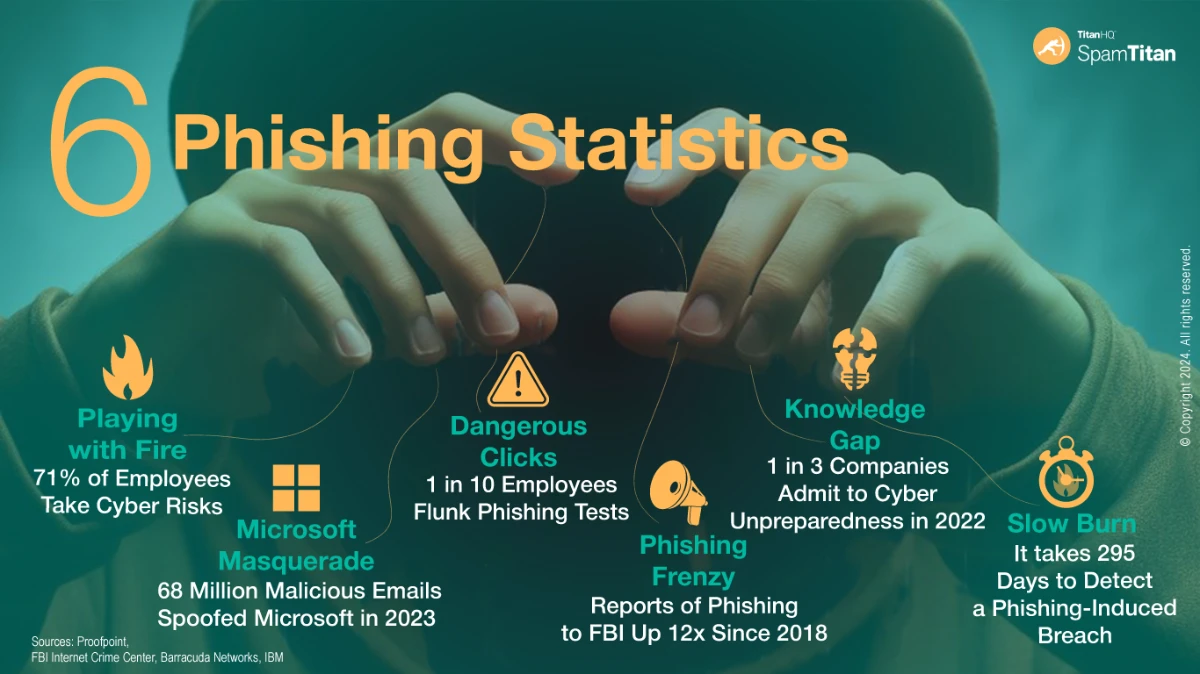


 TitanHQ has announced a new partnership with Pax8. The partnership means Pax8 partners now have access to TitanHQ’s cloud-based email security solution – SpamTitan – and its DNS filtering solution, WebTitan.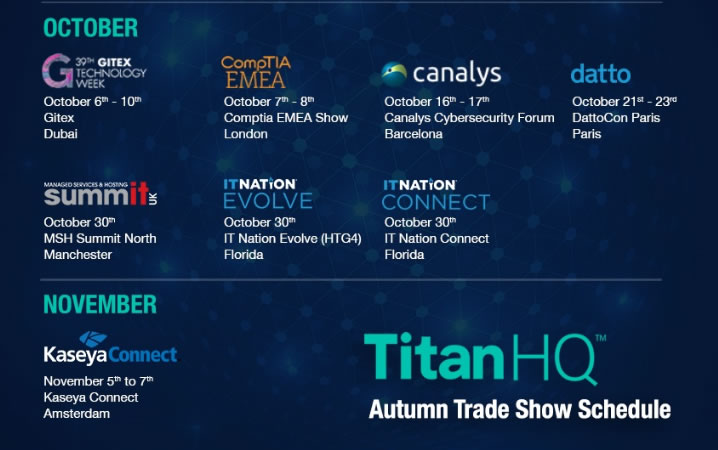
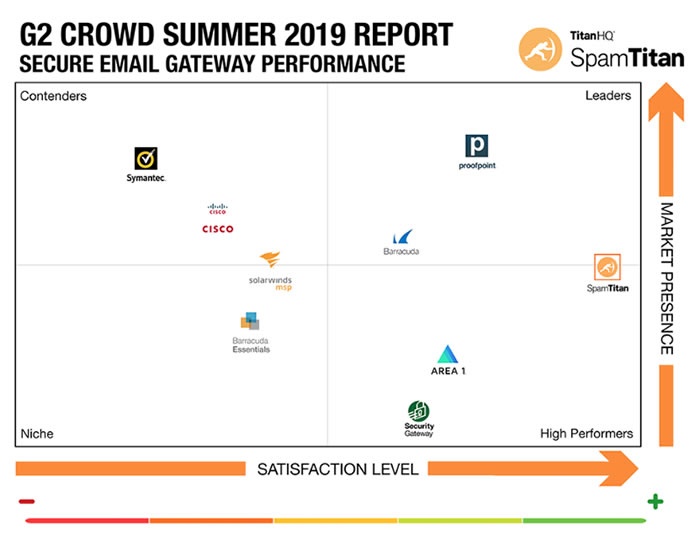
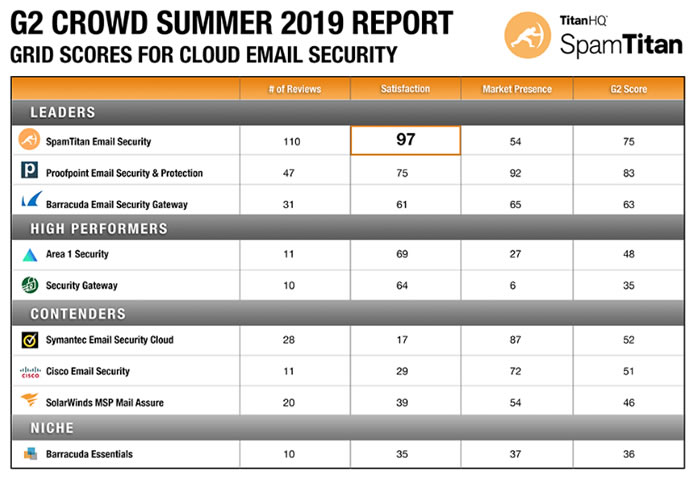
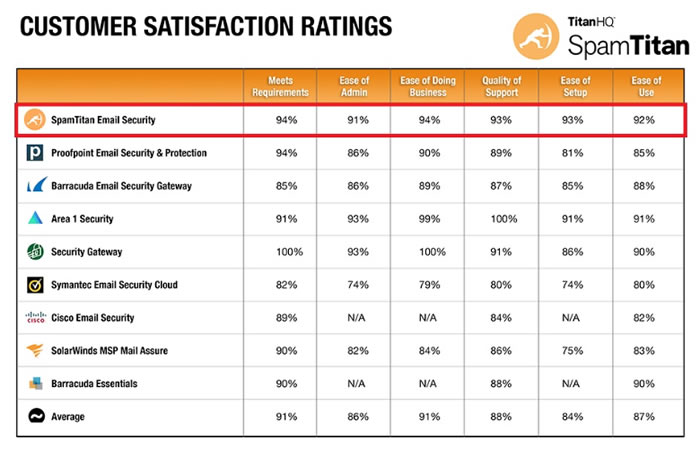

 TitanHQ is a Datto Select Vendor and a proud sponsor of DattoCon19. TitanHQ has developed cybersecurity solutions to exactly meet the needs of MSPs. All solutions area easy to implement and maintain and can be integrated into MSP’s existing systems via a suite of APIs. TitanHQ provides the web security layer to Datto DNA and D200 boxes and is the only third-party security company trusted to work with Datto.